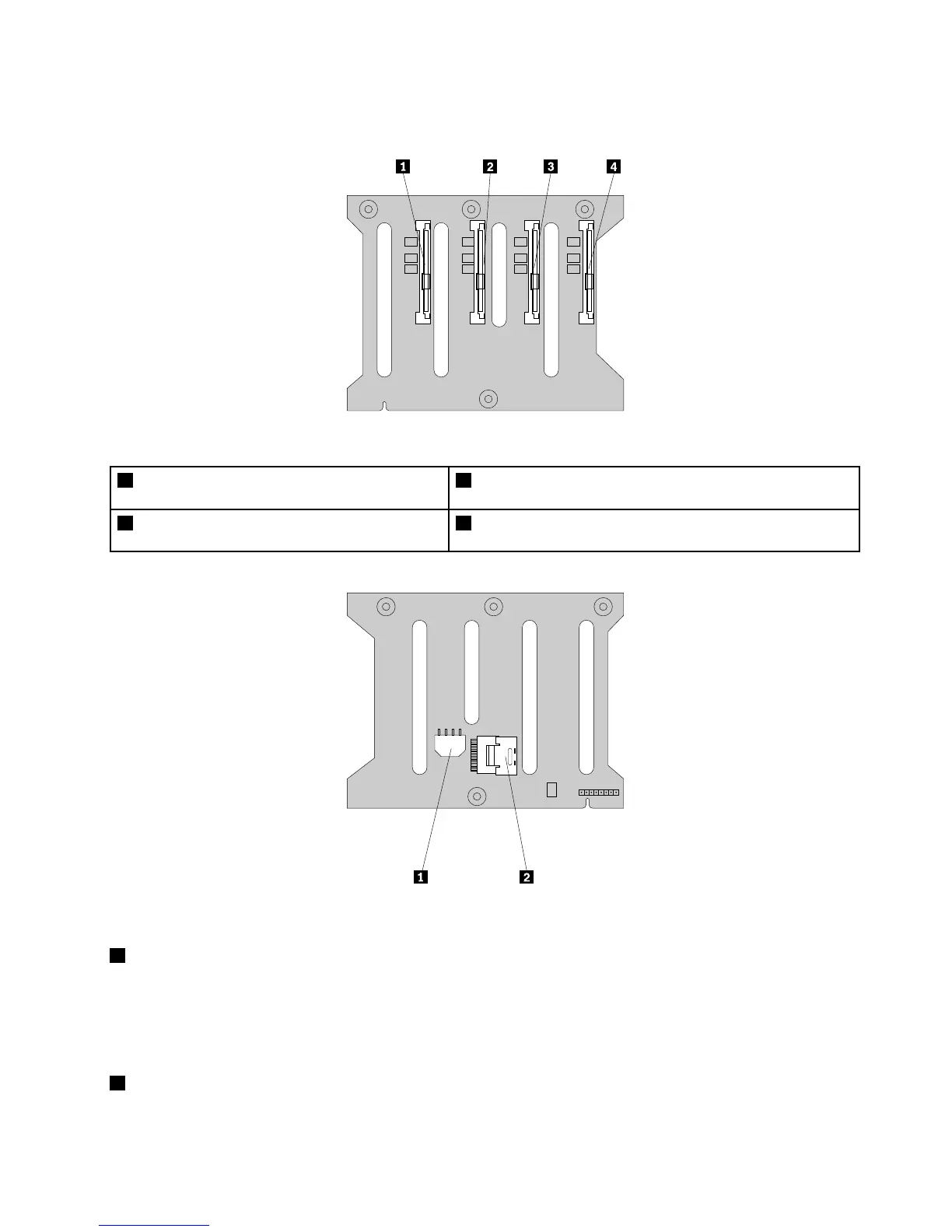
Thefollowingillustrationsshowtheconnectorsona3.5-inchhot-swaphard-disk-drivebackplane.
Figure22.Frontviewofthe3.5-inchhot-swaphard-disk-drivebackplane
1Slot0fora3.5-inchSATAorSAShot-swaphard
diskdrive
3Slot2fora3.5-inchSATAorSAShot-swapharddiskdrive
2Slot1fora3.5-inchSATAorSAShot-swaphard
diskdrive
4Slot3fora3.5-inchSATAorSAShot-swapharddiskdrive
Figure23.Rearviewofthe3.5-inchhot-swaphard-disk-drivebackplane
18-pinpowerconnector
•Forthe3.5-inchhot-swaphard-disk-drivebackplaneonthelowerhard-disk-drivecage,connecttheP5
powerconnectorofthepowersupplytothe8-pinpowerconnectoronthebackplane.
•Forthe3.5-inchhot-swaphard-disk-drivebackplaneontheupperhard-disk-drivecage,connecttheP4
powerconnectorofthepowersupplytothe8-pinpowerconnectoronthebackplane.
2Mini-SASsignalcableconnector0
Usedtoconnectthemini-SASconnectorononeendofthemini-SASsignalcable.
Chapter3.Productoverview41







 To Next Page