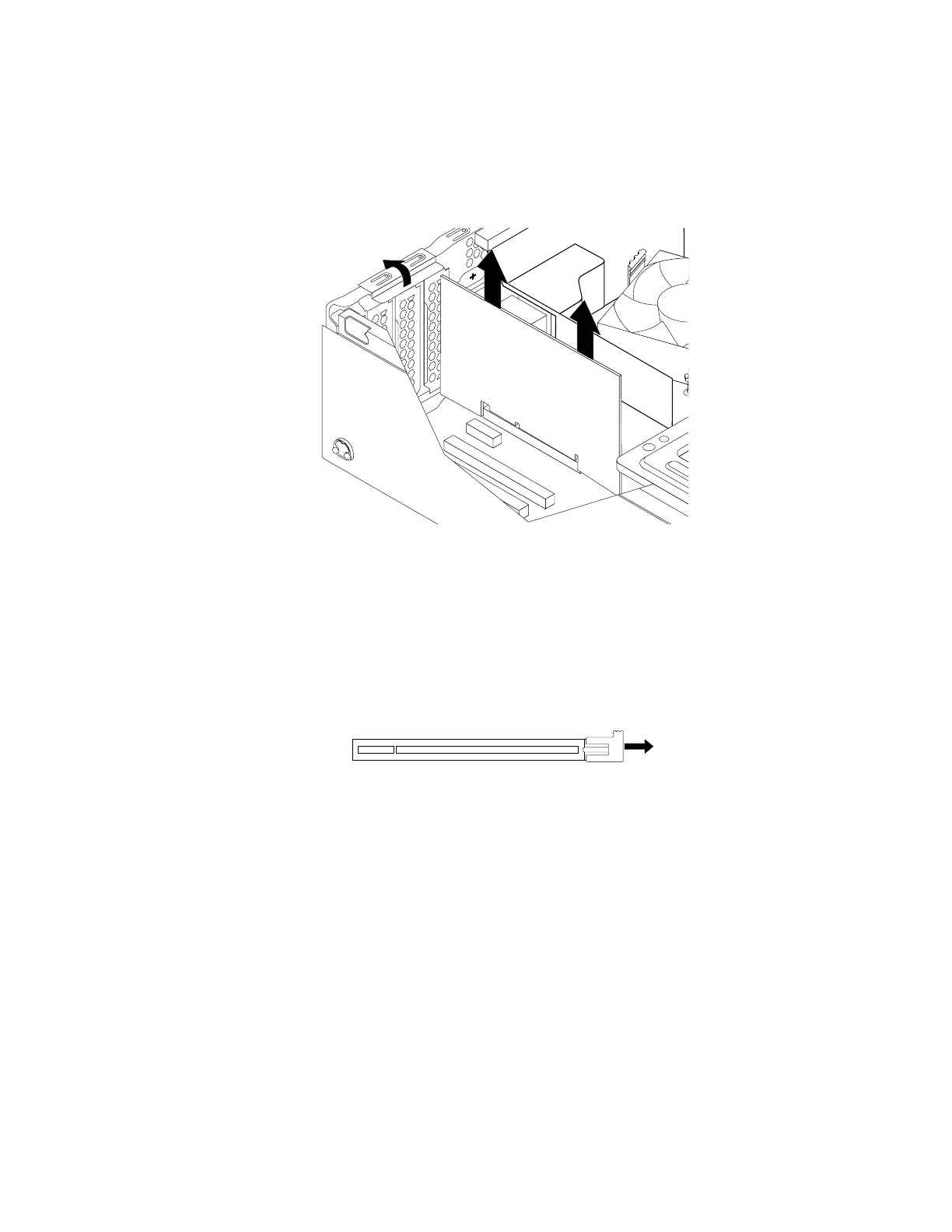
3.RotatethePCIcardretainertotheopenposition.Dependingonwhetheryouareinstallingorreplacing
aPCIcard,dooneofthefollowing:
•IfyouareinstallingaPCIcard,removetheappropriatemetalslotcover.
•IfyouarereplacinganoldPCIcard,grasptheoldcardandgentlypullitoutoftheslot.
Figure26.RemovingaPCIcard
Notes:
–Thecardfitstightlyintotheslot.Ifnecessary,alternatelymoveeachsideofthecardasmall
amountuntilthecardisremovedfromtheslot.
–Ifthecardisheldinplacebyaretaininglatch,disengagethecardretaininglatchonthePCIcard
slot.Thengraspthecardandgentlypullitoutoftheslot.
Figure27.Disengagingthecardretaininglatch
4.RemovethenewPCIcardfromitsstatic-protectivepackage.
100ThinkStationP310HardwareMaintenanceManual













 To Next Page