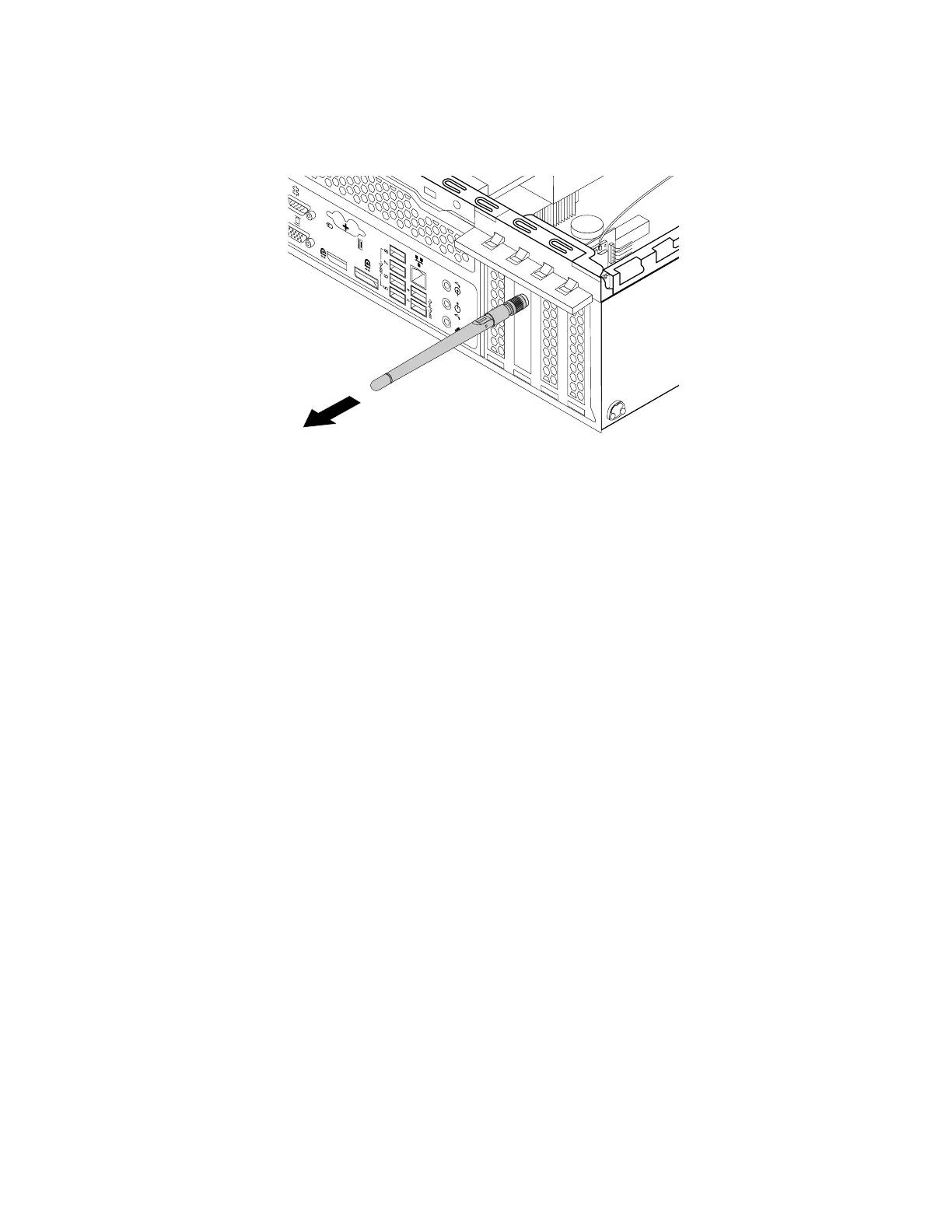
3.HoldthethickerendoftherearWi-FiantennaandunscrewtheWi-Fiantennafromtherearofthe
computer.
Figure130.RemovingtherearWi-Fiantenna
Whattodonext:
•Toworkwithanotherpieceofhardware,gototheappropriatesection.
•Tocompletetheinstallationorreplacement,goto“Completingthepartsreplacement”onpage166.
Completingthepartsreplacement
Aftercompletingtheinstallationorreplacementforallparts,reinstallthecomputercoverandreconnect
cables.Dependingonthepartsyouinstalledorreplaced,youmightneedtoconfirmtheupdatedinformation
intheSetupUtilityprogram.Referto“UsingtheSetupUtilityprogram”onpage59
.
Toreinstallthecomputercoverandreconnectcablestoyourcomputer,dothefollowing:
1.Ensurethatallcomponentshavebeenreassembledcorrectlyandthatnotoolsorloosescrewsare
leftinsideyourcomputer.See“Computercomponents”onpage31
forthelocationsofvarious
componentsinyourcomputer.
2.Ensurethatthecablesareroutedcorrectlybeforereinstallingthecomputercover.Keepcablesclearof
thehingesandsidesofthecomputerchassistoavoidinterferencewithreinstallingthecomputercover.
166ThinkStationP310HardwareMaintenanceManual













 To Next Page