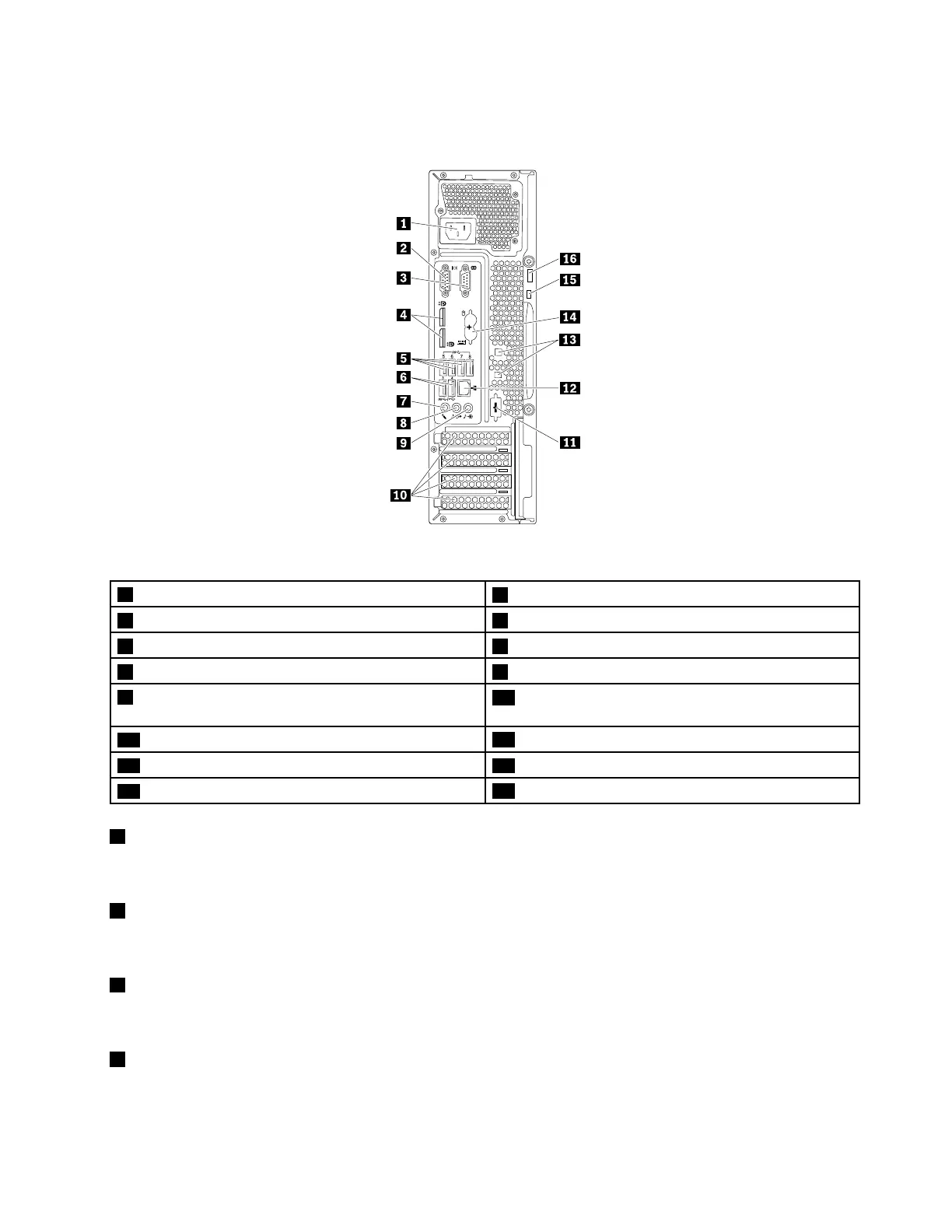
Rearview
Figure2.Rearview
1Power-cordconnector
2VGAconnector
3Serialconnector4DisplayPort
®
connectors(2)
5USB3.0connectors(4)6USB2.0connectors(2)
7Microphoneconnector8Audioline-outconnector
9Audioline-inconnector
10PCI/PCI-Expresscardarea(differentcardsprovide
differentconnectors)
11Optionalserialconnector
12Ethernetconnector
13Cable-lockslots(2)14PS/2keyboardandmouseconnectors(somemodels)
15Security-lockslot
16Padlockloop
1Power-cordconnector
Usedtoconnectthepowercordtoyourcomputerforpowersupply.
2VGAconnector
UsedtoattachaVideoGraphicsArray(VGA)monitororotherdevicesthatuseaVGAconnector.
3Serialconnector
Usedtoattachanexternalmodem,aserialprinter,orotherdevicesthatusea9-pinserialconnector.
4DisplayPortconnector
Usedtoattachahigh-performancemonitor,adirect-drivemonitor,orotherdevicesthatuseaDisplayPort
connector.
Chapter2.Productoverview29













 To Next Page