29PCIExpressx1cardslot130PCIExpressx16cardslot(graphiccardavailableon
somemodels)
31Systemfanconnector32Coverpresenceswitchconnector(intrusionswitch
connector)
Internaldrives
Internaldrivesaredevicesthatyourcomputerusestoreadandstoredata.Youcanadddrivestoyour
computertoincreasestoragecapacityandenableyourcomputertoreadothertypesofmedia.Internal
drivesareinstalledinbays.
Wheninstallingorreplacinganinternaldrive,itisimportanttonotethetypeandsizeofthedrivethatyou
caninstallorreplaceineachbayandcorrectlyconnectthecablestothedriveinstalled.Refertothe
appropriatesectionin“Installingorreplacinghardware”onpage89
forinstructionsonhowtoinstallor
replaceinternaldrivesforyourcomputer.
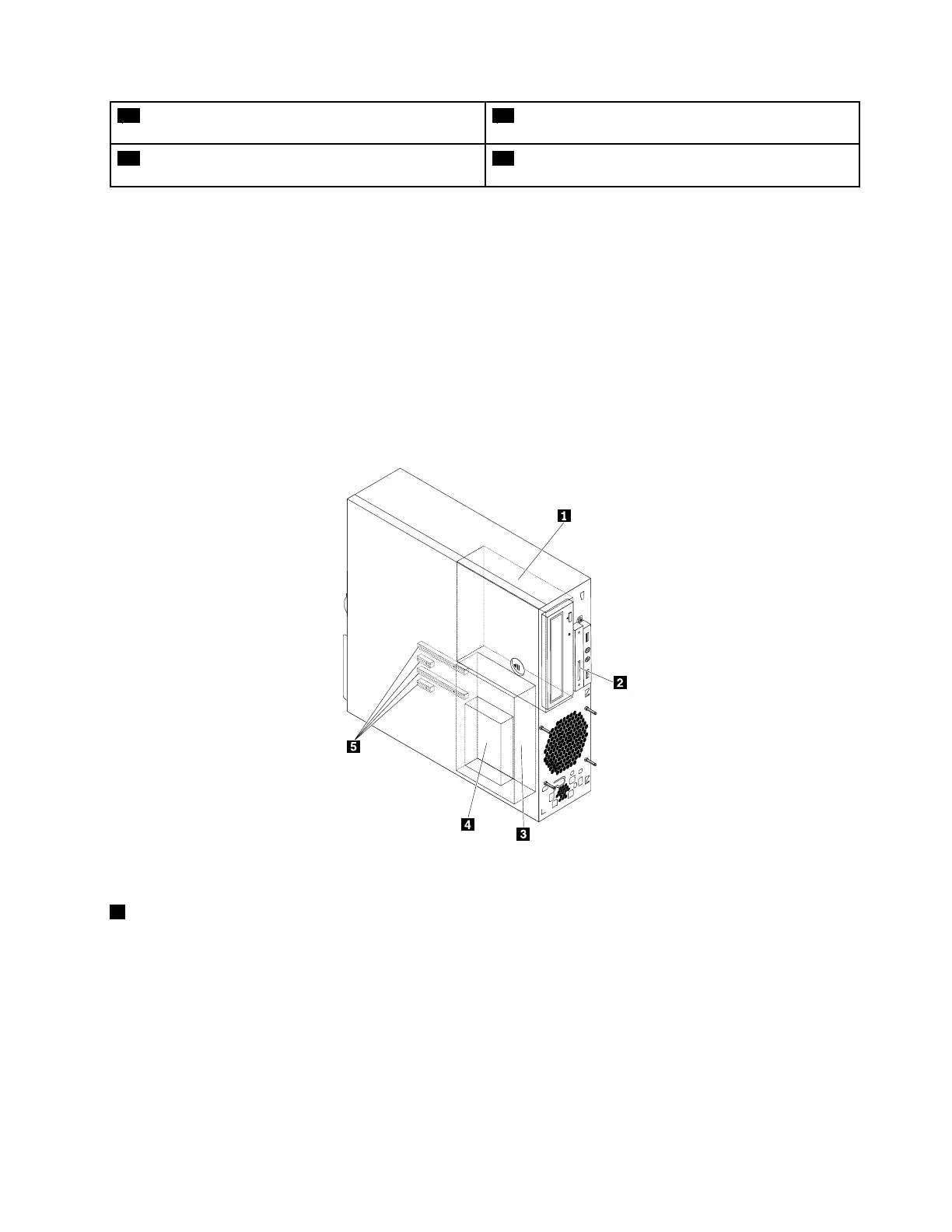
Thefollowingillustrationshowsthelocationsofthedrivebays.
Figure6.Drive-baylocations
1Optical-drivebay
Theoptical-drivebaysupportsthefollowingdevices.Dependingonyourcomputermodel,oneofthem
mightbeinstalled:
•Opticaldrive
•5.25-inchflexmoduleequippedwithsomeorallofthefollowingcomponents:
–Slimopticaldrive
–Cardreader
–eSATAconnector
–IEEE1394connector
Chapter2.Productoverview35













 To Next Page