8.Connectthepowerbuttoncabletothefrontbezelconnectorthesystemboard.See“Partsonthe
systemboard”onpage34.
9.Reinstallthefrontbezel.See“Removingandreinstallingthefrontbezel”onpage90.
Whattodonext:
•Toworkwithanotherpieceofhardware,gototheappropriatesection.
•Tocompletetheinstallationorreplacement,goto“Completingthepartsreplacement”onpage166.
Replacingthecardreader
Attention:BeforeyoureplaceanyFRU,besuretoreadandunderstandChapter1“Readthisfirst:Important
safetyinformation”onpage1.
Toreplacethecardreader,dothefollowing:
1.Removeallmediafromthedrivesandturnoffallattacheddevicesandthecomputer.Then,disconnect
allpowercordsfromelectricaloutletsanddisconnectallcablesthatareconnectedtothecomputer.
2.Removethecomputercover.See“Removingthecomputercover”onpage90.
3.Removethefrontbezel.See“Removingandreinstallingthefrontbezel”onpage90.
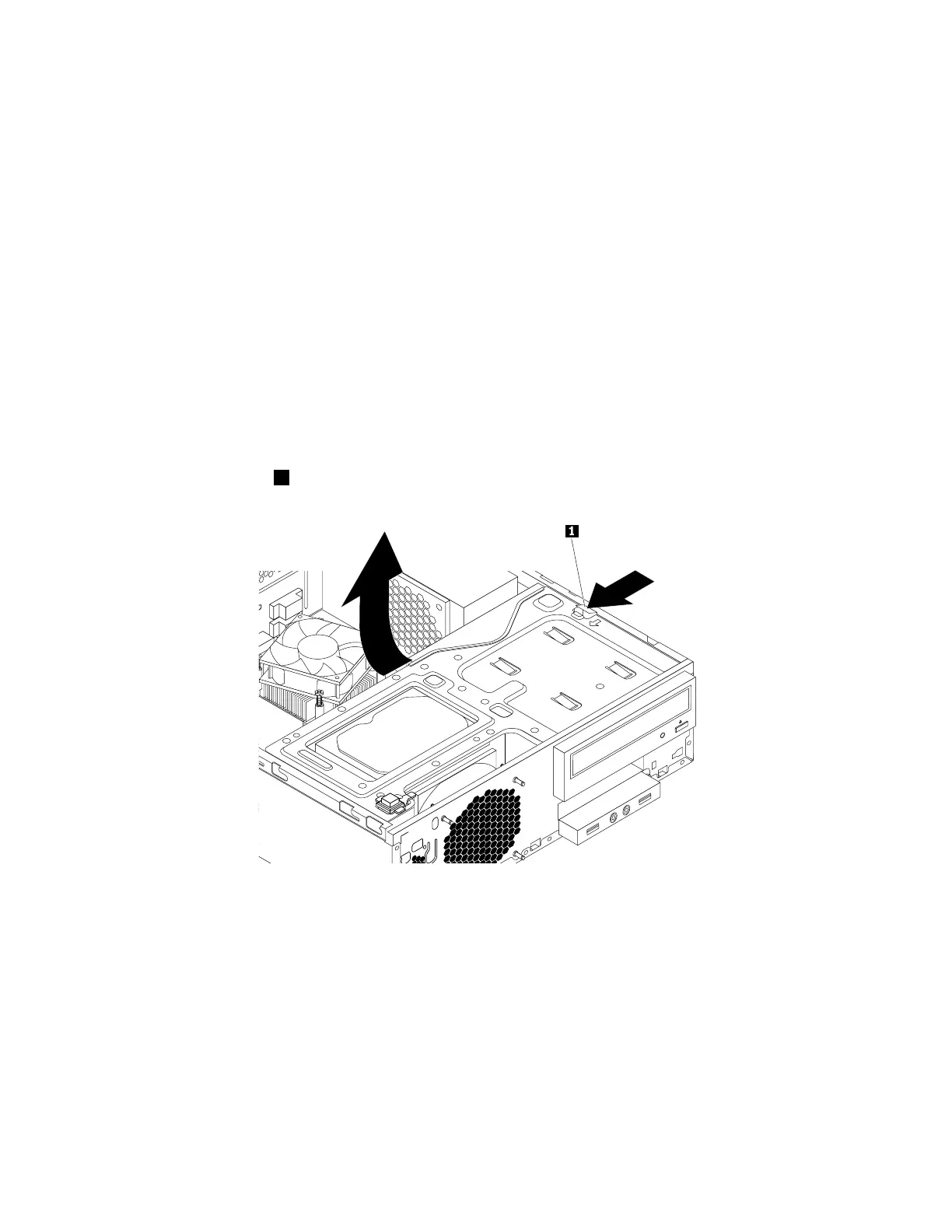
4.Pressthereleasetab1asshownandpivotthedrivebayassemblyupward.
Figure17.Pivotingthedrivebayassemblyupward
5.DisconnectthecardreadercablefromtheUSB2.0connectoronthesystemboard.See“Partsonthe
systemboard”onpage34.
94ThinkStationP310HardwareMaintenanceManual













 To Next Page