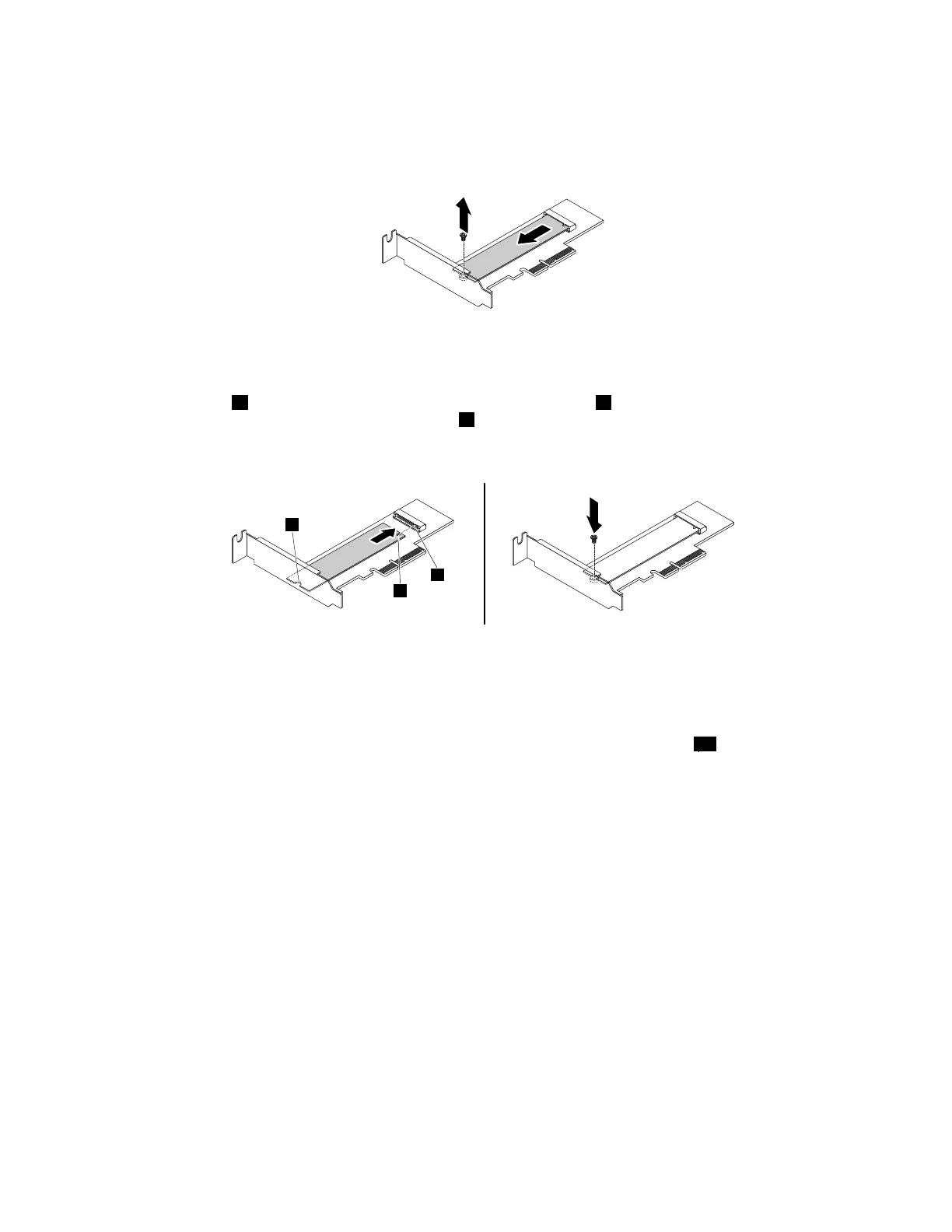
•IfyouarereplacinganM.2solid-statedrive,locateandremovetheM.2solid-statedriveadapter.
See“InstallingorreplacingaPCIcard”onpage99
.RemovethescrewthatsecurestheoldM.2
solid-statedrive.Then,gentlypullthesolid-statedriveoutoftheM.2slot.
Figure29.RemovingtheM.2solid-statedrive
•IfyouareinstallinganM.2solid-statedrive,removethescrewthatisalignedwiththeM.2slot.
5.Alignthenotch1onthenewM.2solid-statedrivewiththeslotkey2intheM.2slot.Then,insertthe
solid-statedriveintotheM.2slotuntilthenotch3isalignedwiththecorrespondingscrewholeinthe
driveadapter.Installthescrewtosecurethenewsolid-statedrive.
Figure30.InstallingtheM.2solid-statedrive
6.InstalltheM.2solid-statedriveadapterintotheappropriatePCIorPCIExpresscardslotonthesystem
board.See“InstallingorreplacingaPCIcard”onpage99.
Note:ItisrecommendedthatyouinstalltheM.2solid-statedriveadapterintothe28PCIExpressx16
cardslot.See“Partsonthesystemboard”onpage34.
Whattodonext:
•Toworkwithanotherpieceofhardware,gototheappropriatesection.
•Tocompletetheinstallationorreplacement,goto“Completingthepartsreplacement”onpage166.
Replacingthebattery
Attention:DonotopenyourcomputerorattemptanyrepairbeforereadingandunderstandingtheChapter
1“Readthisfirst:Importantsafetyinformation”onpage1.
Yourcomputerhasaspecialtypeofmemorythatmaintainsthedate,time,andsettingsforbuilt-infeatures.
Abatterykeepsthisinformationactivewhenyouturnoffthecomputer.
Thebatterynormallyrequiresnochargingormaintenancethroughoutitslife;however,nobatterylasts
forever.Ifthebatteryfails,thedate,time,andconfigurationinformation(includingpasswords)arelost.An
errormessageisdisplayedwhenyouturnonthecomputer.
Refertothe“Lithiumcoincellbatterynotice”intheSafety,Warranty,andSetupGuideforinformationabout
replacinganddisposingofthebattery.
102ThinkStationP310HardwareMaintenanceManual













 To Next Page