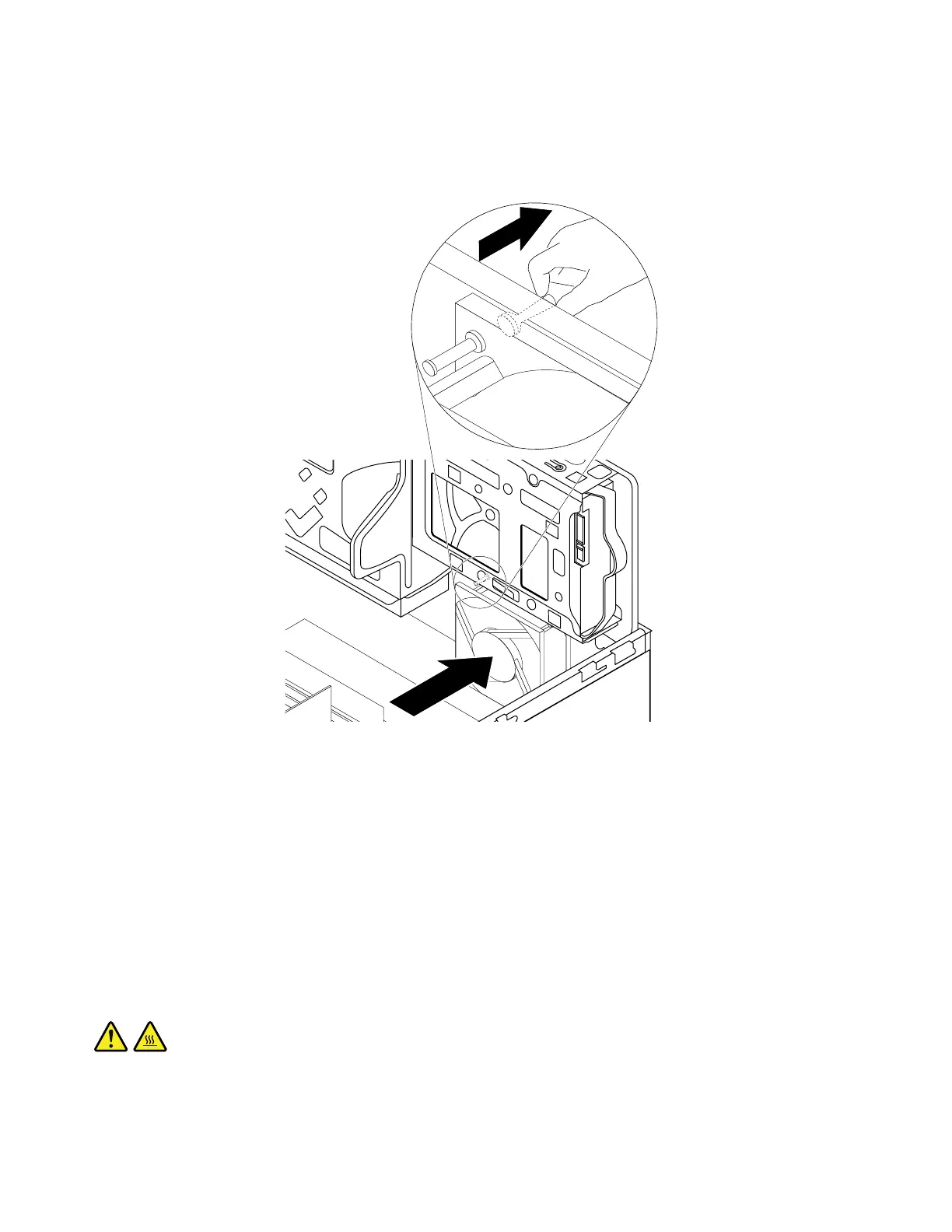
7.Installthenewsystemfanbyaligningthenewrubbermounts(shippedwiththenewfan)withthe
correspondingholesinthechassis.Pushtherubbermountsthroughtheholes.Then,carefullypullon
thetipsoftherubbermountsfromthebottomuntilthenewsystemfanissecuredinplace.
Figure87.Installingthesystemfan
8.Connectthesystemfancabletothepowerfanconnectoronthesystemboard.See“Partsonthe
systemboard”onpage34.
Whattodonext:
•Toworkwithanotherpieceofhardware,gototheappropriatesection.
•Tocompletetheinstallationorreplacement,goto“Completingthepartsreplacement”onpage166.
Replacingtheheatsinkandfanassembly
Attention:DonotopenyourcomputerorattemptanyrepairbeforereadingandunderstandingtheChapter
1“Readthisfirst:Importantsafetyinformation”onpage1.
CAUTION:
Theheatsinkandfanassemblymightbeveryhot.Beforeyouopenthecomputercover,turnoffthe
computerandwaitseveralminutesuntilthecomputeriscool.
Toreplacetheheatsinkandfanassembly,dothefollowing:
136ThinkStationP310HardwareMaintenanceManual













 To Next Page