15Security-lockslot
UsedtoattachaKensington-stylecablelock.See“AttachingaKensington-stylecablelock”onpage56.
16Padlockloop
Usedtoinstallapadlock.See“Attachingapadlock”onpage55
.
Computercomponents
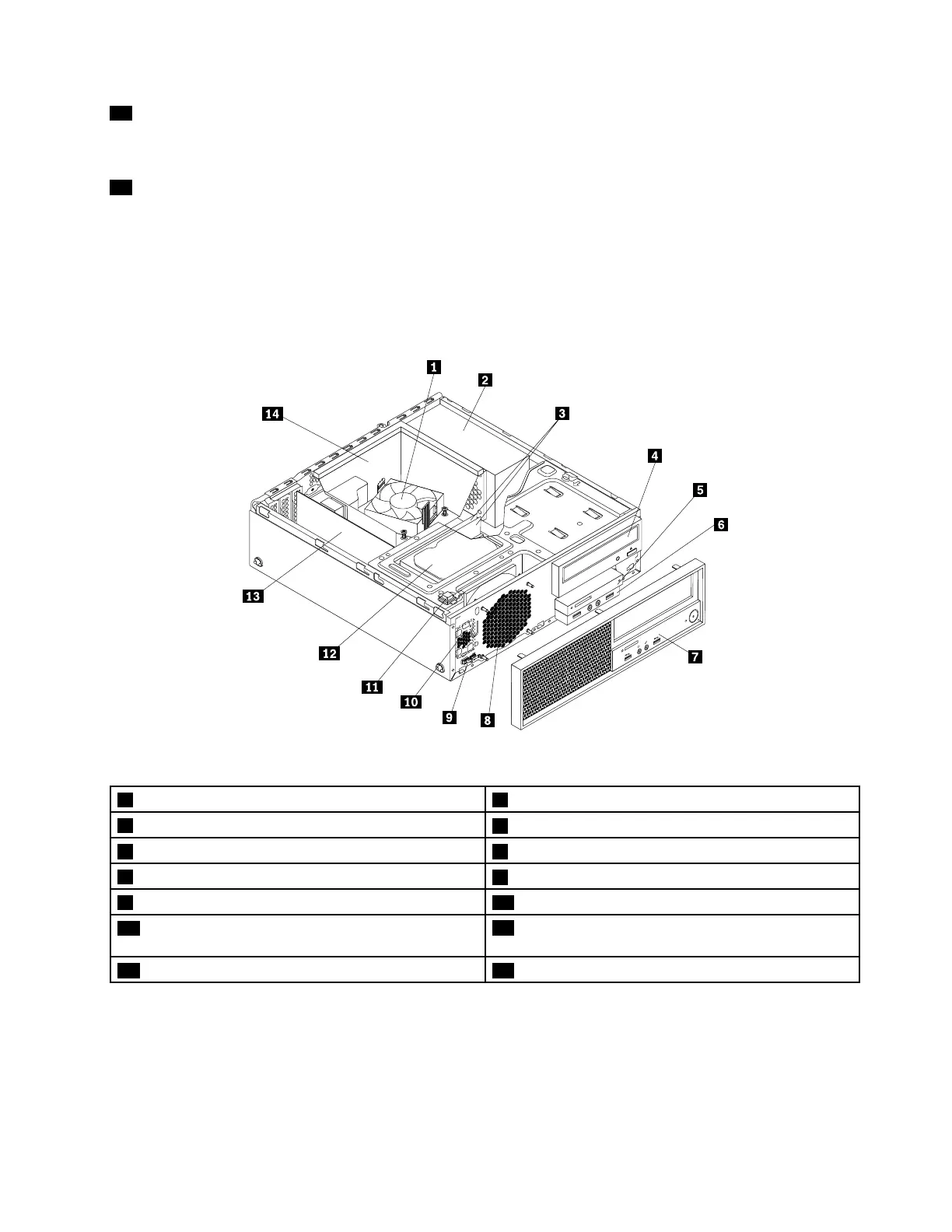
Thefollowingillustrationshowsthelocationsofthevariouscomponentsinyourcomputer.Toremovethe
computercover,see“Removingthecomputercover”onpage90.
Figure3.Computercomponent
1Heatsinkandfanassembly
2Powersupplyassembly
3Memorymodules
4Opticaldrive(somemodels)
5Cardreader6FrontaudioandUSBassembly
7Frontbezel
8Systemfan
9Thermalsensor10Internalspeaker
11Coverpresenceswitch(Intrusionswitch)(some
models)
12Harddiskdrive
13PCIcard(somemodels)
14Heatsinkfanduct
MajorFRUsandCRUs
ThefollowingillustrationshowsthelocationsofthemajorFRUsandCRUsinthecomputer.Toremovethe
computercover,see“Removingthecomputercover”onpage90.
Chapter2.Productoverview31













 To Next Page