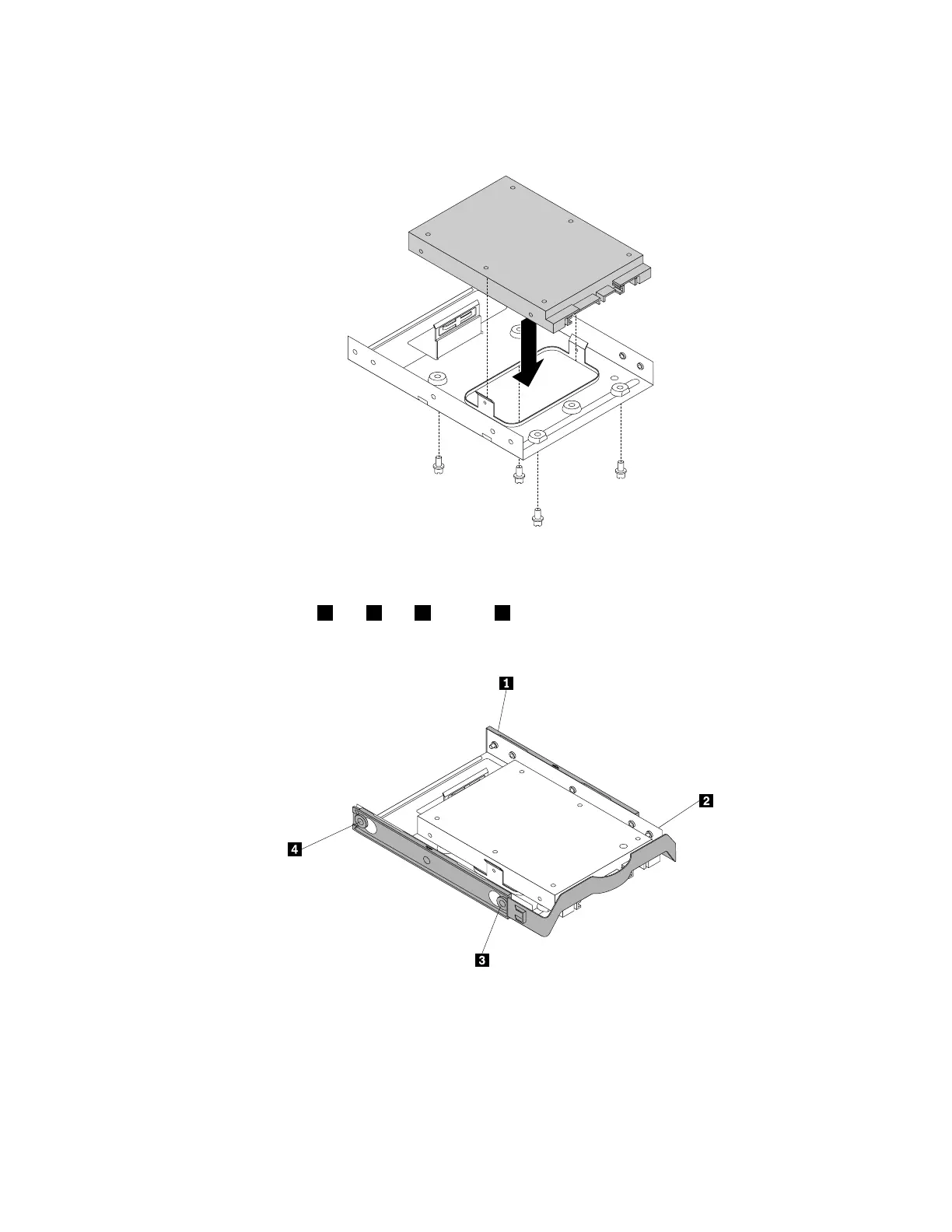
1.Installthesolid-statedriveintothestorageconverter.Then,installthefourscrewstosecurethe
solid-statedrivetothestorageconverter.
Figure77.Installingthesolid-statedriveintothestorageconverter
2.Toinstallthesolid-statedrivewiththestorageconverterintothe3.5-inchhard-disk-drivebracket,flex
thebracketandalignpin1,pin2,pin3,andpin4onthebracketwiththecorrespondingholesin
thestorageconverter.
Figure78.Installingthestorageconvertertogetherwiththesolid-statedriveintothehard-disk-drivebracket
3.Installthestorageconverterwiththebracketintothedesiredhard-disk-drivebay.See“Replacingthe
primaryharddiskdrive”onpage150
or“Replacingthesecondaryharddiskdrive”onpage152.
4.Connectthesignalcableandthepowercabletothesolid-statedrive.
Chapter9.Installingorreplacinghardware129













 To Next Page