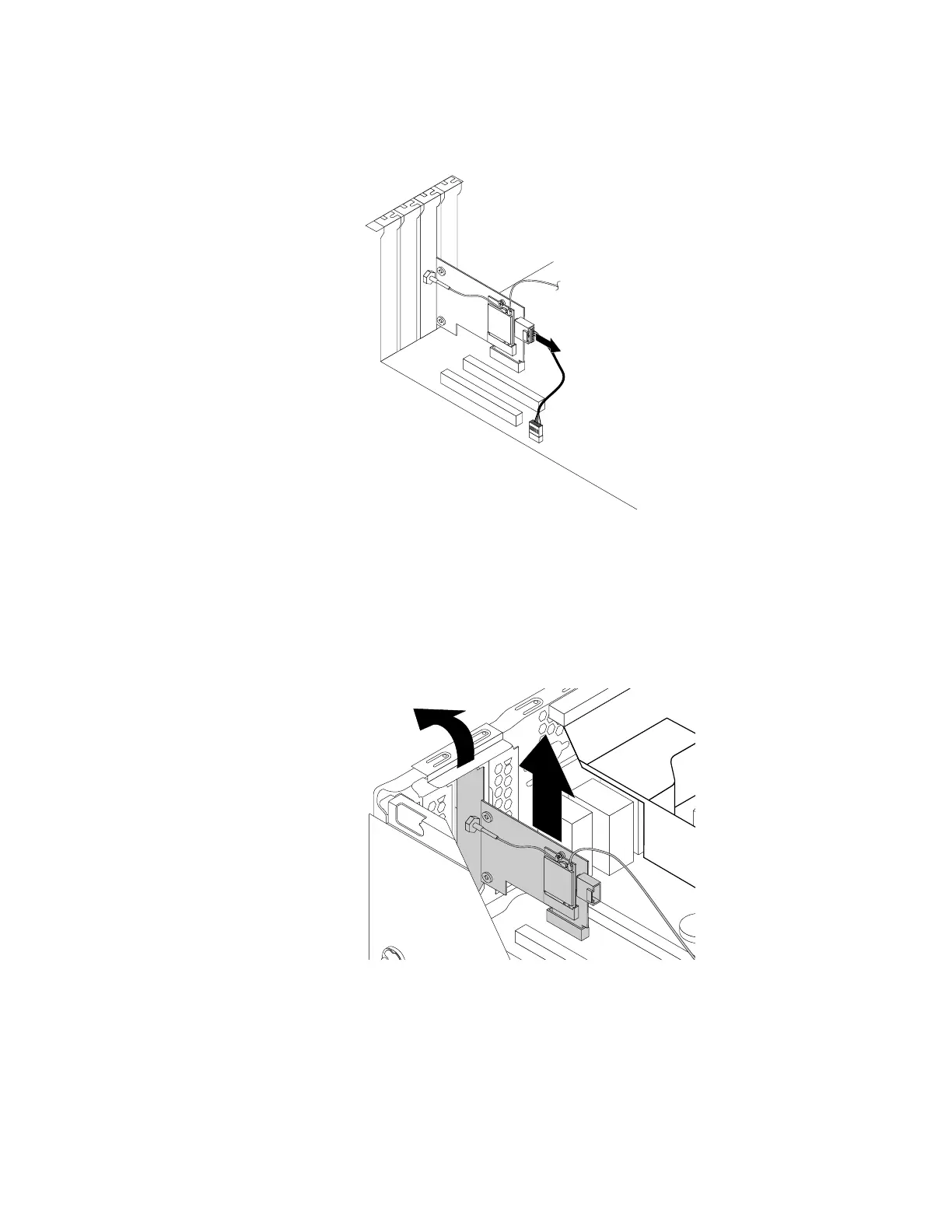
3.IfyourcomputercomeswithaWi-FicardmodulethatsupportstheBluetoothfunction,disconnect
theBluetoothcablefromtheWi-Fiadaptercard.
Figure115.DisconnectingtheBluetoothcable
Note:TheBluetoothcableconnectstheBluetoothconnectorontheWi-FiadaptercardtotheUSB
2.0connectoronthesystemboard.
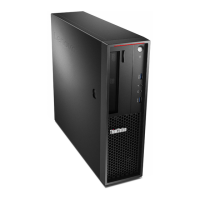
4.RotatethePCIcardretainertotheopenposition.
5.GrasptheWi-Fiadaptercardthatisinstalledandgentlypullitoutoftheslot.
Figure116.RemovingtheWi-Fiadaptercard
Note:Thecardfitstightlyintotheslot.Ifnecessary,alternatelymoveeachsideofthecardasmall
amountuntilthecardisremovedfromtheslot.
RemovingtheWi-Ficardmodule
ToremovetheWi-Ficardmodule,dothefollowing:
Chapter9.Installingorreplacinghardware157








 To Next Page