8400 BaseLine D | Software Manual
Commissioning
Password protection
42 L Firmware 03.00 - DMS EN 5.0 - 07/2009
3.5.2 Delete or change available password
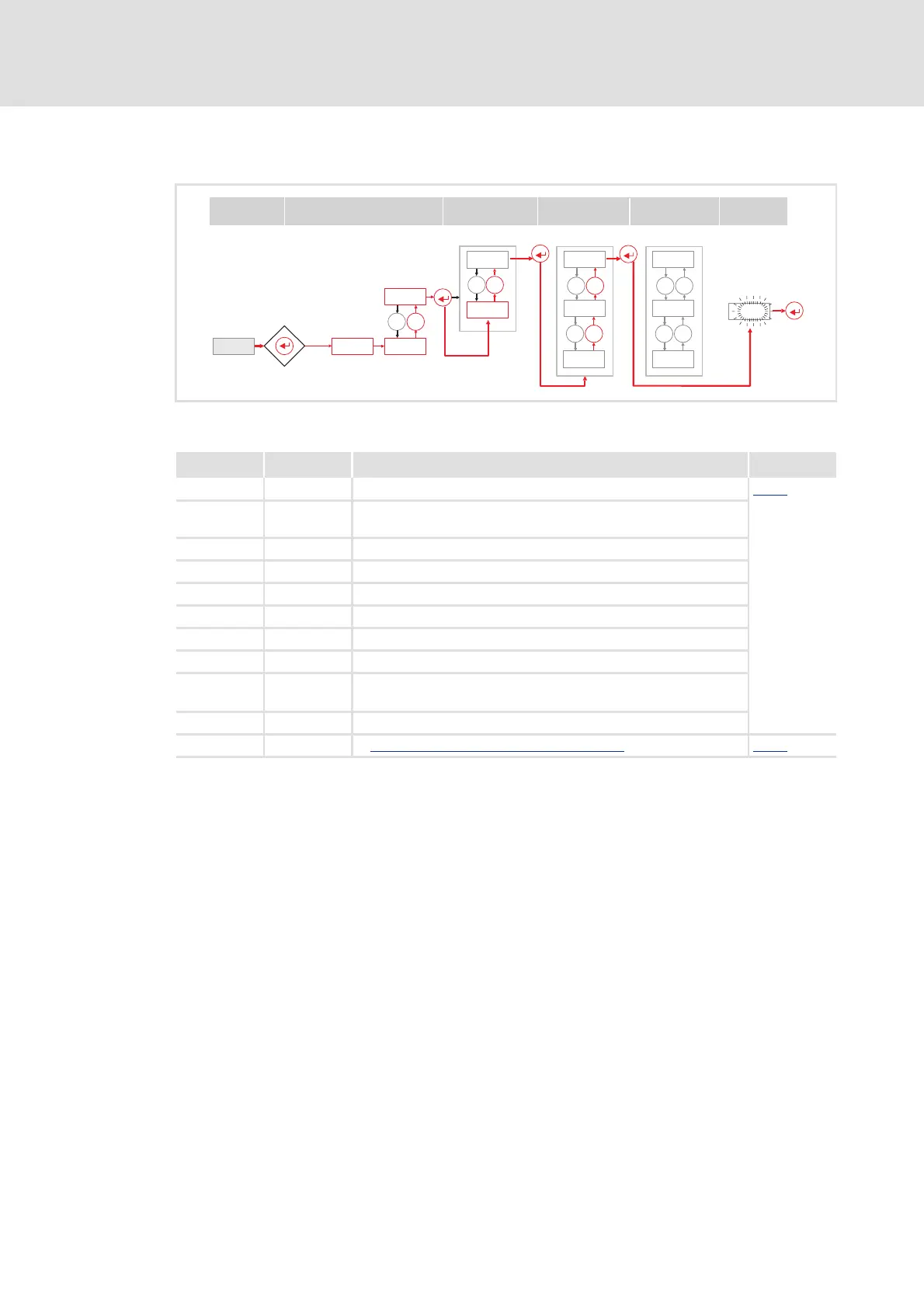
[3-11] Call available password
-0-
_
-1-
PASS
0.5 s
0000
8888
_
`
00
PASS
C094 c007
8888
Status
Password
Menu
Code Subcode
Action
Action Display Info Graphics
Mains on 00 [3-11]
↵ ... PASS ....
0000
First PASS appears, then 0000
<8888> Enter password
↵ -0- Ready to delete or change the password
-1-
↵ C002
C094 Press until C094 appears
↵ <8888> Available password is blinking
<8888>
0000
New password: Set with or
Delete password: Set with to "0000"
↵ C094 Password confirmed
Save Save password with mains failure protection
( 41) [3-10]



 To Next Page
 Loading...