64 | 2-16 FreshWaterSystem
2-16 FRESHWATER SYSTEM
RefertodrawingB1TCF-023FreshWater
System.
Two tanks (390L capacity each) are
situatedin the Port &Starboardforedeck
lockers and can be lled directly through
llercapsituatedoneachtank.Aseparate
valve controls each tank and is marked
according to which tank it controls. All
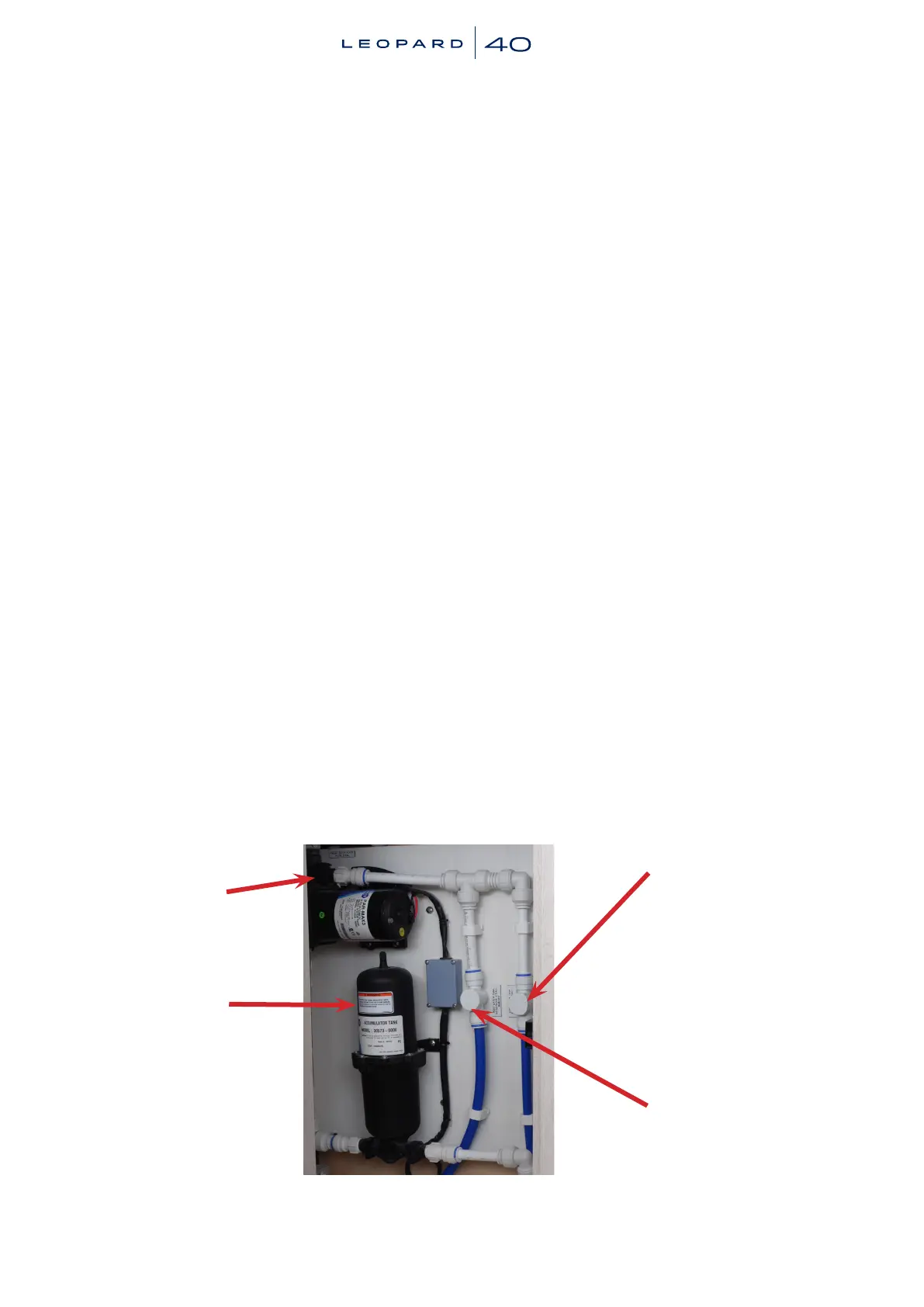
valves,pumps&switchesareonthewater
pump boardsituated inthe lockeron the
inboardsideoftheforwardcockpitdoor.
1. To Use Water:
1.1.Turnonthe “Fresh WaterPump”
breaker at the DC switch panel.
Open the faucet. The pump will
start running and only stop once
thefaucetisclosedandthesystem
is pressurised, which could take
approximately a minute for the
rsttime.
1.2.If the pump keeps running after
thefaucetisclosed,thefollowing
problems may exist:
- Atankhasrundry.
- A leak has developed in the
system,i.e.,anotherfaucetcould
be open.
PortWaterTank
Valve
Starboard Water
TankValve
FreshWaterFilter
FreshWaterPump
1.3 When the pump is running the
indicatorlightontheDCpanelwill
beon.Thelightwillautomatically
fadeandswitchoffoncethepump
stopsrunning.
2. Toswitchfromanemptytanktoafull
one:
2.1.Leavethepumprunning.
2.2.Closethevalveoftheemptytank.
2.3.Open the valve of full tank. It
should take approx. 15 seconds
for there to be a steady ow of
water.
2.4.Close the faucet. The pump will
run until adequate pressure has
been restored (1-2 minutes) and
thenswitchoff.
2.5.Ifthepumpfailstoshutoffrepeat
steps 2.3 and 2.4.
To prevent accidental syphoning of
water between tanks and air locks in the
system. Make sure that only one tank is
open at any time. Rell the empty tank
as soon as possible.


 To Next Page