Chapter 4
| Interface Configuration
Port Configuration
– 110 –
Default: Autonegotiation enabled on Gigabit and 10 Gigabit ports;
Advertised capabilities for
1000BASE-T – 10half, 10full, 100half, 100full, 1000full
1000BASE-SX/LX/ZX (SFP
2
/
SFP+) – 1000full
10GBASE-SR/LR/ER (SFP+) – 10Gfull
◆
Speed/Duplex
– Allows you to manually set the port speed and duplex mode.
(i.e., with auto-negotiation disabled)
◆
Flow Control
– Allows automatic or manual selection of flow control.
(Default: Enabled)
Web Interface
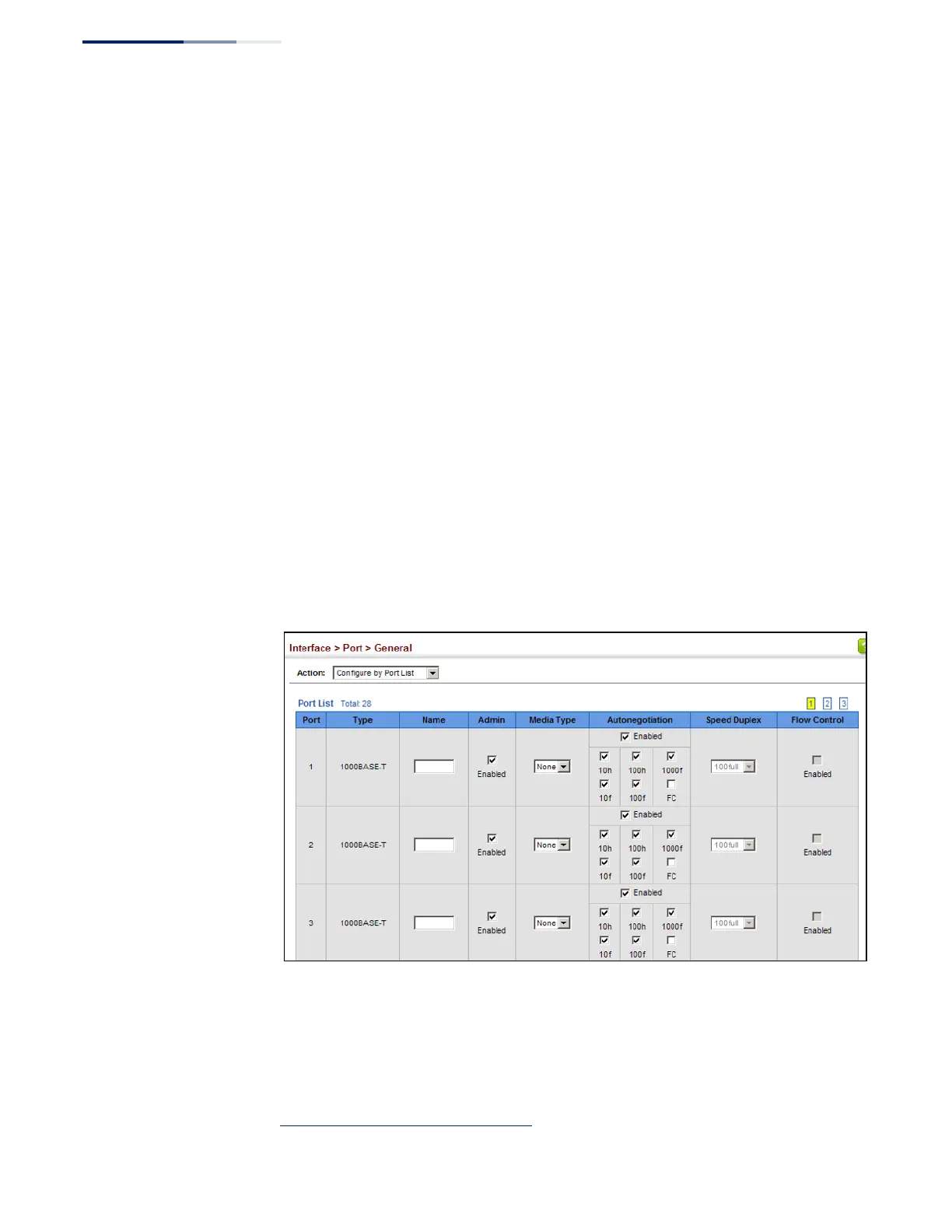
To configure port connection parameters:
1.
Click Interface, Port, General.
2.
Select Configure by Port List from the Action List.
3.
Modify the required interface settings.
4.
Click Apply.
Figure 33: Configuring Connections by Port List
2. GTL-2882










 To Next Page