Chapter 13
| Basic Administration Protocols
Switch Clustering
– 448 –
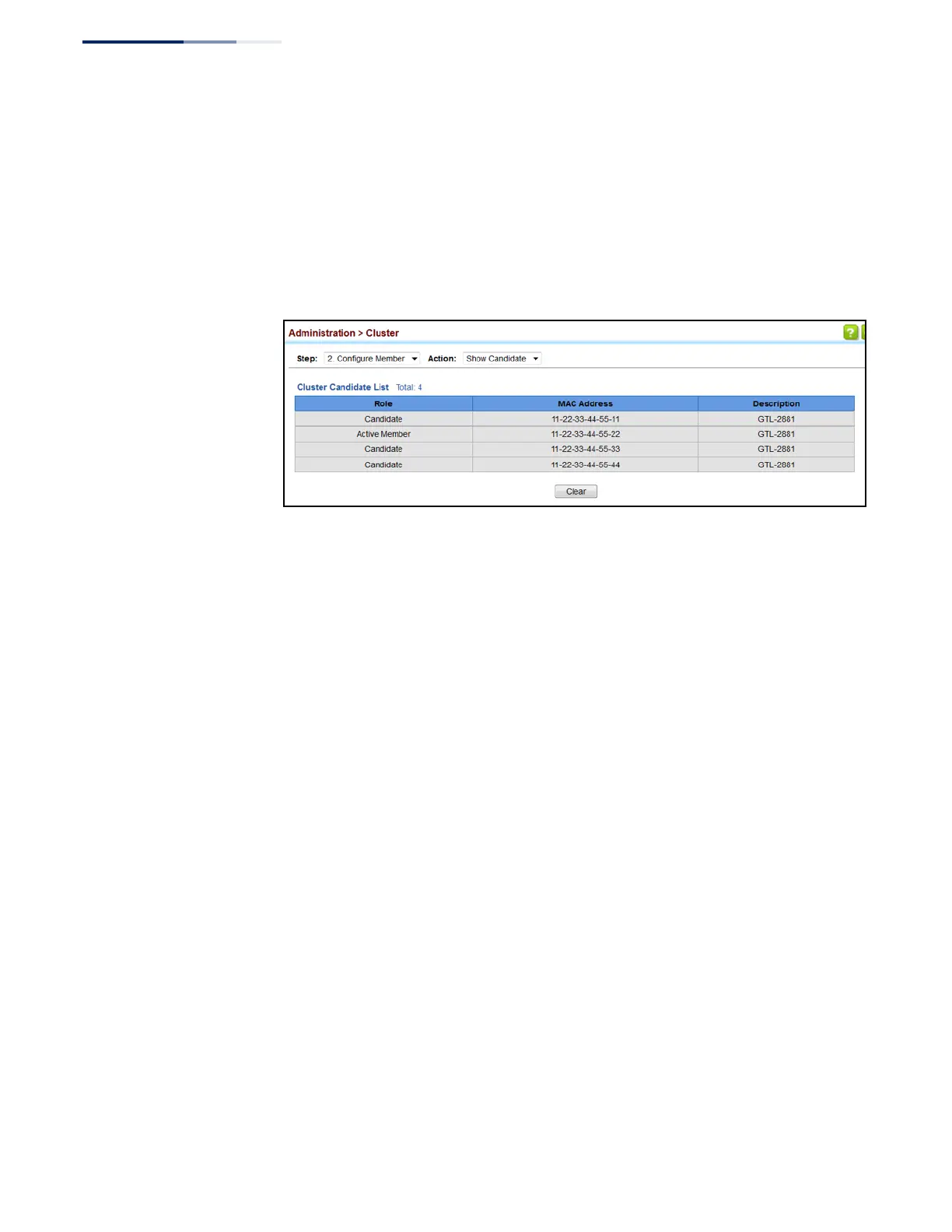
To show cluster candidates:
1.
Click Administration, Cluster.
2.
Select Configure Member from the Step list.
3.
Select Show Candidate from the Action list.
Figure 292: Showing Cluster Candidates
Managing Cluster
Members
Use the Administration > Cluster (Show Member) page to manage another switch
in the cluster.
Parameters
These parameters are displayed:
◆
Member ID
– The ID number of the Member switch. (Range: 1-36)
◆
Role
– Indicates the current status of the switch in the cluster.
◆
IP Address
– The internal cluster IP address assigned to the Member switch.
◆
MAC Address
– The MAC address of the Member switch.
◆
Description
– The system description string of the Member switch.
◆
Operate
– Remotely manage a cluster member.
Web Interface
To manage a cluster member:
1.
Click Administration, Cluster.
2.
Select Show Member from the Step list.
3.
Select an entry from the Cluster Member List.
4.
Click Operate.










 To Next Page