Chapter 8
| Congestion Control
Storm Control
– 222 –
Web Interface
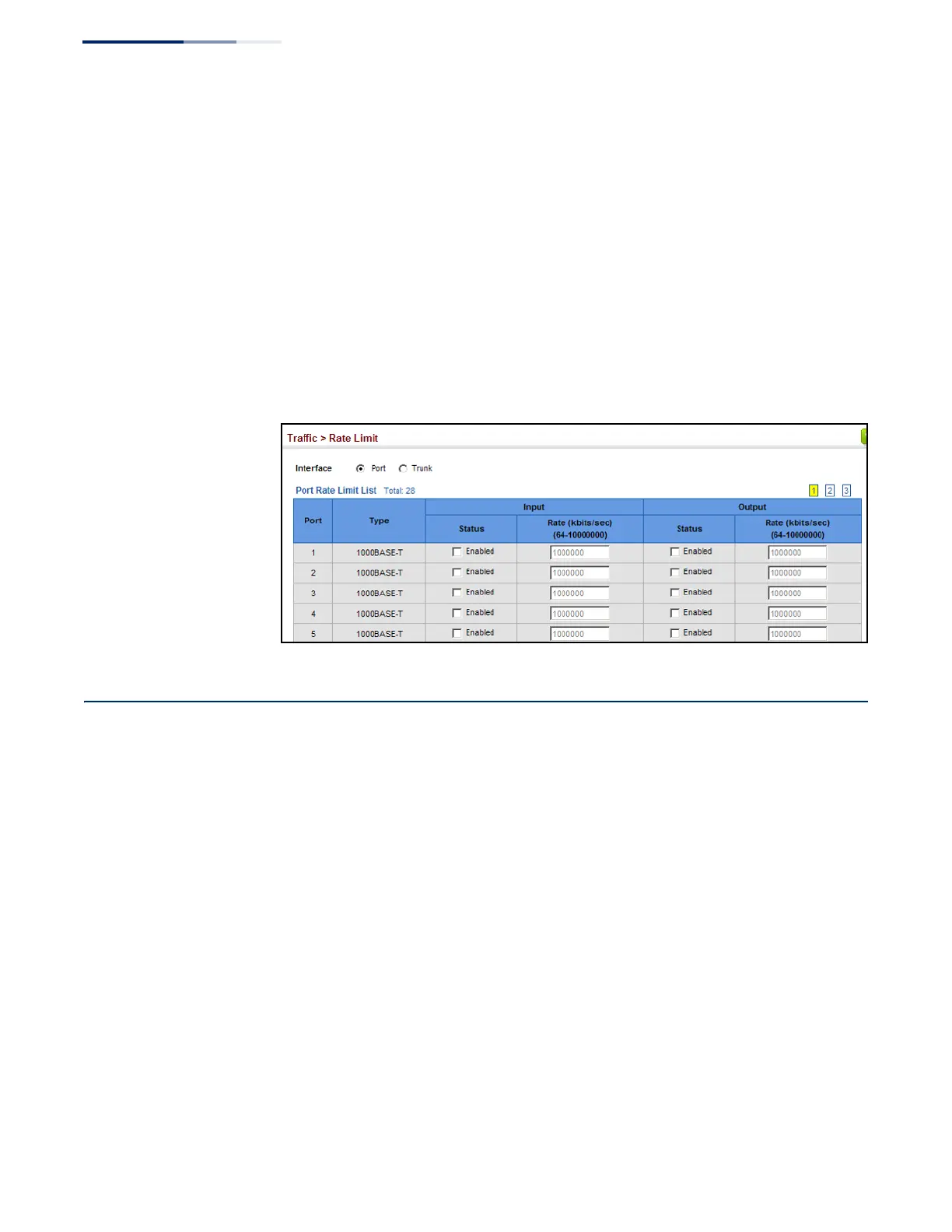
To configure rate limits:
1.
Click Traffic, Rate Limit.
2.
Set the interface type to Port or Trunk.
3.
Enable the Rate Limit Status for the required interface.
4.
Set the rate limit for required interfaces.
5.
Click Apply.
Figure 130: Configuring Rate Limits
Storm Control
Use the Traffic > Storm Control page to configure broadcast, multicast, and
unknown unicast storm control thresholds. Traffic storms may occur when a device
on your network is malfunctioning, or if application programs are not well
designed or properly configured. If there is too much traffic on your network,
performance can be severely degraded or everything can come to complete halt.
You can protect your network from traffic storms by setting a threshold for
broadcast, multicast or unknown unicast traffic. Any packets exceeding the
specified threshold will then be dropped.
Command Usage
◆
Broadcast Storm Control is enabled by default.
◆
When traffic exceeds the threshold specified for broadcast and multicast or
unknown unicast traffic, packets exceeding the threshold are dropped until the
rate falls back down beneath the threshold.
◆
Traffic storms can be controlled at the hardware level using Storm Control or at
the software level using Automatic Traffic Control which triggers various










 To Next Page