Chapter 5
| VLAN Configuration
IEEE 802.1Q Tunneling
– 166 –
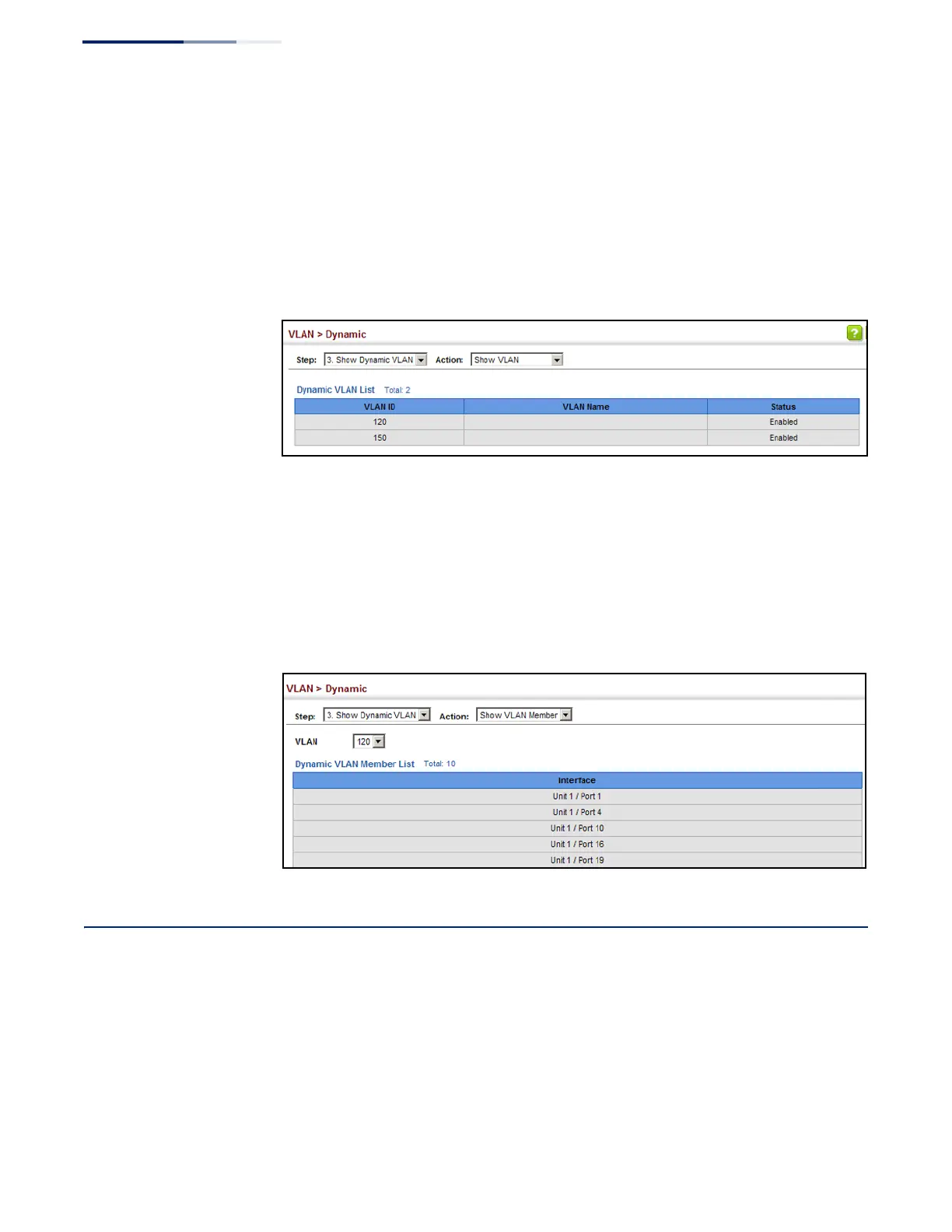
To show the dynamic VLAN joined by this switch:
1.
Click VLAN, Dynamic.
2.
Select Show Dynamic VLAN from the Step list.
3.
Select Show VLAN from the Action list.
Figure 80: Showing Dynamic VLANs Registered on the Switch
To show the members of a dynamic VLAN:
1.
Click VLAN, Dynamic.
2.
Select Show Dynamic VLAN from the Step list.
3.
Select Show VLAN Members from the Action list.
Figure 81: Showing the Members of a Dynamic VLAN
IEEE 802.1Q Tunneling
IEEE 802.1Q Tunneling (QinQ) is designed for service providers carrying traffic for
multiple customers across their networks. QinQ tunneling is used to maintain
customer-specific VLAN and Layer 2 protocol configurations even when different
customers use the same internal VLAN IDs. This is accomplished by inserting
Service Provider VLAN (SPVLAN) tags into the customer’s frames when they enter
the service provider’s network, and then stripping the tags when the frames leave
the network.










 To Next Page