Chapter 18
| Unicast Routing
Configuring the Routing Information Protocol
– 656 –
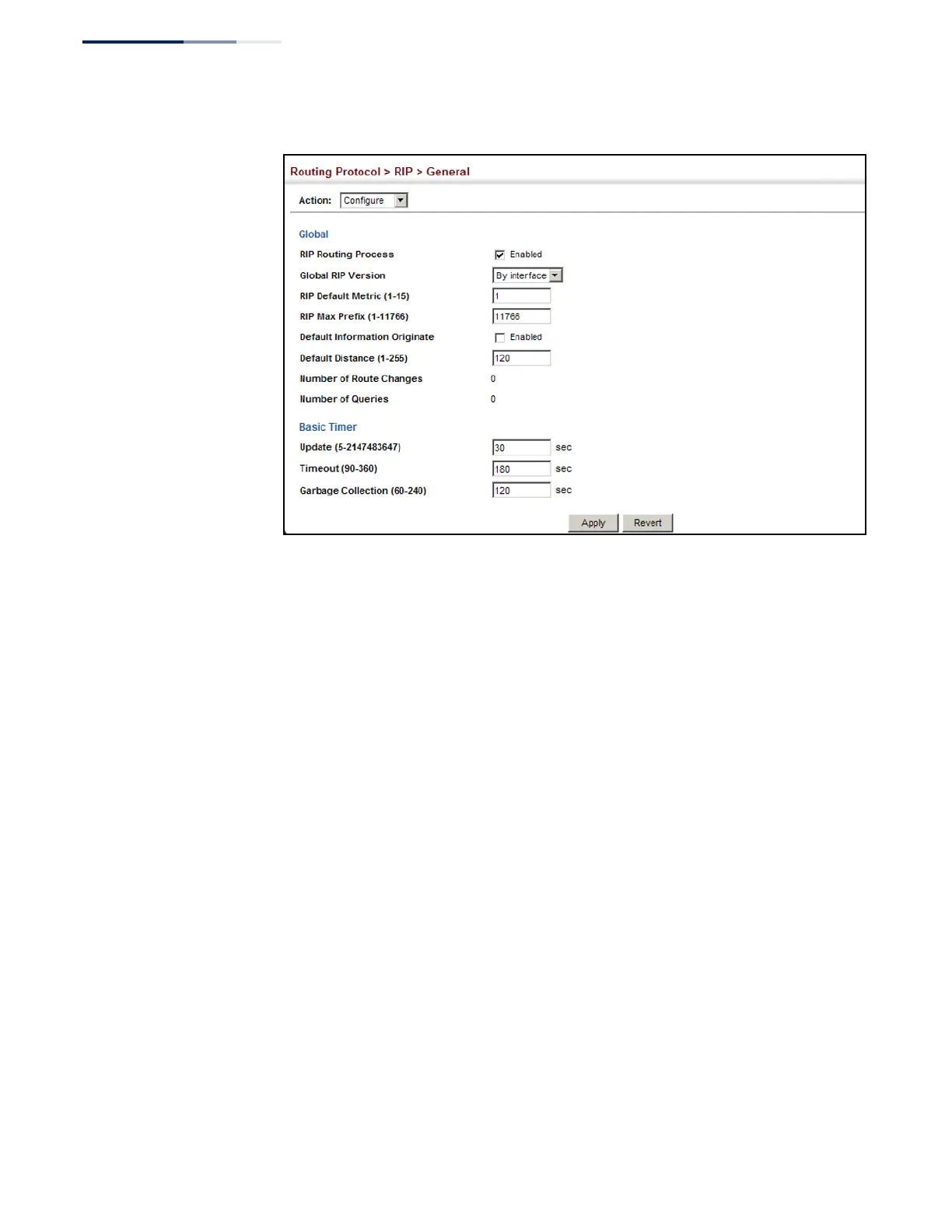
Figure 435: Configuring General Settings for RIP
Clearing Entries from
the Routing Table
Use the Routing Protocol > RIP > General (Clear Route) page to clear entries from
the routing table based on route type or a specific network address.
Command Usage
◆
RIP must be enabled to activate this menu option.
◆
Clearing “All” types deletes all routes in the RIP table. To avoid deleting the
entire RIP network, redistribute connected routes using the Routing Protocol >
RIP > Redistribute screen (page 661) to make the RIP network a connected
route. To delete the RIP routes learned from neighbors, but keep the RIP
network intact, clear “RIP” types from the routing table.
Parameters
These parameters are displayed:
◆
Clear Route By Type
– Clears entries from the RIP routing table based on the
following types:
■
All
– Deletes all entries from the routing table.
■
Connected
– Deletes all currently connected entries.
■
OSPF
– Deletes all entries learned through OSPF.
■
RIP
– Deletes all entries learned through the RIP.
■
Static
– Deletes all static entries.










 To Next Page