Chapter 15
| IP Configuration
Setting the Switch’s IP Address (IP Version 6)
– 607 –
5.
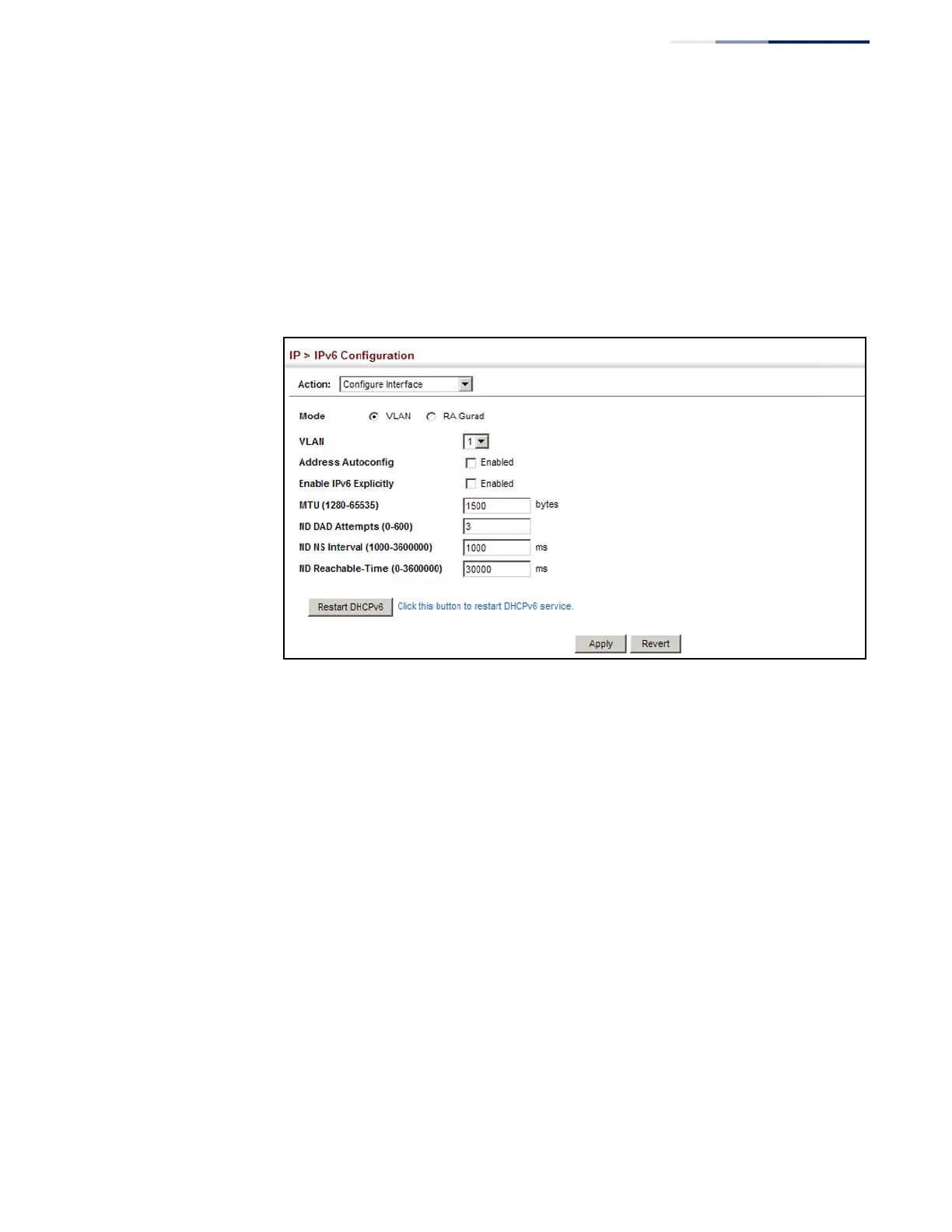
Enable address auto-configuration, or enable IPv6 Explicitly to automatically
configure a link-local address and enable IPv6 on the selected interface. (To
manually configure the link-local address, use the Add IPv6 Address page.) Set
the MTU size, the maximum number of duplicate address detection messages,
the neighbor solicitation message interval, and the amount of time that a
remote IPv6 node is considered reachable.
6.
Click Apply.
Figure 399: Configuring General Settings for an IPv6 Interface
To configure RA Guard for the switch:
1.
Click IP, IPv6 Configuration.
2.
Select Configure Interface from the Action list.
3.
Select RA Guard mode.
4.
Enable RA Guard for untrusted interfaces.
5.
Click Apply.










 To Next Page