Chapter 13
| Basic Administration Protocols
Connectivity Fault Management
– 508 –
■
HIT – Target located on this device.
Web Interface
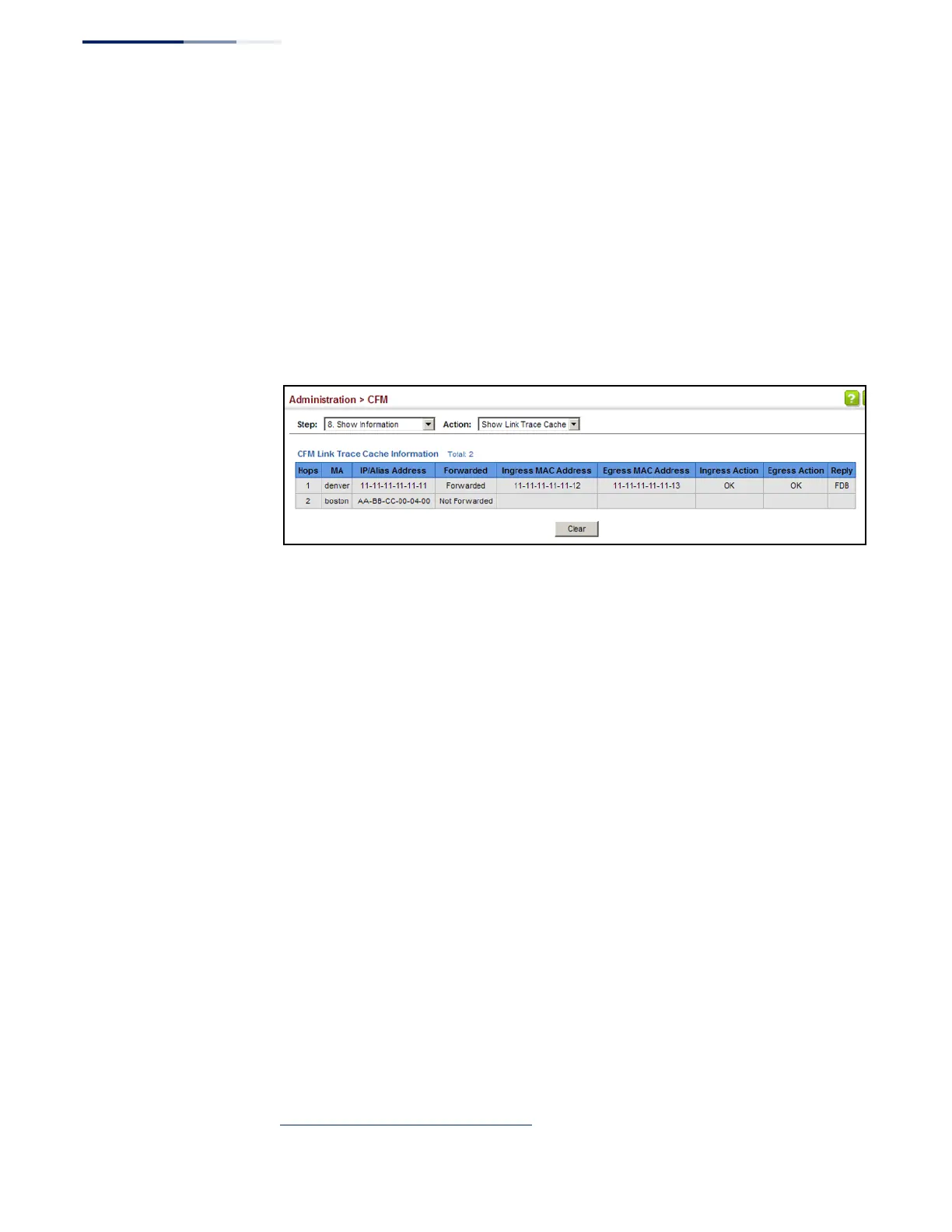
To show information about link trace operations launched from this device:
1.
Click Administration, CFM.
2.
Select Show Information from the Step list.
3.
Select Show Link Trace Cache from the Action list.
Figure 326: Showing the Link Trace Cache
Displaying Fault
Notification Settings
Use the Administration > CFM > Show Information (Show Fault Notification
Generator) page to display configuration settings for the fault notification
generator.
Parameters
These parameters are displayed:
◆
MEP ID
– Maintenance end point identifier.
◆
MD Name
– Maintenance domain name.
◆
MA Name
– Maintenance association name.
◆
Highest Defect
– The highest defect that will generate a fault alarm.
(This is disabled by default.)
◆
Lowest Alarm
– The lowest defect that will generate a fault alarm
16
.
◆
Alarm Time
– The time a defect must exist before a fault alarm is issued
16
.
◆
Reset Time
– The time after a fault alarm has been issued, and no defect exists,
before another fault alarm can be issued
16
.
16. See “Configuring CFM Maintenance Domains” on page 481.










 To Next Page