Chapter 4
| Interface Configuration
Port Configuration
– 124 –
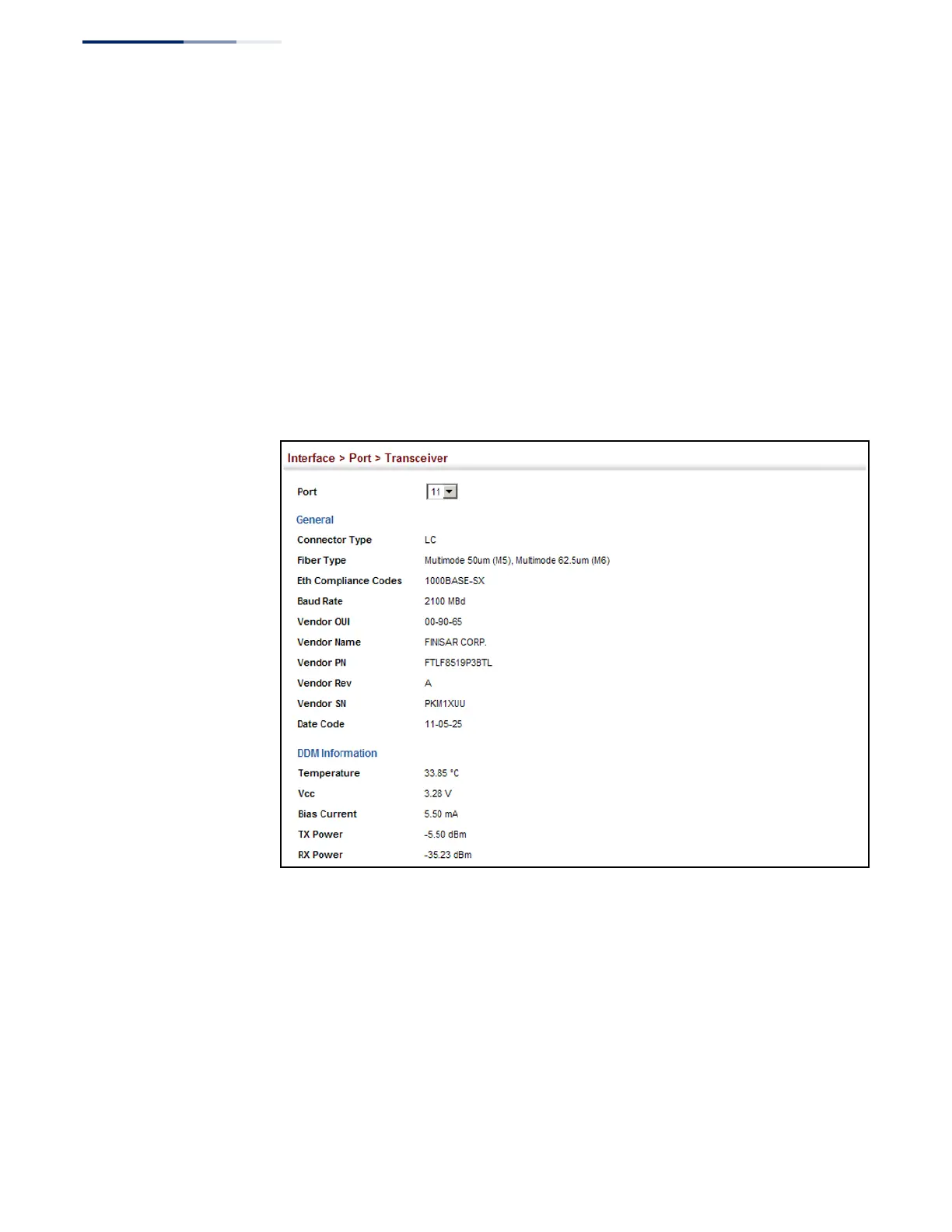
The switch can display diagnostic information for SFP modules which support
the SFF-8472 Specification for Diagnostic Monitoring Interface for Optical
Transceivers. This information allows administrators to remotely diagnose
problems with optical devices. This feature, referred to as Digital Diagnostic
Monitoring (DDM) provides information on transceiver parameters.
Web Interface
To display identifying information and functional parameters for optical
transceivers:
1.
Click Interface, Port, Transceiver.
2.
Select a port from the scroll-down list.
Figure 45: Displaying Transceiver Data
Configuring
Transceiver
Thresholds
Use the Interface > Port > Transceiver page to configure thresholds for alarm and
warning messages for optical transceivers which support Digital Diagnostic
Monitoring (DDM). This page also displays identifying information for supported
transceiver types, and operational parameters for transceivers which support DDM.
Parameters
These parameters are displayed:
◆
Port
– Port number. (GTL-2881: SFP+ ports 25-28; GTL-2882: SFP ports 1-28)
◆
General
– Information on connector type and vendor-related parameters.










 To Next Page