Chapter 14
| Multicast Filtering
Multicast VLAN Registration for IPv4
– 563 –
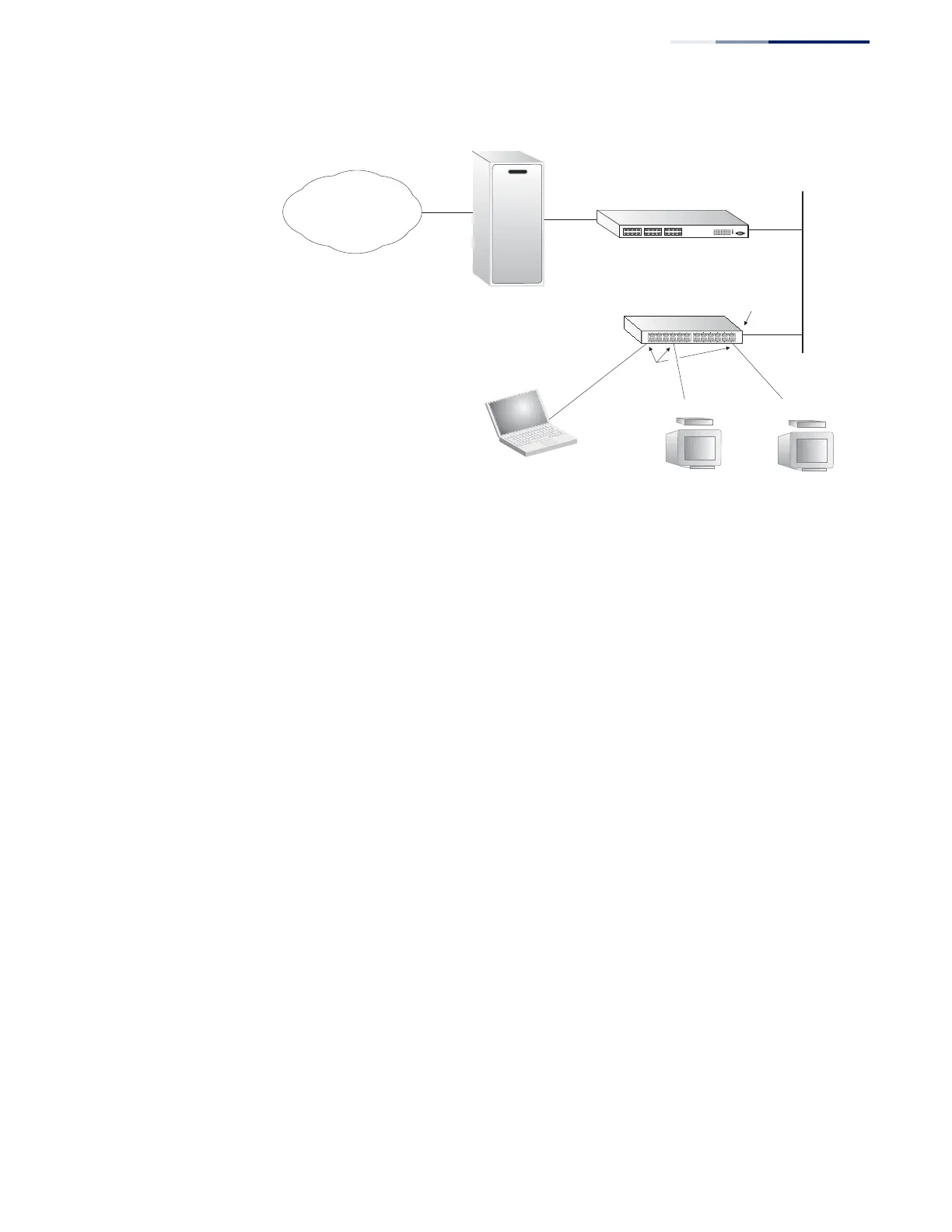
Figure 368: MVR Concept
Command Usage
◆
General Configuration Guidelines for MVR:
1.
Enable MVR for a domain on the switch, and select the MVR VLAN (see
“Configuring MVR Domain Settings” on page 566).
2.
Create an MVR profile by specifying the multicast groups that will stream
traffic to attached hosts, and assign the profile to an MVR domain (see
“Configuring MVR Group Address Profiles” on page 567).
3.
Set the interfaces that will join the MVR as source ports or receiver ports
(see “Configuring MVR Interface Status” on page 570).
4.
For multicast streams that will run for a long term and be associated with a
stable set of hosts, you can statically bind the multicast group to the
participating interfaces (see “Assigning Static MVR Multicast Groups to
Interfaces” on page 572).
◆
Although MVR operates on the underlying mechanism of IGMP snooping, the
two features operate independently of each other. One can be enabled or
disabled without affecting the behavior of the other. However, if IGMP
snooping and MVR are both enabled, MVR reacts only to join and leave
messages from multicast groups configured under MVR. Join and leave
messages from all other multicast groups are managed by IGMP snooping.
Also, note that only IGMP version 2 or 3 hosts can issue multicast join or leave
messages. Since IGMP version 1 hosts do not support leave messages, they are
timed out by the switch.
Multicast Router
Layer 2 Switch
Multicast Server
PC
TV
Set-top Box
TV
Set-top Box
Satellite Services
Service
Network
Source
Port
Receiver
Ports










 To Next Page