Chapter 4
| Interface Configuration
Port Configuration
– 112 –
◆
Admin
– Shows if the port is enabled or disabled.
◆
Oper Status
– Indicates if the link is Up or Down.
◆
Media Type
– Shows the forced transceiver mode for SFP/SFP+ ports, or
forced/preferred port type for RJ-45/SFP combination ports used in the GTL-
2882.
◆
Autonegotiation
– Shows if auto-negotiation is enabled or disabled.
◆
Oper Speed Duplex
– Shows the current speed and duplex mode.
◆
Oper Flow Control
– Shows the flow control type used.
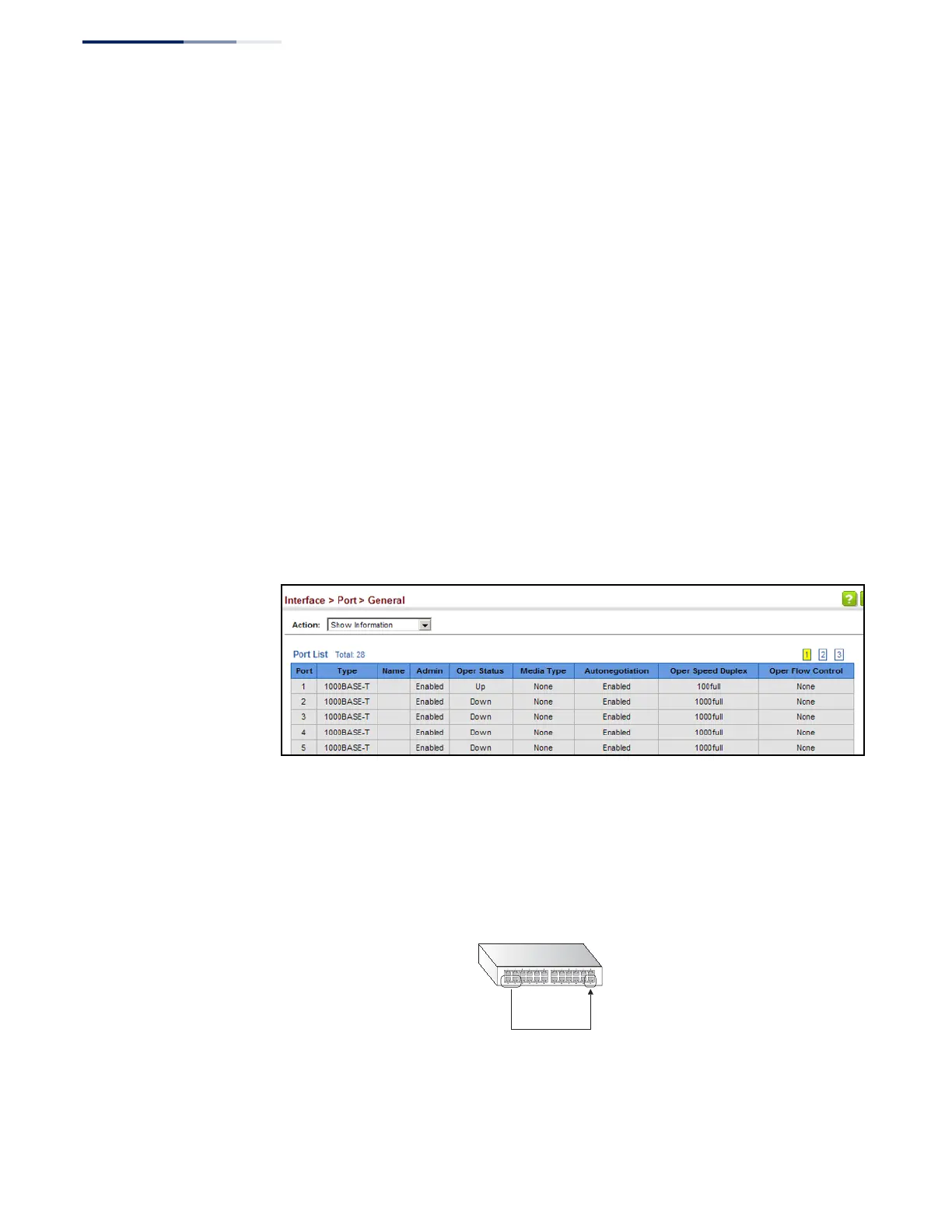
Web Interface
To display port connection parameters:
1.
Click Interface, Port, General.
2.
Select Show Information from the Action List.
Figure 35: Displaying Port Information
Configuring
Local Port Mirroring
Use the Interface > Port > Mirror page to mirror traffic from any source port to a
target port for real-time analysis. You can then attach a logic analyzer or RMON
probe to the target port and study the traffic crossing the source port in a
completely unobtrusive manner.
Figure 36: Configuring Local Port Mirroring
Command Usage
◆
Traffic can be mirrored from one or more source ports to a destination port on
the same switch (local port mirroring as described in this section), or from one
or more source ports on remote switches to a destination port on this switch
Source
port(s)
Single
target
port










 To Next Page