Chapter 6
| Address Table Settings
Issuing MAC Address Traps
– 196 –
MAC authentication traps must be enabled at the global level for this attribute
to take effect.
Web Interface
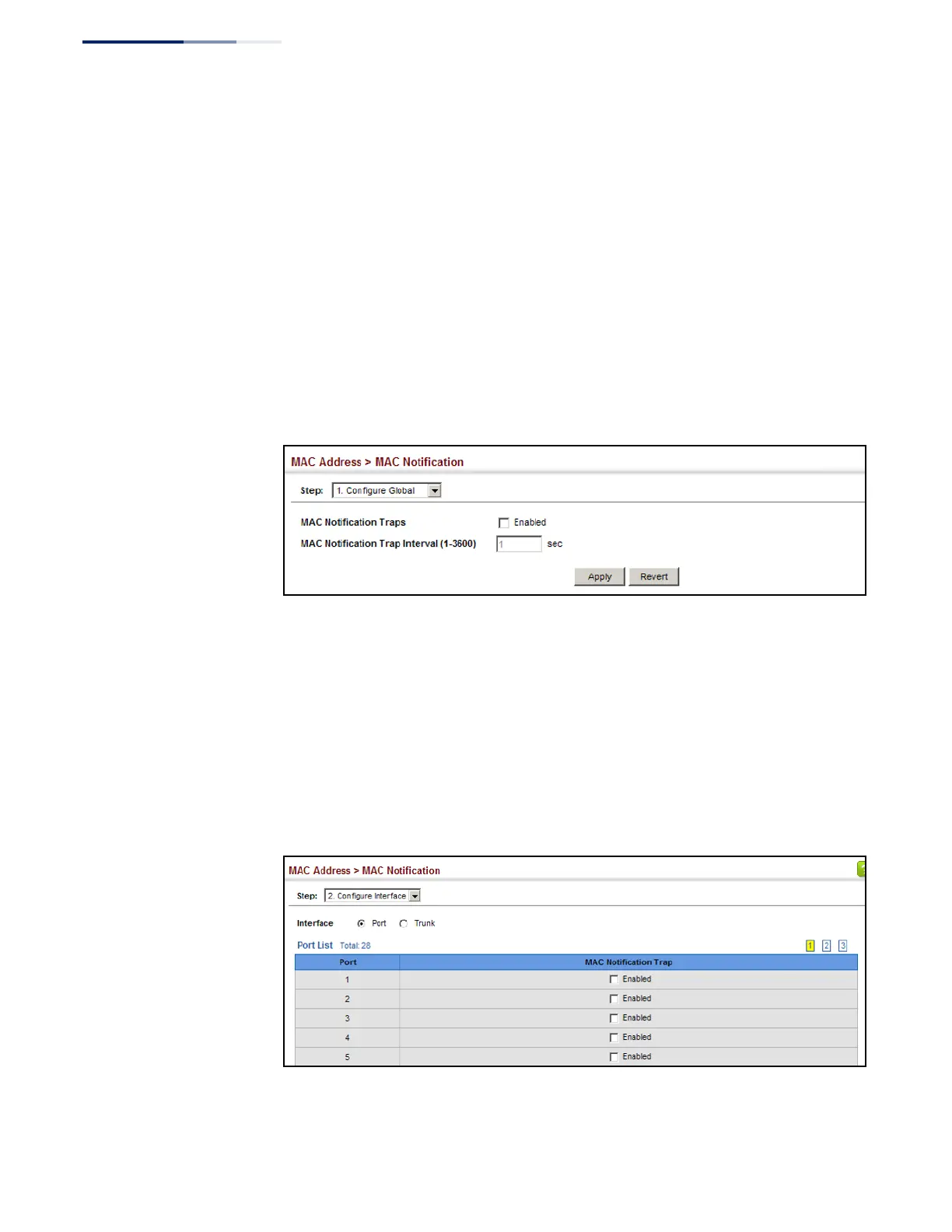
To enable MAC address traps at the global level:
1.
Click MAC Address, MAC Notification.
2.
Select Configure Global from the Step list.
3.
Configure MAC notification traps and the transmission interval.
4.
Click Apply.
Figure 108: Issuing MAC Address Traps
(Global Configuration)
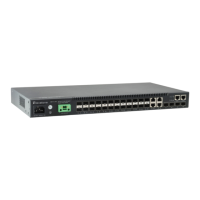
To enable MAC address traps at the interface level:
1.
Click MAC Address, MAC Notification.
2.
Select Configure Interface from the Step list.
3.
Enable MAC notification traps for the required ports.
4.
Click Apply.
Figure 109: Issuing MAC Address Traps
(Interface Configuration)










 To Next Page