3. AC Smart Menu
Installation/Owner's Manual
3-67
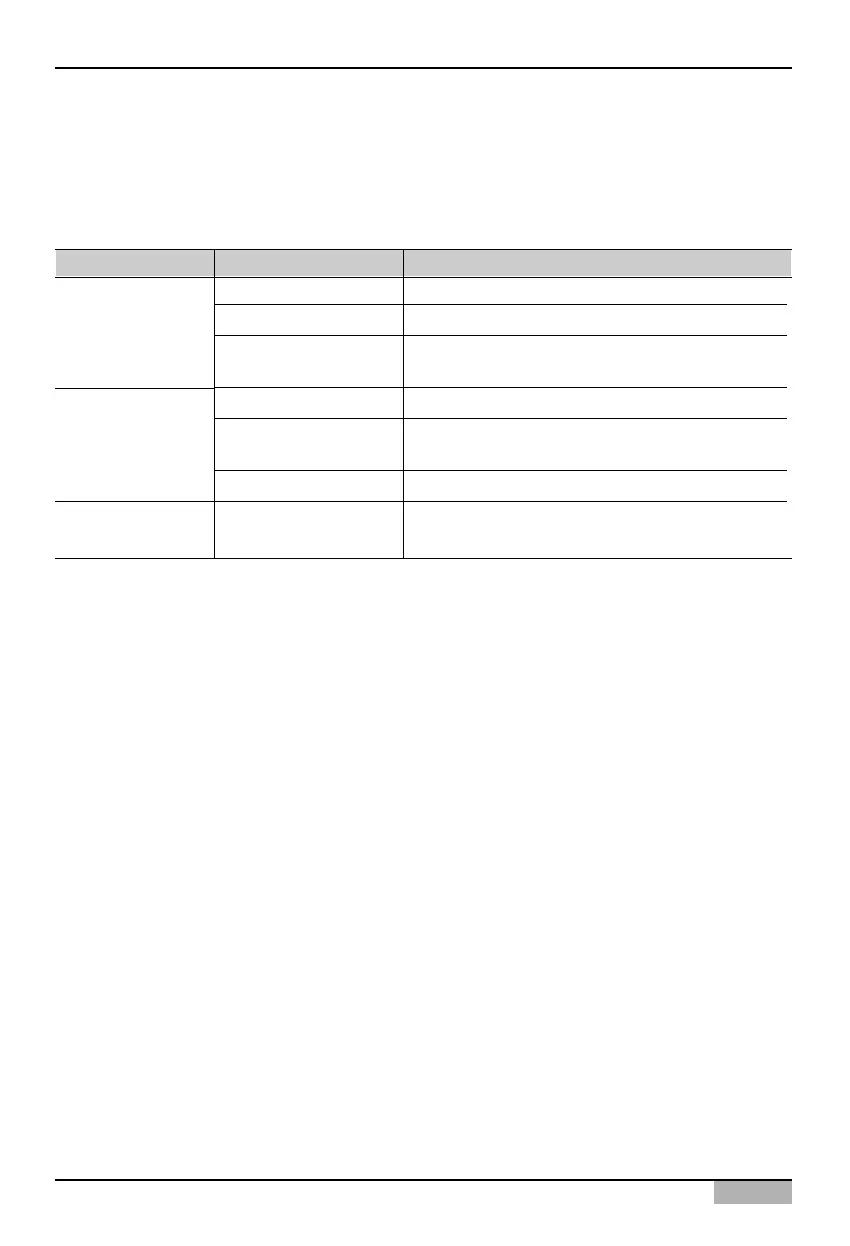
Remote service setting
The information for sending/receiving the history information and the current status information of the
AC Smart via the SVCNet can be set at the Remote service setting. The following items should be set
for setting the remote service.
Type Item Description
Service server address Enter the server address of the SVCNet.
Service server port Enter the server port of the SVCNet.
Update period (min)
Specify the period to update the information at the
SVCNet by minute.
Field address Enter the IP address set at the current AC Smart.
Field name
Enter the information about the location where the
current AC Smart is installed.
Field code The code given for managing the field
-
Select whether to use the function for sending the
information of the AC Smart to the SVCNet.
Remote service
information
Field information
Set to use the
remote service












 To Next Page