3. AC Smart Menu
Installation/Owner's Manual
3-5
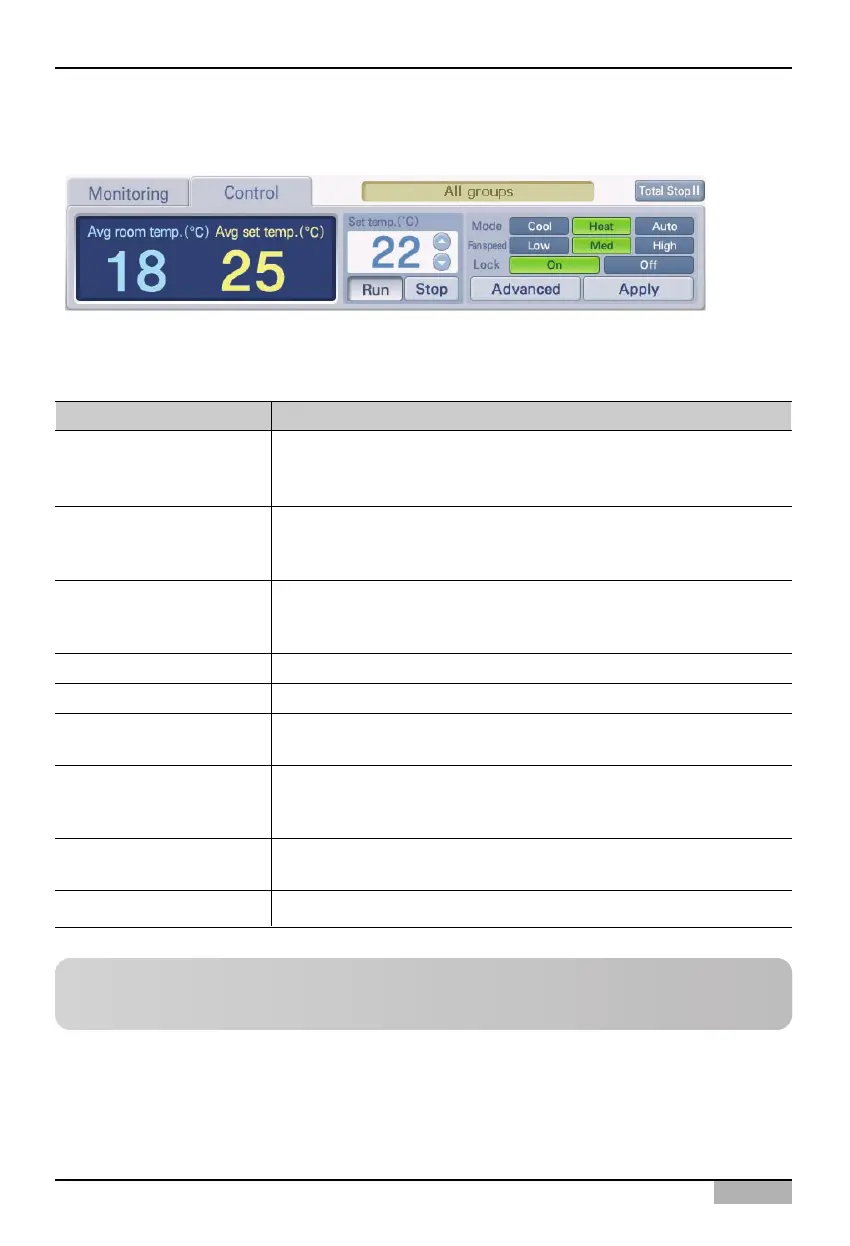
Zone control
The menu to directly control the unit is located at the bottom right corner of the zone information. In
zone control, you can directly control the following functions.
Reference: Zone control operation method
For operation of zone control, refer to the ‘Control/Monitoring’ section on page 4-5.
Control item Description
Average indoor
temperature
Average set
temperature
Set temperature
[Run], [Stop]
Mode
Wind flow
Lock
[Details]
[Apply]
The average indoor temperature of the room where the unit is running
is displayed. The unit with the communication error (code: 242)
occurred is excluded.
The average set temperature of the room where the unit is running is
displayed. The unit with the communication error (code: 242) occurred
is excluded.
Set the desired indoor temperature as the reference of the indoor
temperature. The desired indoor temperature is set together when the
running mode is set.
Run or stop the unit.
Set the running mode of the unit. [Cooling], [Heating] [Automatic]
Set the wind flow of the unit.
[Mild], [Normal], [Strong]
Set the lock function to prevent the user at the room from individually
controlling the unit.
[Lock all], [Unlock all]
The ‘Detailed control’ screen is displayed where the unit can be
controlled in detail.
Apply the set items to the AC Smart and the unit.












 To Next Page