Trackit Mk3 User Manual
73
Clicking on the W rit e butt on causes all values currently being displayed to be writ t en across to the
Module which st ores them in its non-volatile m em ory.
Clicking on the Set de fa ult s but t on loads default values int o all displayed sett ings (t hese are not
sent to the Module unt il a W rite occurs) .
Clicking on the Disconne ct but t on finishes t he setup session and issues com m ands t o disable
changes t o t he Module set up and also to t ake it out of Setup- over- Bluet oot h m ode. The Module is
now ready for use wit h the new sett ings.
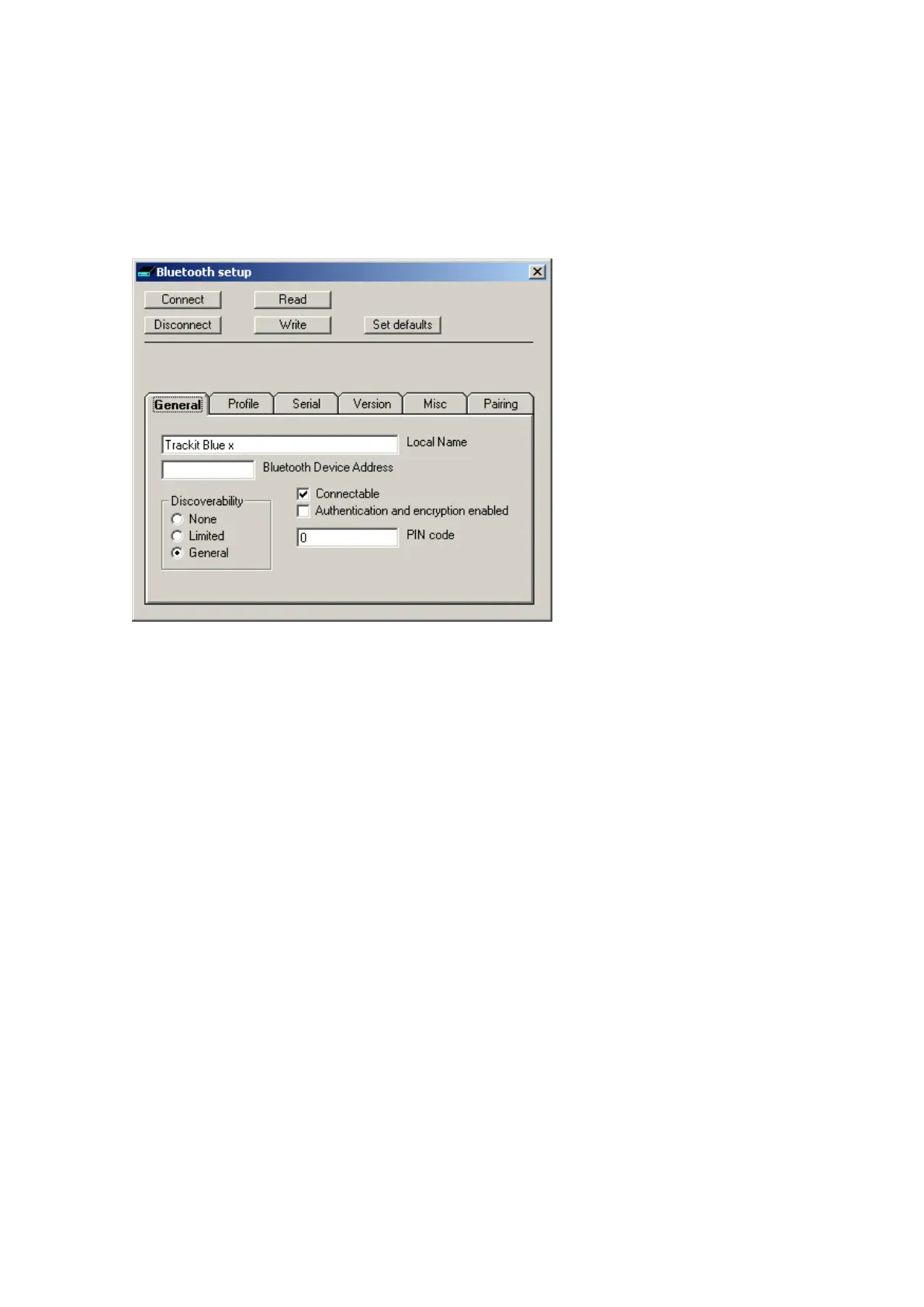
Figur e 5 6 Tra ckit De fa u lt s | Blue t oot h Set u p Ta b 1 ( Ge n e r a l)
• Loca l N a m e . This allows the Module to be given a ‘friendly nam e’ ( in a sim ilar way to a net-
worked com puter). This nam e is the one report ed by ot her com puters during a search or con-
nection. I f t here are several Trackit Bluetoot h devices on- site, it is im port ant t hat each has a
unique nam e. As supplied, every Module will be uniquely nam ed and t his will be in the form of
‘Trackit Blue x’ w here x is num eric. Do not change t he nam e unless there is a good reason t o
do so.
• Blue t oot h De vice Addre ss. Every Bluetoot h device is assigned a unique address ( in a sim ilar
way t o the I P address of a net work adapter) . The address is read- only and cannot be changed.
The Module can be referred to from a rem ote device by either it s local nam e or in som e sit ua-
tions by its Bluet oot h Device Address.
Discoverability
• N on e . I f selected t he Module cannot be discovered by ot her devices during a search – it be-
com es invisible.
• Lim it ed. I f select ed the m odule becom es only part ially discoverable.
• Gener a l. I f select ed the Module can be discovered by other devices.
• Conne ct a ble . I f t icked t he Module can be connected t o by anot her device. Ot herwise a con-
nection is not allowed. The applicat ion forces Connect able.
• Aut h e nt icat ion a nd en cr ypt ion ena bled. I f ticked t he rem ote device m ust know t he Module’s
PI N code passkey t o be able to connect . The Module undergoes a ‘pairing’ procedure wit h t he
rem ot e device. Addit ionally in this m ode, all data transfers are encrypted using t he sam e PI N
code as a passkey.
• PI N code . This is t he code that m ust be known t o t he rem ote connect ing device t o enable a
connect ion t o be m ade. The code is ent ered once only during the ‘pairing’ procedure on the
host (client ). I t can be set here in t he m odule to any num eric sequence. I t is only used if Au -
t he nt ica t ion and en cr y pt ion is enabled in t he Module or the rem ote device requires authen-
tication.



 To Next Page