00
248083387-1 Rev 10 5-1
5 Communications
SOLAIR
Communication
Mode
This chapter contains information on how to set up the SOLAIR 3350
or 5350 to program it and communicate with it.
Communicate with the Instrument
WARNING: Please
note that only one
communication port may
be used at one time.
Attempting to
simultaneously connect
the instrument to
multiple interfaces, such
as Ethernet AND RS485
or USB and Ethernet or
all three will fail. The
instrument must be
powered OFF before
changing from one
interface to another,
such as from USB to
Ethernet.
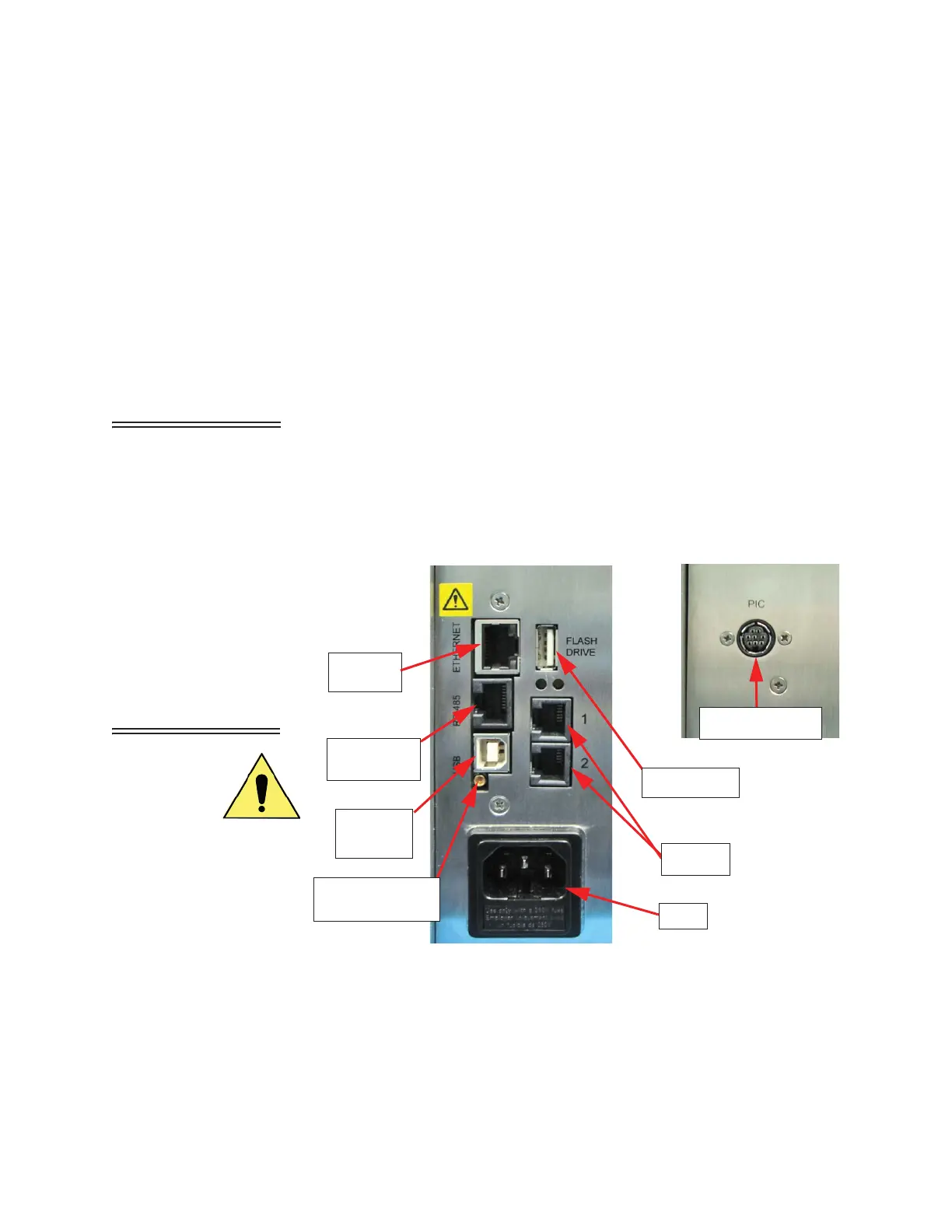
The communication ports are labeled as in Figure 5-1. The Ethernet
port is used to connect the instrument to an Ethernet LAN; RS485 port
is used to connect the unit to a PC COM port via an RS485 serial line or
to an RS232 or RS485 network; the USB port is used to connect the
instrument to a PC USB port.
Figure 5-1 SOLAIR 3350, 5350 Rear Connectors
Ethernet
RS485/
AC In
(B-Type)
USB Port
PIC Connector
Analog
Flash Drive
Port
Port
RS232
(Service Only)
Calibration Port










 To Next Page