Operation 4
Standard equipment
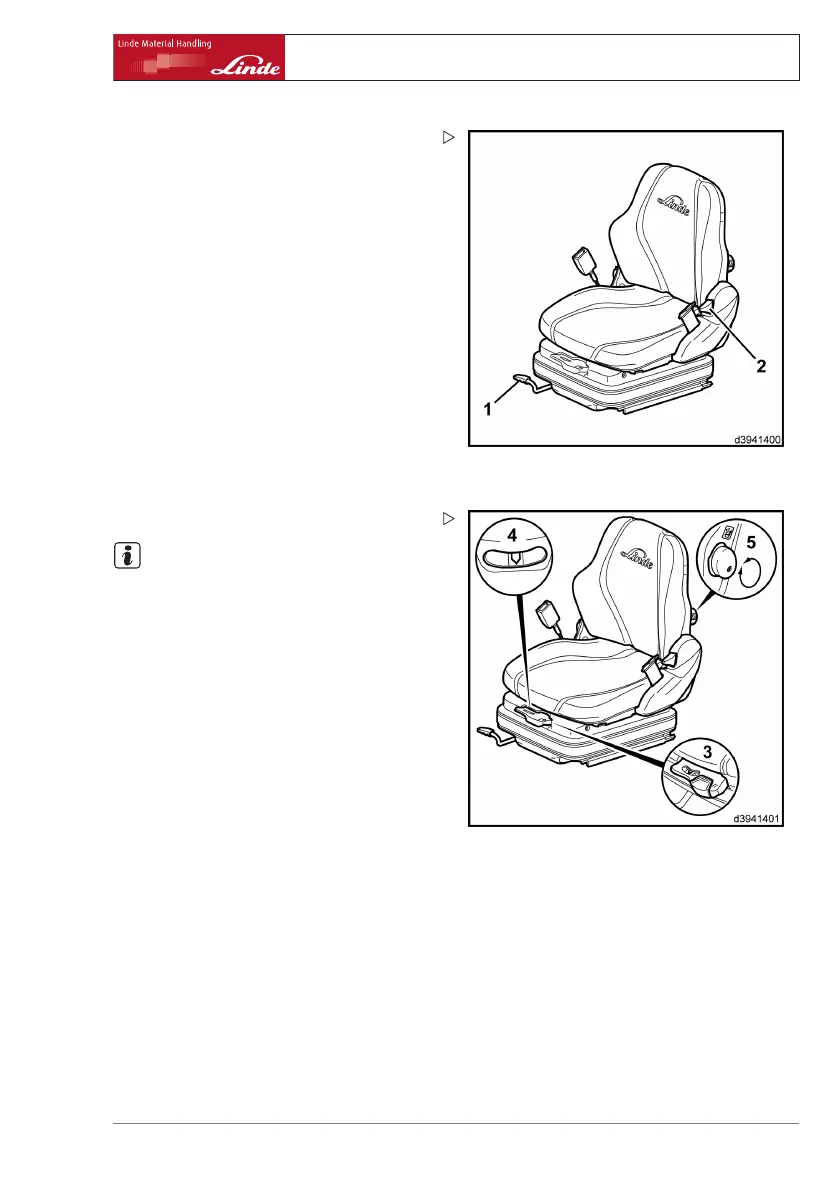
Longitudinal adjustment
¾ Pull lever (1) upwards.
¾ Move the driver’s seat backwar
ds or for-
wards on the runners to find the m
ost com-
fortable position for the driv
er in relation to
the steering wheel and the acce
lerator ped-
als.
¾ Allow lever (1) to snap into place.
Adjusting the seat backrest
¾ Push lever (2) upwards and hold in place.
¾ Move the seat backrest forw
ards or back-
wards until a comfortabl
e seating position
for the driver is found.
¾ Release lever (2).
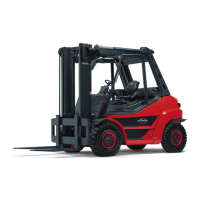
Setting the driver’s weight
NOTE
The individual driver’s weight must be set
when the driver’s seat is under load.
¾ Check the weight setting in the inspection
window (4).
The correct driver’s weight has been set
when the arrow is in the centre position in
the inspection window (4).
Adjust the driver’s weight as necessary.
¾ Pulling the lever (3) upwards signifies a
higher weight.
¾ Pushing the lever (3) downwards signifies a
lower weight.
Operating Instructions – 394 807 10 01 EN – 07/2011 35


 To Next Page