4 Operation
Special equipment
Driver’s cab
Opening the cab door
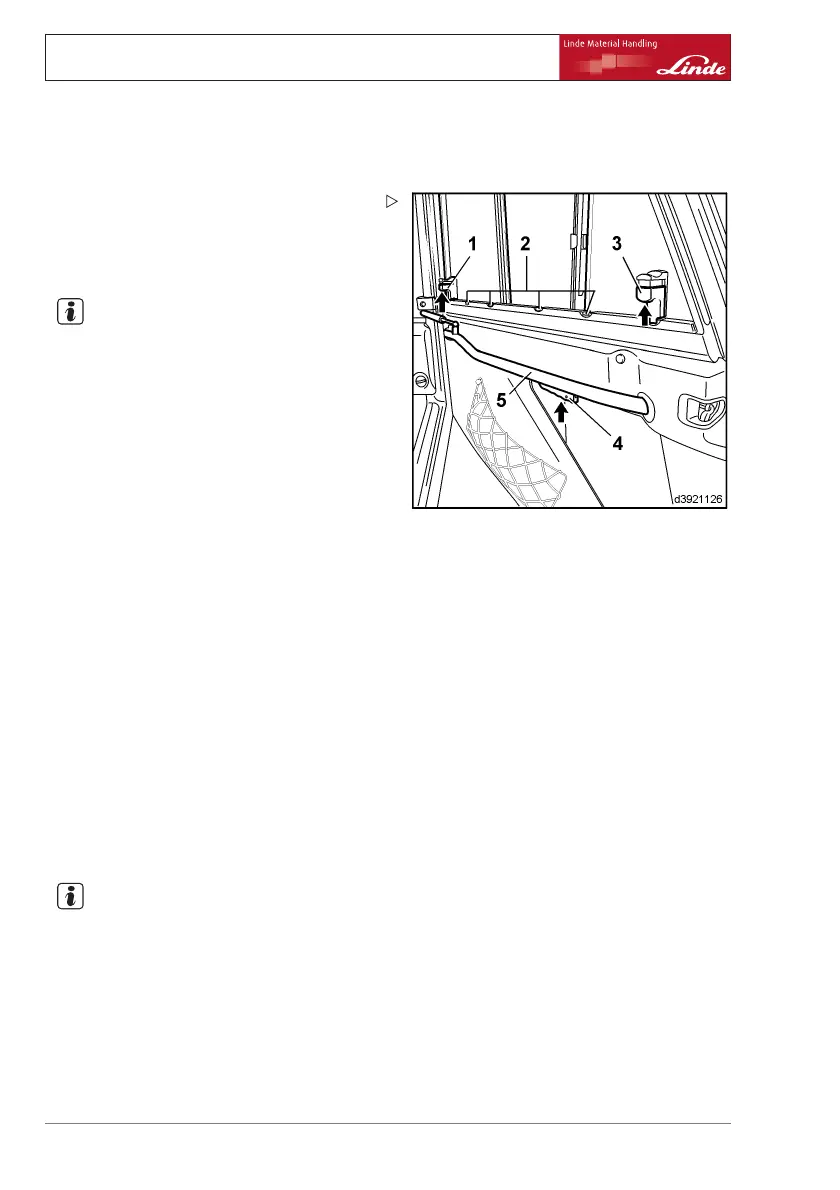
¾ Push handle (4) upwards.
¾ Open driver’s door outwards.
Closingthecabdoor
NOTE
To make it easier to close the door, open the
side window slightly.
¾ Grip the rod (5) and pull the door towards
you until the interlock engages.
Opening/closing the front side window
¾ Press the interlock (3) upwards.
¾ Keep the interlock pressed, slide the side
window into the desired position until it
engages in one of the grooves (2).
Follow a similar procedure to close the side
window.
Opening/closing the rear side window
¾ Press the interlock (1) upwards.
¾ Keep the interlock pressed, slide the side
window into the desired position until it
engages in one of the grooves (2).
Follow a similar procedure to close the side
window.
Lighting
NOTE
The arrangement of the individual switches
on the overhead console on the upper right-
hand side of the overhead guard may vary,
depending on the version. Observe the switch
symbols.
72 Operating Instructions – 394 807 10 01 EN – 07/2011


 To Next Page