D9U001GKB-0101 115/150
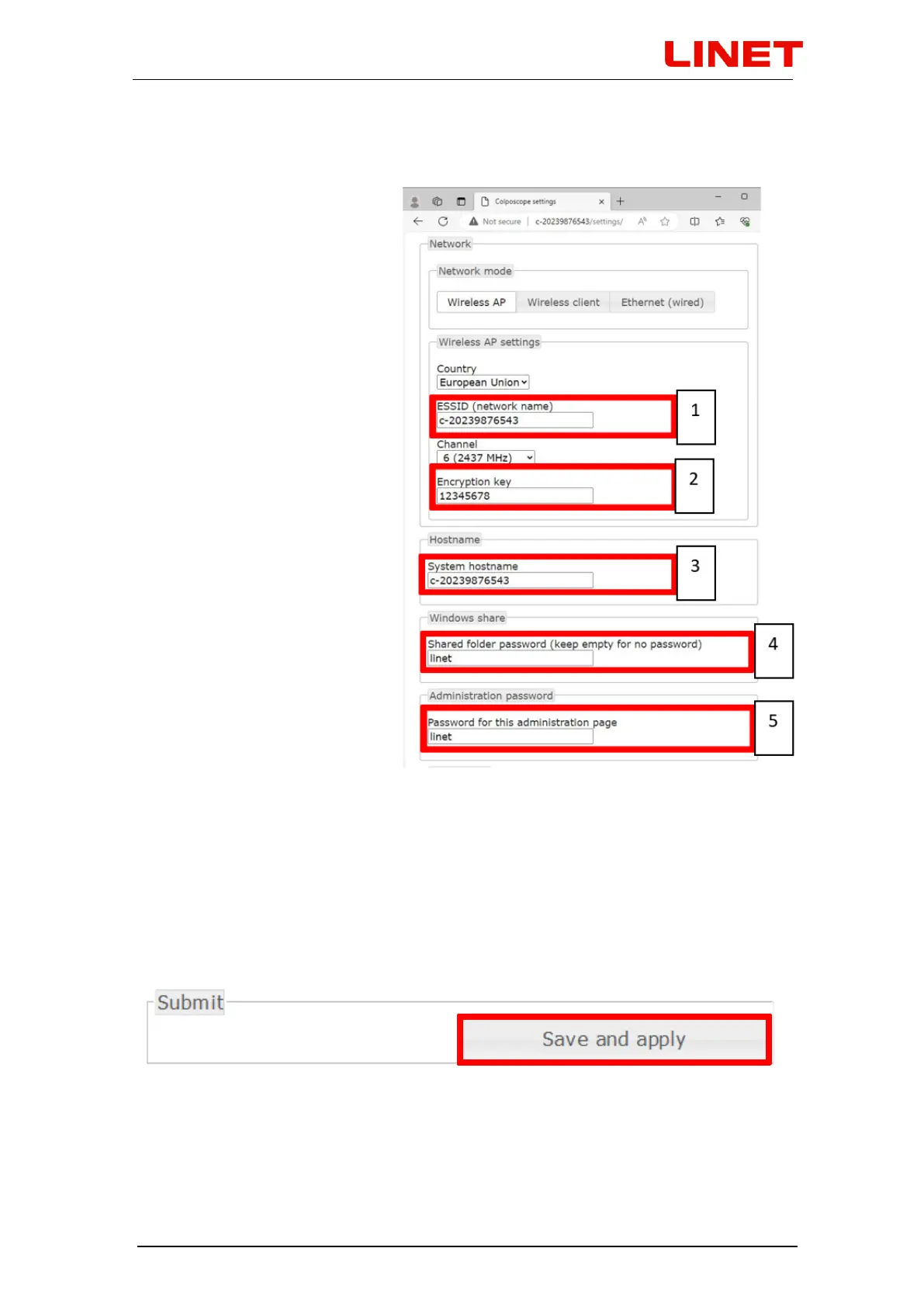
1) To change the network name change c-XXXXXXXXXXX to your chosen
network name.
2) To change the default
password for connection to
the wireless network of the
video colposcope (Wireless
AP) change the password
12345678 to a new one.
3) To change the device
(chair) name for
identification in the
network change
c-XXXXXXXXXXX to a
new name.
For example 123 - you
can then go to the menu
by entering a command in
the following format:
//123/settings
This name serves also for
accessing the menu
(//c-XXXXXXXXXXX) and
the stored photographs
and videos
(\\c-
XXXXXXXXXXX\data).
4) To change the default password protecting your photos and videos against
access of unauthorized persons change the current password linet to a new one.
5) To change the default password protecting the access to the menu of the
microcomputer of the GRACIE chair change the current password linet to a
new one.
To finish the changes press SAVE AND APPLY.


 To Next Page