52/150 D9U001GKB-0101
4.13.1 Operating the monitor
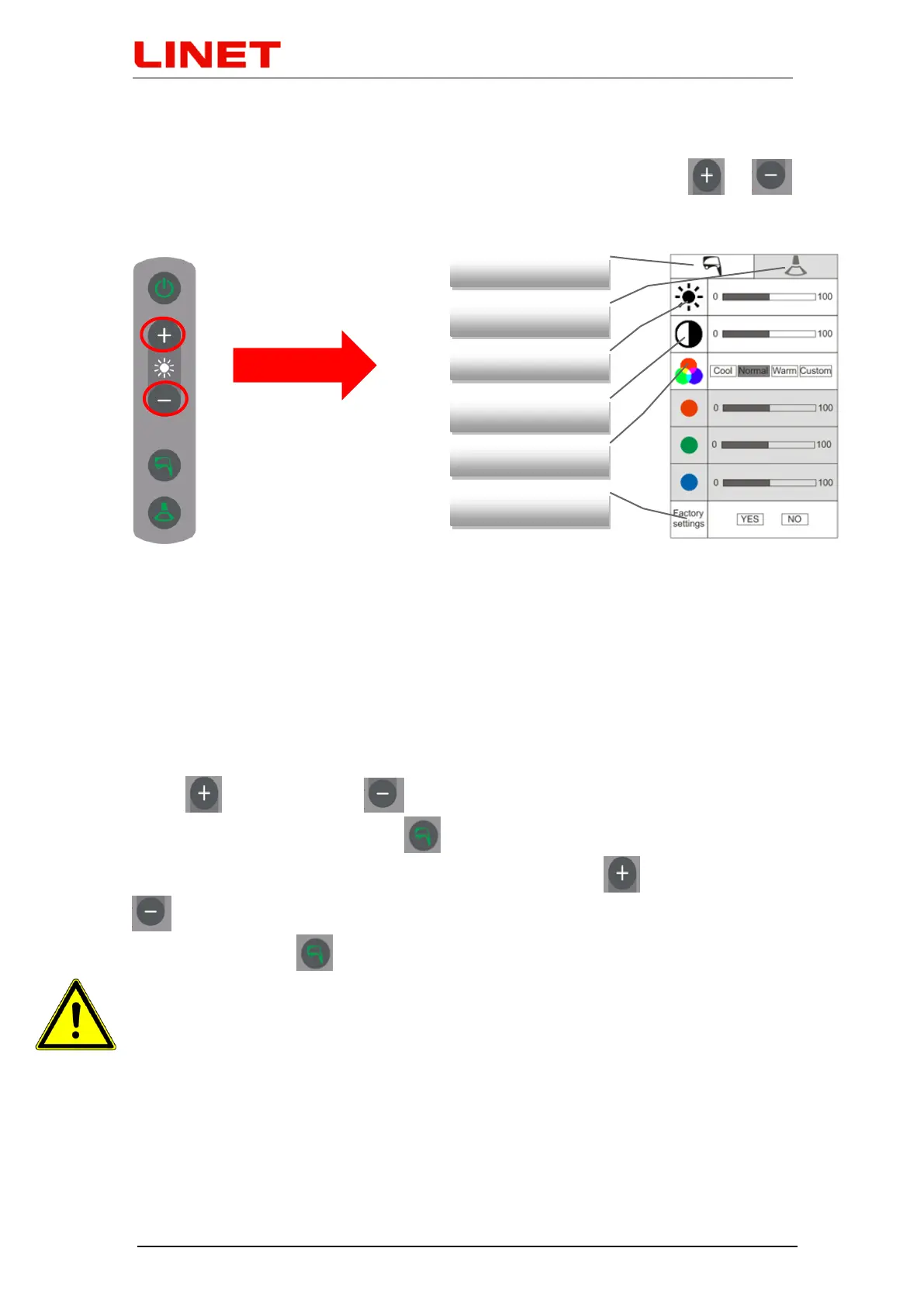
Basic functions of the monitor, such as brightness, contrast, RGB and reset of
factory setting can be set in the menu. To access the menu, press or
on the control panel of the monitor.
Settings are always adjusted for the currently selected source (colposcope or
ultrasound). The current settings are in a white rectangle with an image of the
input source. Inactive source is in a grey rectangle. RGB has three
automatically pre-set values: ‘Cool’, ‘Normal’ and ‘Warm’; individual settings of
these options can be accessed by pressing the ‘Custom’ tab.
Instructions
After activating the menu, you can move from one item to another vertically by
using (upwards) and (downwards). The parameter is selected by
pressing the ‘colposcope’ button . After the parameter is selected, the scale
is activated where you can move horizontally by using (to the right) and
(to the left), and again you confirm your selection by pressing the
‘colposcope’ button ..
• After 10 seconds of inactivity, the menu automatically switches off.
• Reset to factory settings will erase the current monitor settings!


 To Next Page