72/150 D9U001GKB-0101
Use the same steps as in Section "5.2 Direct connection of the GRACIE
chair to the doctor's PC/MAC using WLAN"
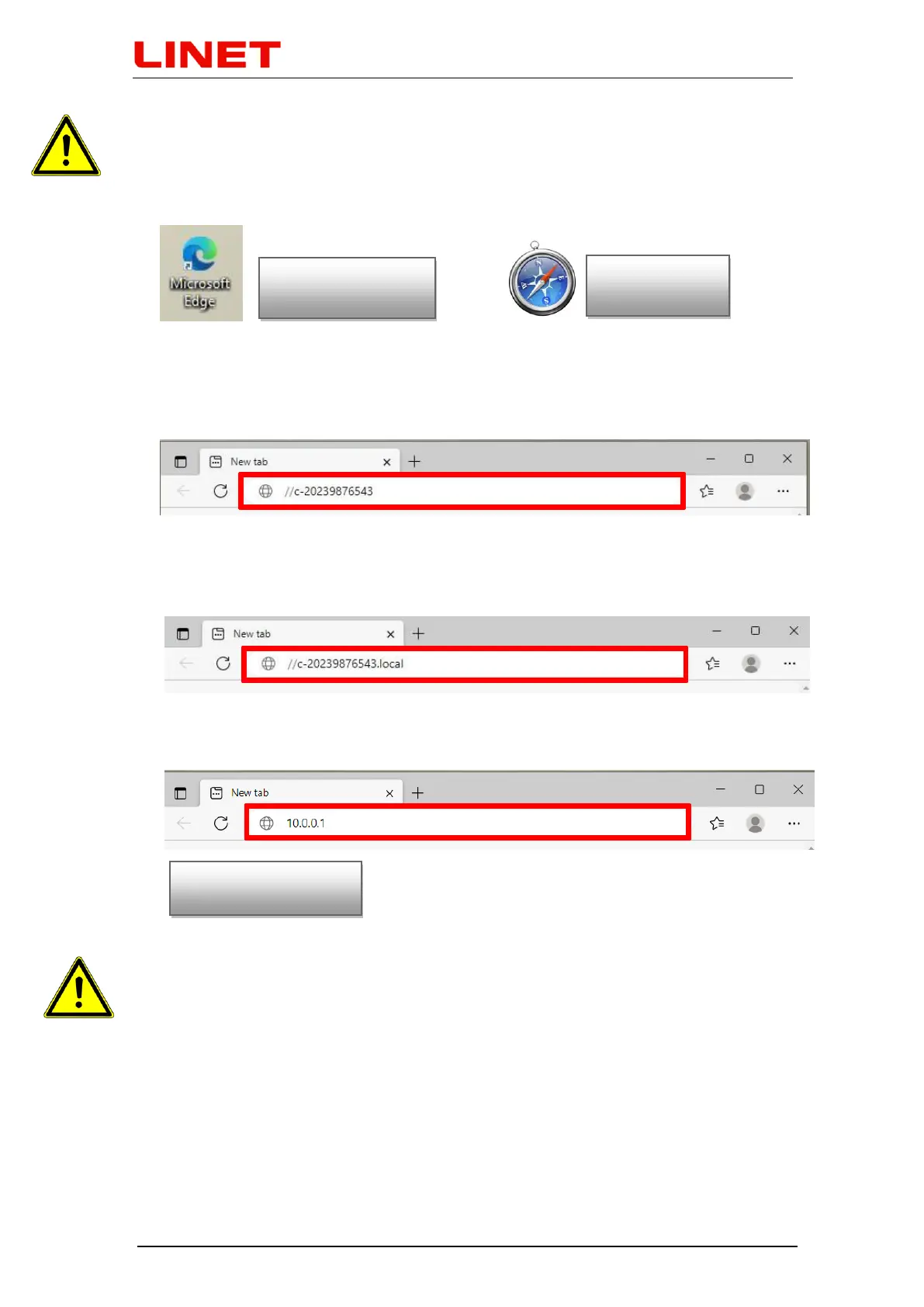
1) Open the Internet browser.
2) Type //c-XXXXXXXXXXX in the address bar, where XXXXXXXXXXX is the
serial number on the nameplate of the Gracie chair.
or type //c-XXXXXXXXXXX.local in the address bar, where
XXXXXXXXXXX is the serial number on the nameplate of the Gracie chair
or type IP address (10.0.0.1) of the GRACIE chair into the address bar
When typing the path into the address bar, make sure to use correct
slashes!
3) Press ENTER on the keyboard of your PC/MAC or click on "Go" on the
address bar.
4) You will enter the settings page of the WLAN module of the GRACIE chair.
Verification of connection may take from two to three minutes. It depends on
the operation system of your PC/MAC.


 To Next Page