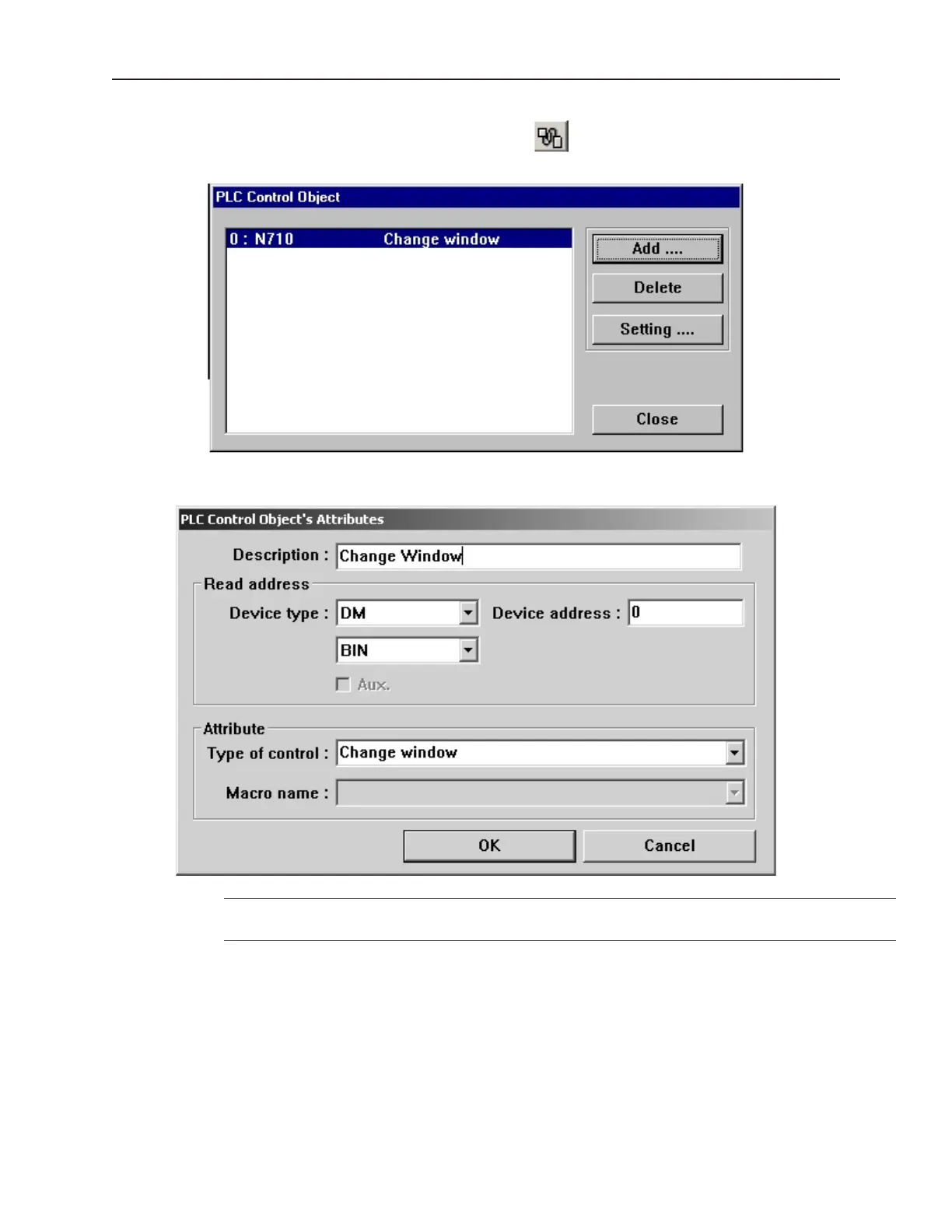
4To call a full screen window using the PLC Control object
1. From the Parts menu, select PLC Control. The PLC Control Object dialog box appears.
2. Click Add. The PLC Control Object’s Attribute dialog box appears.
3. Select the Device type and Device Address for the actual PLC address you wish to monitor.
The OIT will write the number of the newly-displayed window to the next consecutive
address after the address specified in this step.
4. Select either BIN (binary) or BCD format.
5. Click OK to return to the PLC Control Object dialog box.
6. You should see a new entry that lists the PLC address that is monitored by the OIT.
The PLC must only enter window numbers that represent full size windows when using the PLC Control Object
function. The OIT automatically closes any open windows before the window called by the PLC Control Object is
displayed.
1010-1001a, Rev 02
94 Sil ver Se ries In stal la tion & Op er a tion Man ual



 To Next Page