108
Chapter 6, Setting Up Realtime Effects with Adobe Premiere
Creating a custom color correction
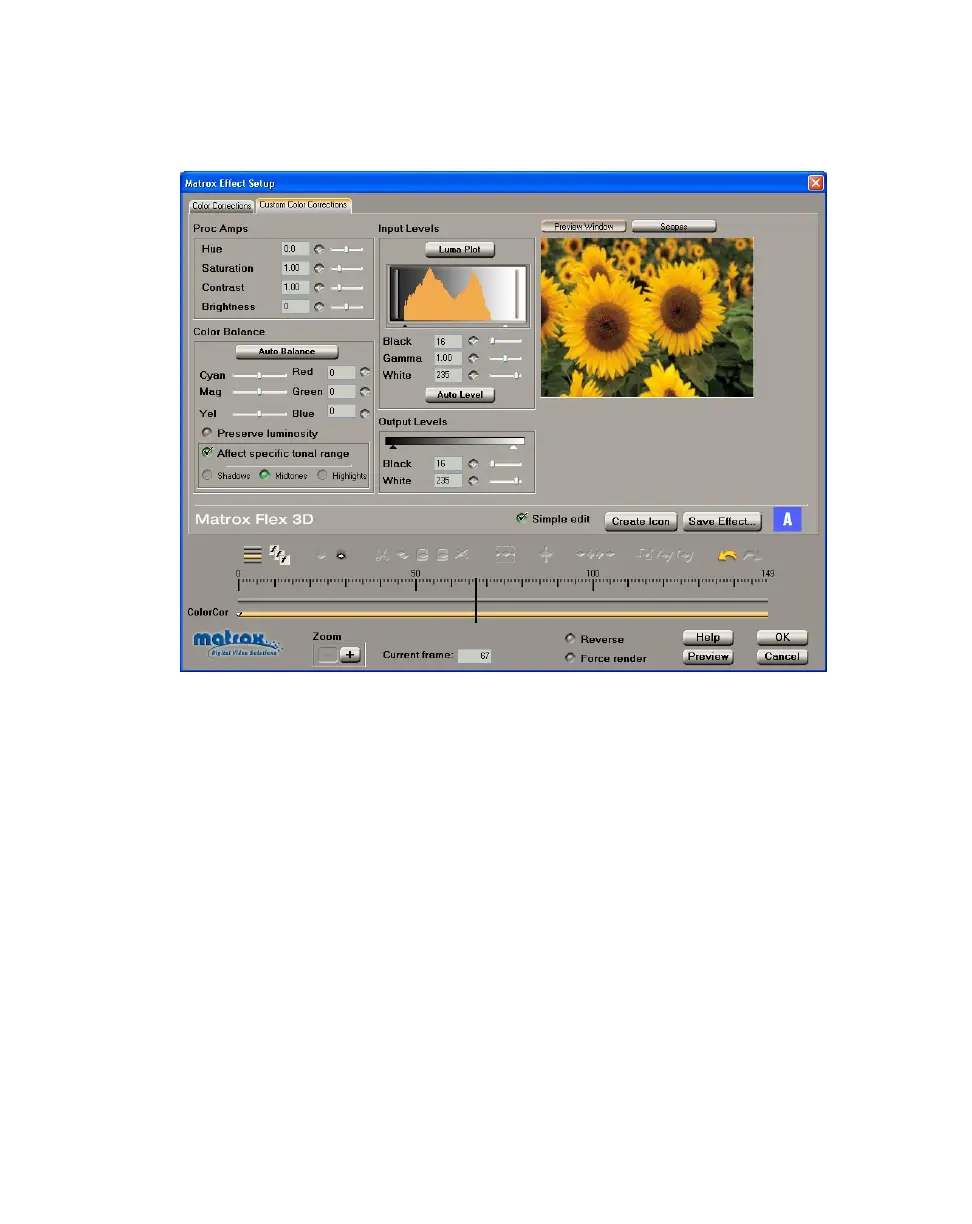
To customize the settings for your Matrox color correction, click the Custom
Color Corrections
tab or the ColorCor track:
By selecting
Simple edit, all settings are applied for the duration of your clip.
This means that you’ll have only one keyframe at the first frame of your clip. If
you want to change settings at different frames of the clip, you’ll have to clear
Simple edit
. For details on how to use the Matrox scopes to check your color
correction settings, see “Using the Matrox scopes” on page 110.
You can customize your color correction using the following:
•
Proc Amps The processing amplifier (proc amp) controls allow you to
adjust different aspects of your clip:
$ Hue Adjusts the tint of the colors in the image.
$ Saturation Adjusts the saturation (vividness) of the image’s colors.
$ Contrast Adjusts the difference in luminance between the lightest and
darkest areas of the image.
$ Brightness Adjusts the level of black in the image.
• Color Balance These controls let you adjust the mixture of colors in your
clip.



 To Next Page