3.4 Software language setup
With the electrical power supply stopped upstream
of the appliance for longer than 100 hours, reset the
software language.
The oven is set to Italian.
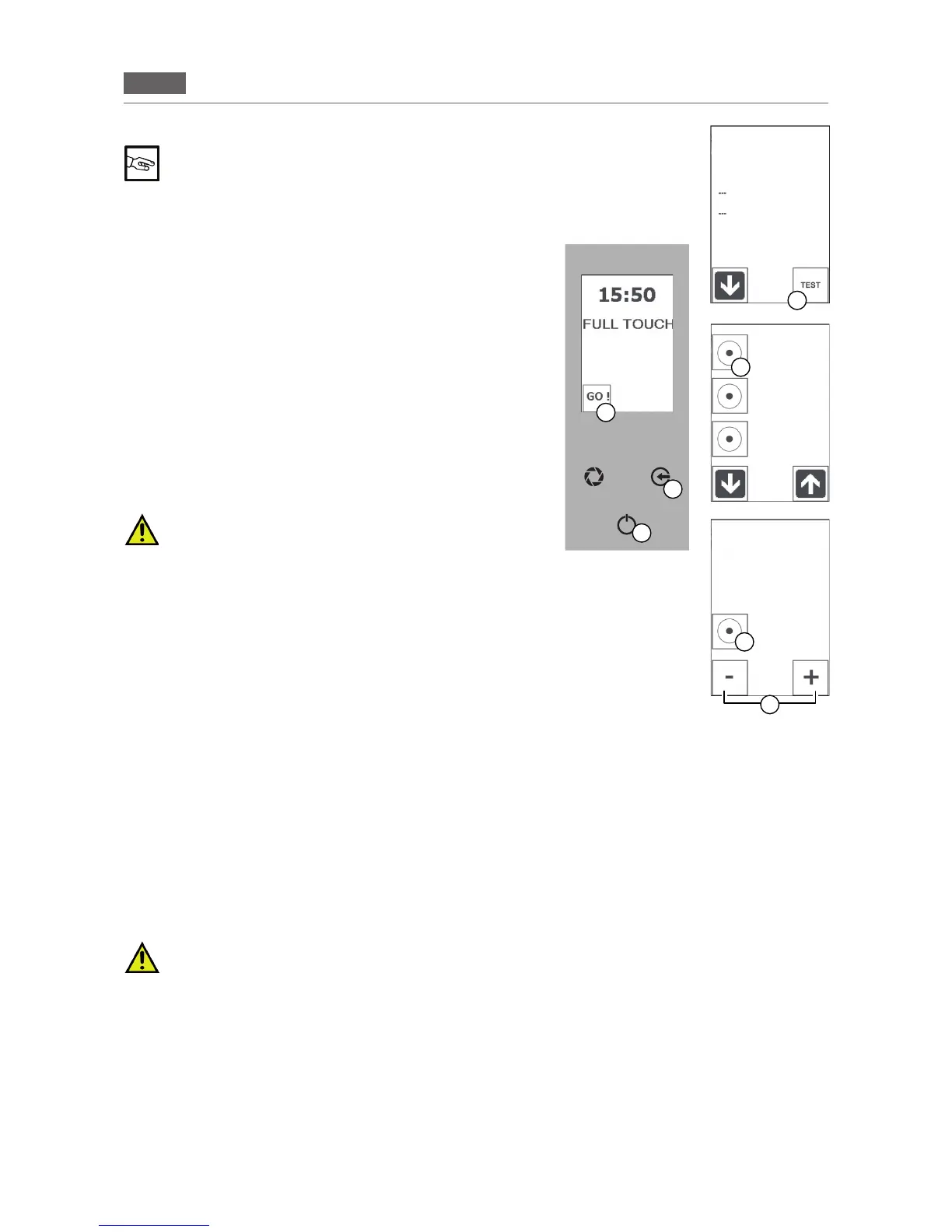
Toselectthelanguageyourequire,pressandholdthe“GO!”icon
andthe“ENTER”keyatthesametime(Fig.2/A+C).
Press the “TEST” icon (Part. D) and selectthe “FACTORY SET
-
TINGS”icon(Fig.2/E).
Pressthe “CONFIRM” icon (Fig. 2/F)and usethe “MINUS”and
“PLUS”icons(Fig.2/G)toselectthelanguageyourequire.
Pressthe“CONFIRM”(Fig.2/F)buttontoconrmyourchoiceand
pressthe“ESC”keyseveraltimes(Fig.2/B)toreturntotheHome
Page.
3.5 Description of stop modes
The description of the various stop modes are described as fol-
lows:
In the event of imminent danger, close all of the lock-
ing devices connected to the appliance (Electrical -
Water - Gas).
1. Emergency stop
Insituationsorcircumstancesthatcouldbedangerous,shutoffthe
electricityupstreamoftheoven.
Restarting:
Torestarttheproductioncycle,contacttheauthorisedservicecen
-
tre.
2. Stoppage during a work phase
Tostoptheoperationoftheproductioncycle,proceedasfollows:
Press“ENTER”(Fig2/C)tostoptheoperationsinprogressand
pressthe“ESC”key(Fig2/B)severaltimestoreturntotheHome
Page.
Restarting:
Torestarttheproductioncycleafterashutdown,followtheproceduregivenin:Dailyactivation
3. Stop due to opening the door during operation
Theappliancecanbeimmediatelystoppedbyopeningthedoor.
Restarting:
Afterhavingresolvedtheissuethatmadeitnecessarytoopenthedoor,anauthorisedoperatorcanrestartthe
appliancebyclosingthedoor.
The appliance has hot surfaces: glass, door and front side. When the oven is hot, open the door
carefully, standing to the side of the appliance to avoid direct heat: the steam accumulated may
cause burns.
B
D
C
E
F
A
G
Fig.2
ALARM LIST
CORE PROBE
FACTORY
SETTINGS
FACTORY
SETTINGS
Languages
Italian
TEST
SETTINGS
RESULTS TEST


 To Next Page