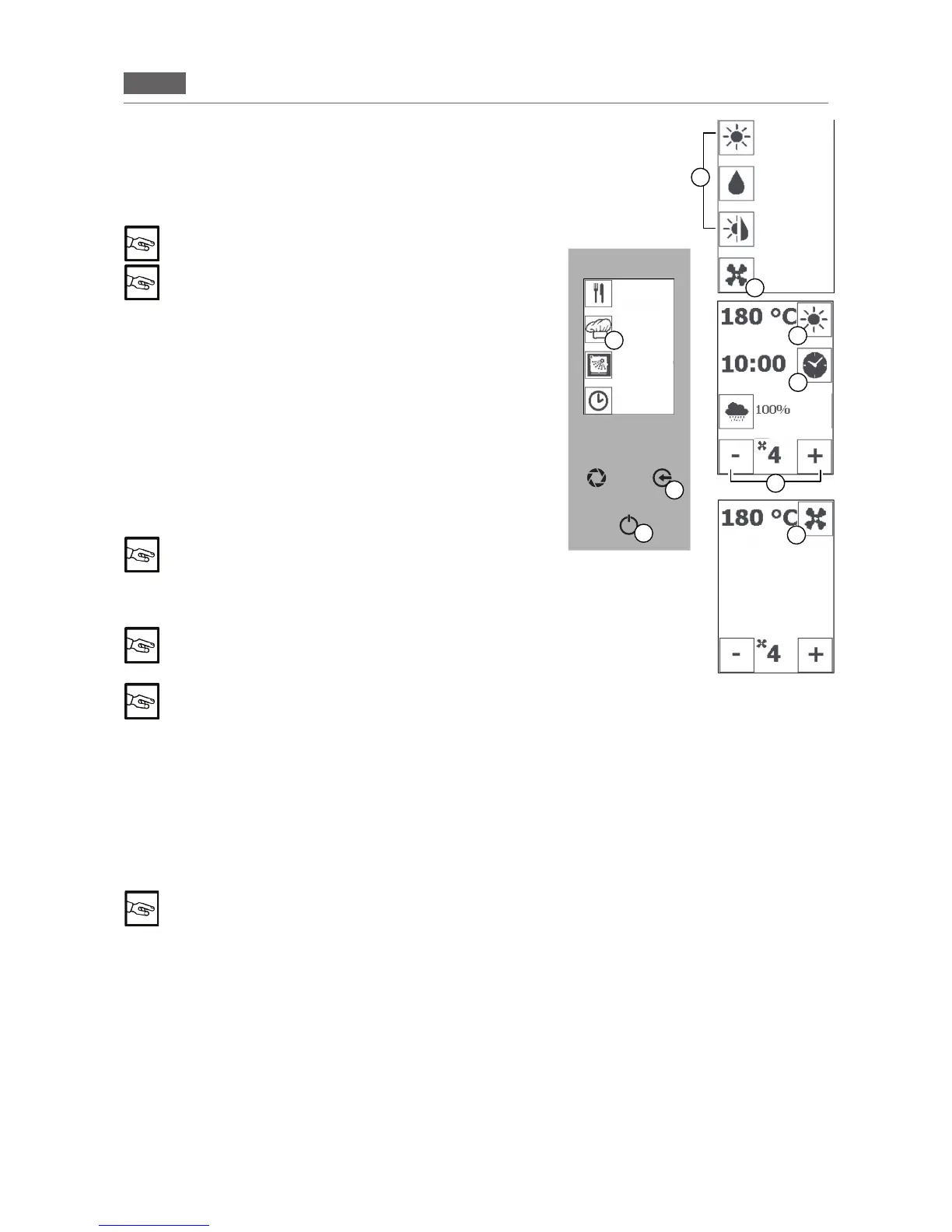
5.6 SETTING THE FAN SPEED
1. Press the “GO!” icon to activate the main menu.
Pressthe“MANUALCOOKING”icon(Fig2/D)andthecooking
typerequired(Fig2/E).
2.Pressthe“MINUS”and“PLUS”icons(Fig2/H)tosetavalue
between 1 and 6.
To change the fan speed no icon must be selected
The "RISING" function can be activated (see Cooking
parameters "CONVECTION"). In the specic case, the
fan can be set to "ZERO".
Pressthe“ESC”key(Fig2/B)severaltimestointerruptthefunc
-
tion and return to the Home Page.
5.7 SETTING THE PREHEATING
1. Press the “GO!” icon to activate the main menu.
Pressthe“MANUALCOOKING”icon(Fig2/D)andthecooking
typerequired(Fig2/E).
Setthetemperature(seesection5.2“Settingthetemperature”,
point2).
Setthetime(seesection5.3“Settingthetime”,point2).
2.Pressandholdthe“TEMPERATURE”icon(Fig2/F).
A ashing “P” will appear when you conrm the com-
mand
Pressthe“ENTER”key(Fig2/C)toactivatethefunction.
“PRE-HEATING” phase: 20 °C higher than the set tem-
perature
Press the “ENTER” key (Fig 2/C) and the “ESC” key to
stop pre-heating and return to the Home Page.
Whenpreheatingisdone,"LOAD"appearsonthedisplay(Fig.2-Display2):Openthedoorandplacetheprod-
uct inside. Then close the door of the oven. The selected cooking mode will start.
5.8 SETTING FAST COOLING
Press the “GO!” icon to activate the main menu.
Pressthe“MANUALCOOKING”icon(Fig2/D)andthe“COOLING”icon(Fig2/I).
Pressthe“VENTILATION”icon(Fig2/M)andusethe“MINUS”and“PLUS”icons(Fig2/H)tosettherequired
temperature to at least 40 °C.Pressthe“ENTER”key(Fig2/C)toactivatethefunction.
The corresponding display will appear (Fig 2/L)
Pressthe“ESC”key(Fig2/B)severaltimestoreturntotheHomePage.
Pressthe“ESC”key(Fig2/B)severaltimestointerruptthefunctionandreturnto the Home Page.
B
C
Fig.2
D
E
F
G
H
I
M
CONVECTION
STEAM
COMBI
COOLING
RECIPES
MENU
MANUAL
COOKING
WASHING
POSTPONE-
MENT
FUNCTION
STAGE 1/5
COOLING


 To Next Page