5.1 DATE/CLOCK
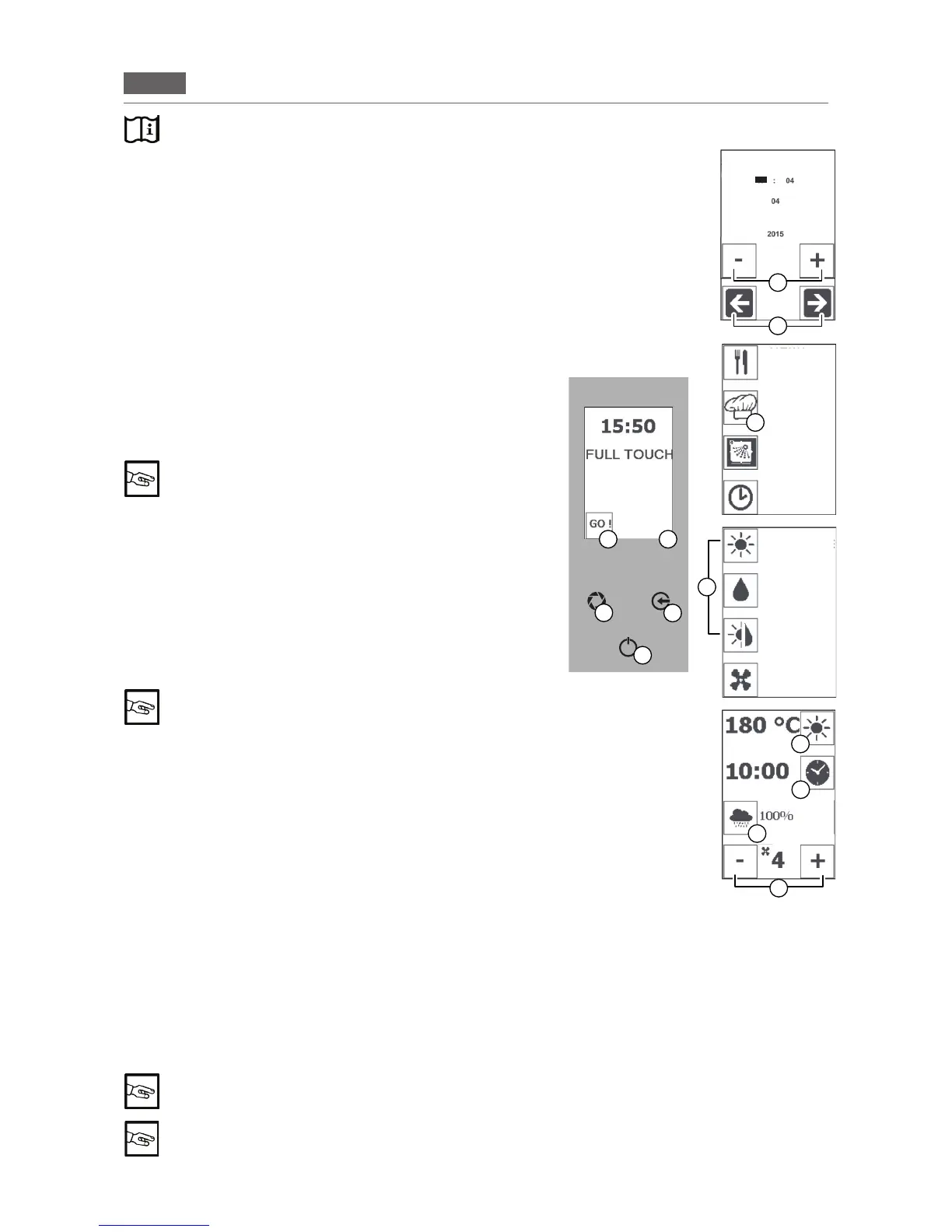
Tosetthedateandthetime,press and hold the screen at the bot-
tomright(Fig1/D).
Use the “ARROW” icons (Fig 1/F) to select the parameter you
wanttochange(e.g.HOUR,DAY,MONTH,YEAR).
Usethe“MINUS”and“PLUS”icons(Fig1/E)tochangetheparam
-
eter.
Pressthe“ENTER”key(Fig1/C)tosave.
Pressthe“ESC”key(Fig1/B)toexitwithoutsaving.
5.2 SETTING THE TEMPERATURE
1. Press the “GO!”icontoactivatethemainmenu(Fig1/A).
Pressthe“MANUALCOOKING”icon(Fig1/G)andselectthede
-
siredcookingmode:CONVECTION,STEAMorCOMBI(Fig1/H).
2.Pressthe“TEMPERATURE”icon(Fig1/I)andusethe“MINUS”
and“PLUS”icons(Fig1/N)tosetthetemperaturetobetween40
°C and 250 °C.
In STEAM mode the temperature is between 40 °C and
100 °C
Pressthe“TEMPERATURE”icontoconrm(Fig1/I).
Pressthe“ESC”key(Fig1/B)toexitwithoutsaving.
5.3 SETTING THE TIME
1. Press the “GO!”icontoactivatethemainmenu(Fig1/A).
Pressthe“MANUALCOOKING”icon(Fig1/G)andselectthede
-
siredcookingmode:CONVECTION,STEAMorCOMBI(Fig1/H).
2.Pressthe“TIME”icon(Fig1/L)andusethe“MINUS”and“PLUS”
icons(Fig1/N)tosetthetimebetweeninnite,1minuteand09:00
hours/minutes.Pressthe“TIME”icontoconrm(Fig1/L).
It is mandatory to set the time to start the oven
“Innitetime”modedisplaysthetimecountingup,whilethe“time
set”displaysthetimecountingdown(Fig.1/L).
Pressthe“ESC”key(Fig1/B)toexitwithoutsaving.
5.4 MOISTURE SETUP
1. Press the “GO!”icontoactivatethemainmenu(Fig1/A).
Press the “MANUAL COOKING” icon (Fig 1/G) and select the
“COMBI”cookingmode(Fig1/H).
2.Pressthecorrespondingicon(Fig1/M)andusethe“MINUS”
and“PLUS”icons(Fig1/N)tosetthehumiditytobetween 0% and 100%. Press the corresponding icon to
conrm(Fig1/M).
Pressthe“ESC”key(Fig1/B)toexitwithoutsaving.
5.5 SETTING THE VENT VALVE (CONVECTION only)
1. Press the “GO!”icontoactivatethemainmenu(Fig1/A).Selectthe“CONVECTION”cookingmode(Fig1/H).
2.Pressthe“VENT”button(Fig1/O-LEDashing:VENTOPEN-LEDlit:VENTCLOSED)toopenorclose
the motor's vent valve.
Selecting "VENT OPEN" mode allows the humidity to escape from the cooking compartment
while "VENT CLOSED" keeps the humidity inside.
Setting the “COMBI” or “STEAM” functions (Fig 1/H) sets control over valve opening and clos-
ing to automatic mode.
Read the “Description of the operating modes” carefully beforehand
B
C
A
D
F
E
17
Fig.1
G
H
M
I
L
N
O
RECIPES
MENU
MANUAL
COOKING
WASHING
POSTPONE-
MENT
FUNCTION
CONVECTION
STEAM
COMBI
COOLING
DATE-TIME
MARCH
STAGE 1/5


 To Next Page