CHANGE RECIPE
Press the “GO!” icon to activate the main menu.
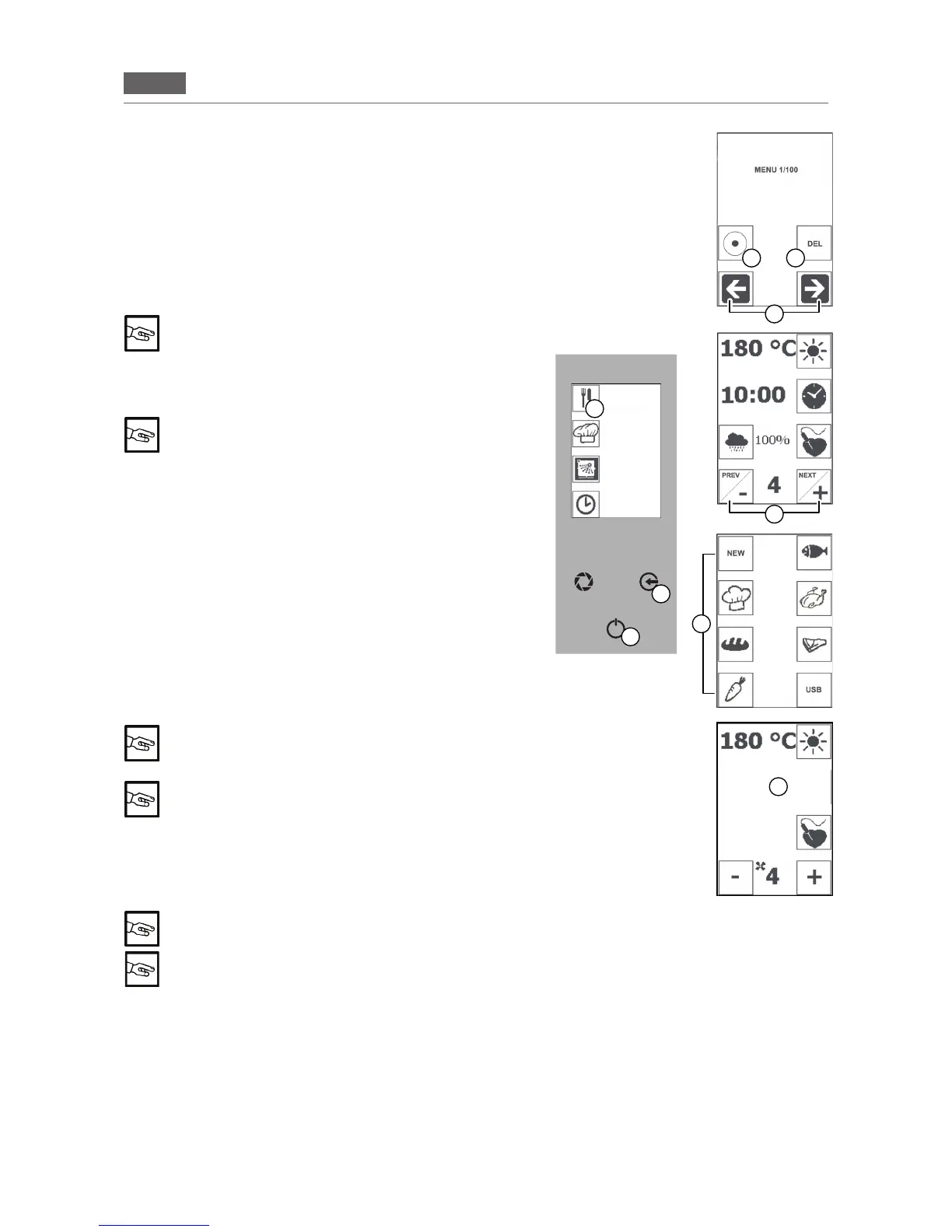
Pressthe“RECIPES”icon(Fig2/I)andtheiconinwhichtherec
-
ipeyouwouldliketochangeissaved(Fig2/E).
Selectthesavedrecipewiththe“ARROWS”icons(Fig2/M)and
pressthe“CONFIRM”icon(Fig2/L)todisplaytherecipe.
Ifrequired,changetheparameters(seesection7.1“SavingREC
-
IPES,point2).
Keepthe“NEXT/PIÙ”or“PREV/MENO”icon(Fig2/N)pressedto
select other phases of the recipe.
To delete a stage, press the “TIME” icon, press the
“MINUS” icon (Fig 2/N) and reset the time (00:00) for
the stage to be deleted.
Pressthe“ENTER”key (Fig2/C)twice andthe“ESC” key(Fig
2/B)oncetosavethechanges.
“SAVE?” is displayed
Pressthe“ENTER”key(Fig2/C)andselecttheiconwhereyou
wouldliketosavetherecipethathasbeenchanged(Fig2/E).
Ascreenandatripleacousticsignalconrmsaving.
Toexitwithoutsaving,pressthe“ESC”keyseveraltimestoreturn
totheHomePage(Fig2/B).
START RECIPE
Press the “GO!” icon to activate the main menu.
Pressthe“RECIPES”icon(Fig2/I)andpresstheiconinwhich
therecipeyourequireissaved(Fig2/E).
Selecttherecipeusingthe“ARROW”icons(Fig2/M).
Pressthe“CONFIRM”icon(Fig2/L)toselecttherecipe.
Pressthe“ENTER”keytostartpre-heating.
“PRE-HEATING” phase: 20°C higher than the set
temperature
Press the “ENTER” key (Fig 2/C) to stop pre-heating
(“PAUSE” function)
The“ADD”screenwillappearoncepre-heatingiscomplete(Fig.
2/L).Openthedoorandplacetheproductinside.Thenclosethe
door of the oven.
Theselectedrecipestarts,countdownstarts.
“PAUSE” function: Press the “ENTER” key (Fig 2/C) to interrupt the function in progress and
press the “ENTER” key again (Fig 1/C) to resume cooking
Press the “ESC” key (Fig 2/B) twice to interrupt the recipe.
DELETE RECIPE
Press the “GO!” icon to activate the main menu.
Pressthe“RECIPES”icon(Fig2/I)andpresstheiconinwhichtherecipeyouwouldliketodeleteissaved
(Fig2/E).
Selecttherequiredrecipeusingthe“ARROW”icons(Fig2/M).
Keepthe“DEL”key(Fig2/G)pressedtodeletethesavedrecipe.
Anacousticsignalconrmsdeletion.
B
C
Fig.2
L
I
M
N
E
G
ADD
STAGE 0/2
L
RECIPES
MENU
MANUAL
COOKING
WASHING
POSTPONE-
MENT
FUNCTION
STAGE 1/5
INDEX
HONEY MUSTARD
CHICKEN_


 To Next Page