6.3 COOKING MODE ON “LEVELS”
Youcancookmultipleproductsatthesametimebyspecifyingdif-
ferentcookingtimesforthegrillinglevels(ONEBYONE)orbyset-
tingcookingforeachlevelaccordingtoasettimetable(e.g.totake
dishesout-READYTOGO)
This function is disabled when using a cooking pro-
gram (recipe)
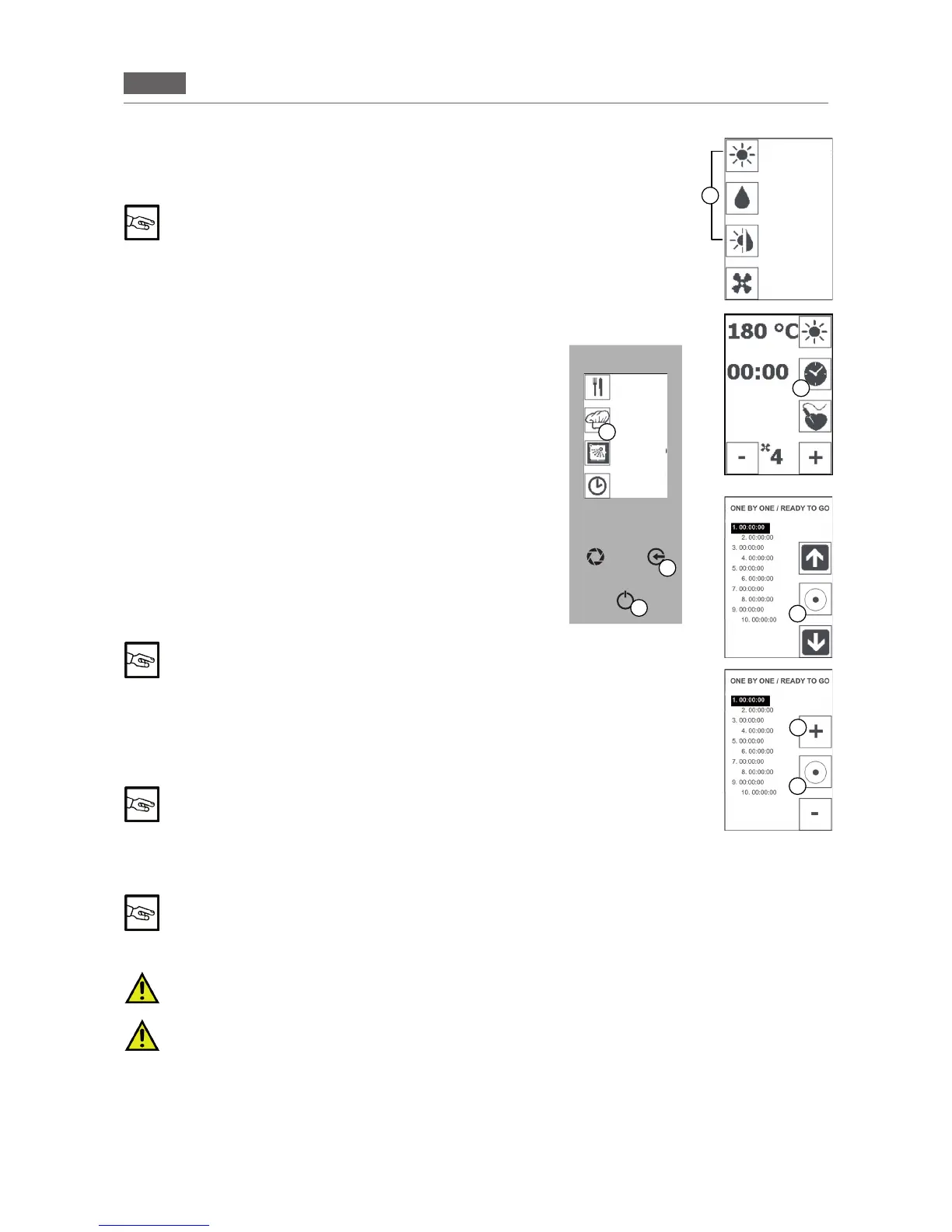
A - ONE BY ONE
Placetheproducttobecookedontraysandinsertthemintothe
ovenonthetrayholderspreviouslyinstalled.Closethedoor.
1. Press the “GO!” icon to activate the main menu.
Selectthe“MANUALCOOKING”icon(Fig4/D)andtherequired
cookingmode(Fig4/E).
2.Pressandholdthe“TIME”icon(Fig.4/F).Thedisplaywillshow10
numberedpositions(onetrayperposition).
3.Selecttherequiredlevelusingthe“ARROW”iconsandselectit
usingthe“CONFIRM”icon(Fig4/H).
4. Adjust the cooking time for the level using the “MINUS” and
“PLUS”icons(Fig4/G).Pressthe“CONFIRM”icon(Fig4/I).
Ifrequired,proceedinthesamewayfortheotherlevels(repeatthe
proceduredescribedatpoints3and4).
Pressthe“ENTER”key(Fig4/C)toreturntothepreviouspage.
Set the temperature (see section 5.2 “Setting the temperature”,
point2)
To activate the “PRE-HEATING” function, see section
5.7, point 2
Pressthe“ENTER”key(Fig4/C)toactivatethefunction.
The time will begin to count down.
Pressthe“ENTER”key(Fig4/C)andpressthe“ESC”keyseveral
times(Fig4/B)tointerruptandthenexitthefunction.
Press the “TIME” icon to display the levels and the time
counting down. Press the “ESC” key (Fig.4/B) to return
to the previous page
Avisualandaudiblesignalwillappear/soundoncethetimethathasbeensetforeachlevelhasbeenreached(the
word REMOVEwillappear).
The audible signal will stop automatically after a few seconds. The visual signal shown on the
display is deactivated when the door is opened.
Signals for all the other levels will sound once the time that has been set for each of them has elapsed.
The (audible and visual) signals do not stop the cooking process and the oven will continue op-
erating unless switched off.
This means that the oven needs to be switched off manually once cooking is complete: Press the
“ENTER” key (Fig 4/C) and press the “ESC” key (Fig 4/B) several times to return to the Home Page.
B - READY TO GO
Repeat the procedure described above from point 1.
2.Pressthe“TIME”icon(Fig.4/F)andsetthenishingtimesforthedishes(e.g.itis09.00andthedishesneedto
becookedby12.00:Setthreehours).Pressthe“TIME”icontoconrm.
F
H
I
G
E
B
C
D
Fig.4
CONVECTION
STEAM
COMBI
COOLING
RECIPES
MENU
MANUAL
COOKING
WASHING
POSTPONE-
MENT
FUNCTION


 To Next Page