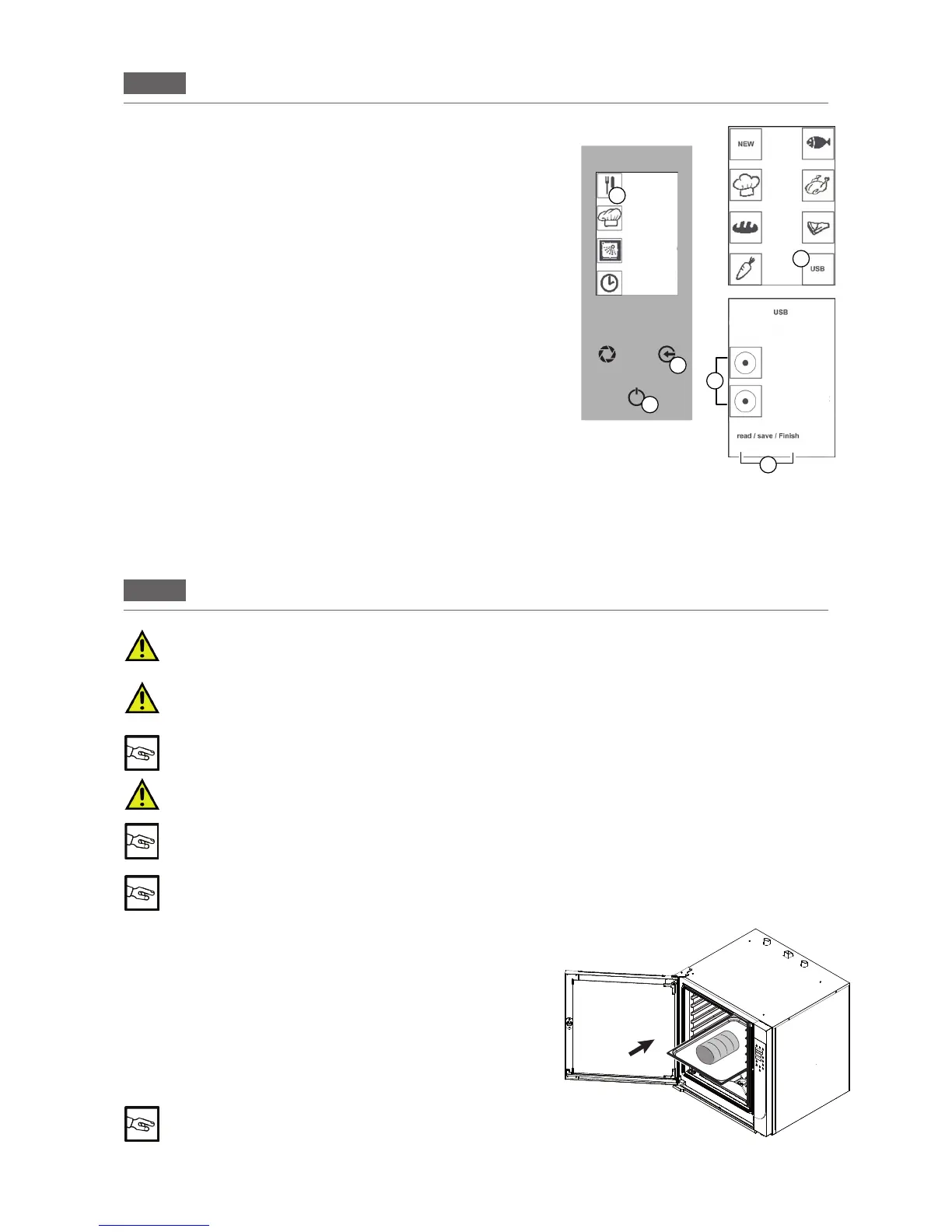
7.2 USB DEVICE
DOWNLOADING RECIPES
Proceed as follows to save the recipes saved on the oven to a USB
device:
Press the “GO!” icon to activate the main menu.
Pressthe“RECIPES”icon(Fig3/D)andthe“USB”icon(Fig3/E).
Open the cover below the oven's control panel and insert the USB
device. Press the “SAVE RECIPES” button to select the function
(Fig3/F).
Waituntiltherecipeshavebeendownloaded(SAVE-FINISH-Fig
3/G).RemovetheUSBdeviceandclosethecoveragain.Pressthe
“ESC”key(Fig3/B)severaltimestoreturntotheHomePage.
UPLOADING RECIPES
Proceed as follows to save the recipes saved on a USB device to
the oven:
Press the “GO!” icon to activate the main menu.
Pressthe“RECIPES”icon(Fig3/D)andthe“USB”icon(Fig3/E).
Open the cover below the oven's control panel and insert the USB
device.
Press the “IMPORT RECIPES” button to select the function (Fig
3/F).
Waituntiltherecipeshavenisheduploading(READ-FINISH-Fig3/G).
RemovetheUSBdevice.Closethecover.Pressthe“ESC”key(Fig3/B)severaltimestoreturntotheHome
Page.
E
B
C
G
Fig.3
F
D
RECIPES
MENU
MANUAL
COOKING
WASHING
POSTPONE-
MENT
FUNCTION
SAVE RECIPES
IMPORT RECIPES
LOADING AND UNLOADING THE PRODUCT
8.
When loading the product into the appliance and unloading it, there is a residual risk of being
burnt; this risk can occur coming into unintentional contact with the cooking compartment, trays
or recipients or processed material
Whenever the "cooking compartment" must be accessed, always remember that there is a burn
hazard. It is therefore mandatory to take appropriate measures for personal protection. Wear pro
-
tective equipment that is suited to the operations to be performed.
Wear the proper individual protective clothing before proceeding with cleaning operations (gloves,
mask, goggles)
Open the door while standing to the side of the appliance to avoid direct heat
Door opening: hold the handle, turn right or left and pull to release the spring mechanism.
Door closing: hold the handle and push the door to lock the spring mechanism.
See section 5 “OPERATING PARAMETERS” before placing food in the oven
LOADING THE PRODUCT
Loadtheproducttobeprocessedontray(s)andinsertonthetrayholderspreviouslyin
-
stalledintheoven.(Fig.1)
Startthecommissioningproceduredaily(see4.CommissioningorPro
-
gramming(see7PROGRAMMING)
UNLOADING THE PRODUCT
Opentheovendoorandunloadthetraysfromthetrayholderusing
the appropriate personal protection equipment.
Once you have nished processing, if necessary, start the main-
tenance procedure (see 9 Routine maintenance).
Fig. 1


 To Next Page