6.1 CONVECTION (RISING) - STEAM - COMBI
CONVECTION:cookingwithventilation(static)andwithventilation.
STEAM:delicatecooking,defrostingandheatingproducts.
COMBI:mixedcooking,withconvectionandhumidity.
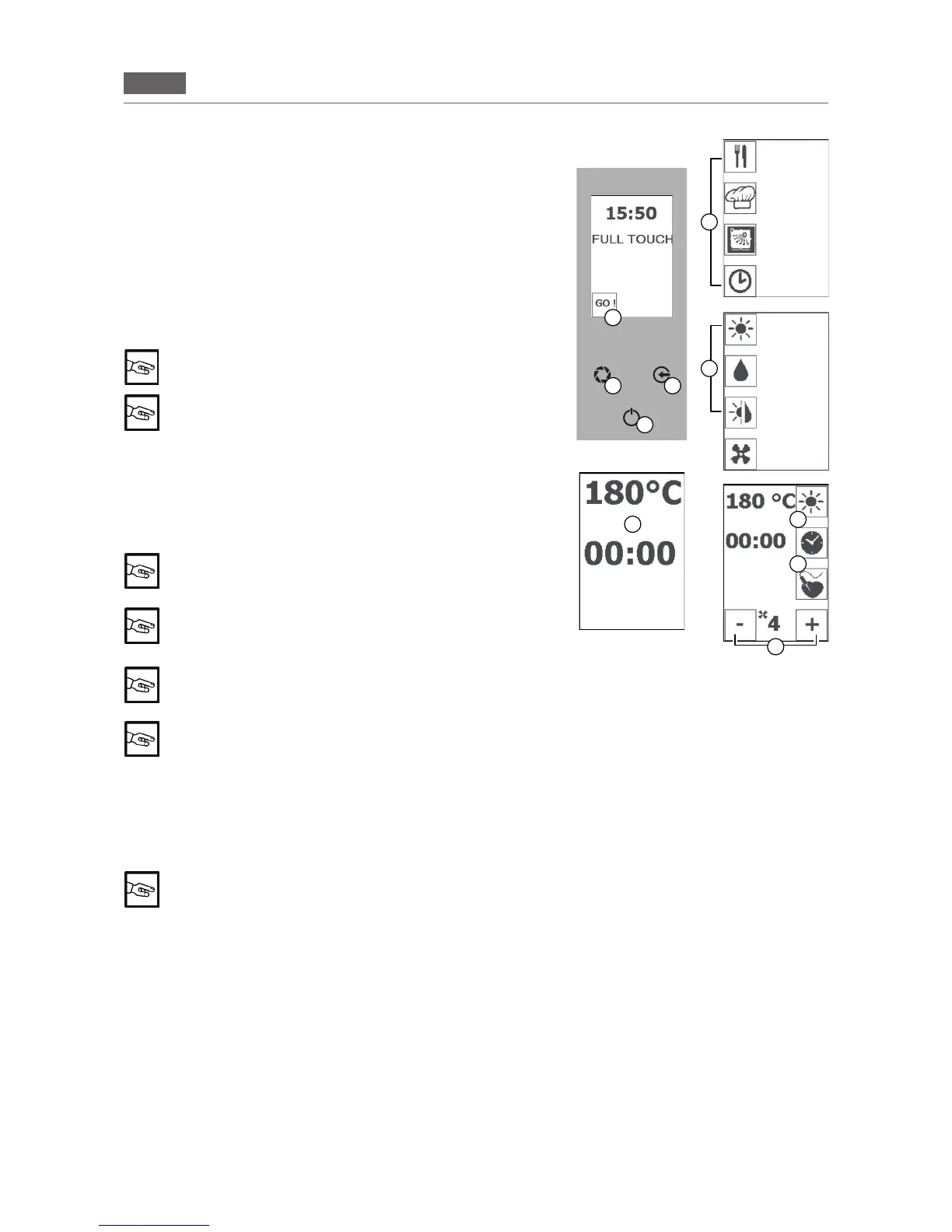
Pressthe“GO!”icontoactivatethemainmenu(Fig1/A).
Pressthe“MANUALCOOKING”icon(Fig1/D)andselectthedesired
cookingmode:CONV.,STEAM,COMBI(Fig1/E).
Presstheiconforthecookingmode(e.g.Fig1/F)
Setthetemperature(seesection5.2“Settingthetemperature”,point
2).
Setthetime(seesection5.3“Settingthetime”,point2)
When cooking without setting a time the oven can be
stopped manually by the operation.
The vent valve can only be set in “CONVECTION” mode
(see section 5.5 “Setting the vent valve”)
Setthefanspeed(see5.6Settingthefanspeed).
Pressthe“ENTER”key(Fig1/C)tostartcooking.
Thetimestartsdecreasing(settimemode)orincreasing(innitytime
mode).
After 3 minutes of inactivity the temperature and cooking
time appear on the screen (Fig 1/I). Press the “ENTER” key
to return to the screen with the set parameters.
“PAUSE” function: Press the “ENTER” key (Fig 1/C) to in-
terrupt the function in progress and press the “ENTER”
key again (Fig 1/C) to resume cooking
During the “COOKING” function you can switch from one mode to another (CONVECTION,
STEAM, COMBI and CORE PROBE) and change all of the parameters (time, temperature, fan,
vent)
To activate the “PRE-HEATING” function, see section 5.7, point 2
Pressthe“ENTER”key(Fig1/C)tointerruptcooking.
Pressthe“ESC”key(Fig1/B)severaltimestoreturntotheHomePage.
RISING
Forbreadandpastrymaking.
The "RISING" mode function can only be set in "CONVECTION" mode.
Pressthe“GO!”icontoactivatethemainmenu(Fig1/A).
Pressthe“MANUALCOOKING”icon(Fig1/D)andselectthecookingmode:CONVECTION(Fig1/E).
Press the “MINUS” button to select the “ZERO” parameter.
Pressthe“TEMPERATURE”button(Fig1/F)andusethe“MINUS”and“PLUS” buttons to set the temperature
tobetween25°Cand40°C.Press"TEMPERATURE"toconrm.
Pressthe“TIME”button(Fig4/G)andusethe“MINUS”and“PLUS”buttons(Fig1/H)tosetthetimetoinnite,1
minute or 09:00 hours/minutes.
Press"ENTER"toconrmthefunction.
Pressthe“ENTER”key(Fig1/C)tointerrupttheprocess.
Pressthe“ESC”key(Fig1/B)severaltimestoreturntotheHomePage.
F
G
H
I
B
L
C
A
Fig.1
E
D
RECIPES
MENU
MANUAL
COOKING
WASHING
POSTPONE-
MENT
FUNCTION
CONVECTION
STEAM
COMBI
COOLING


 To Next Page