7.1 RECIPES LIST
SAVE RECIPE
Press the “GO!” icon to activate the main menu.
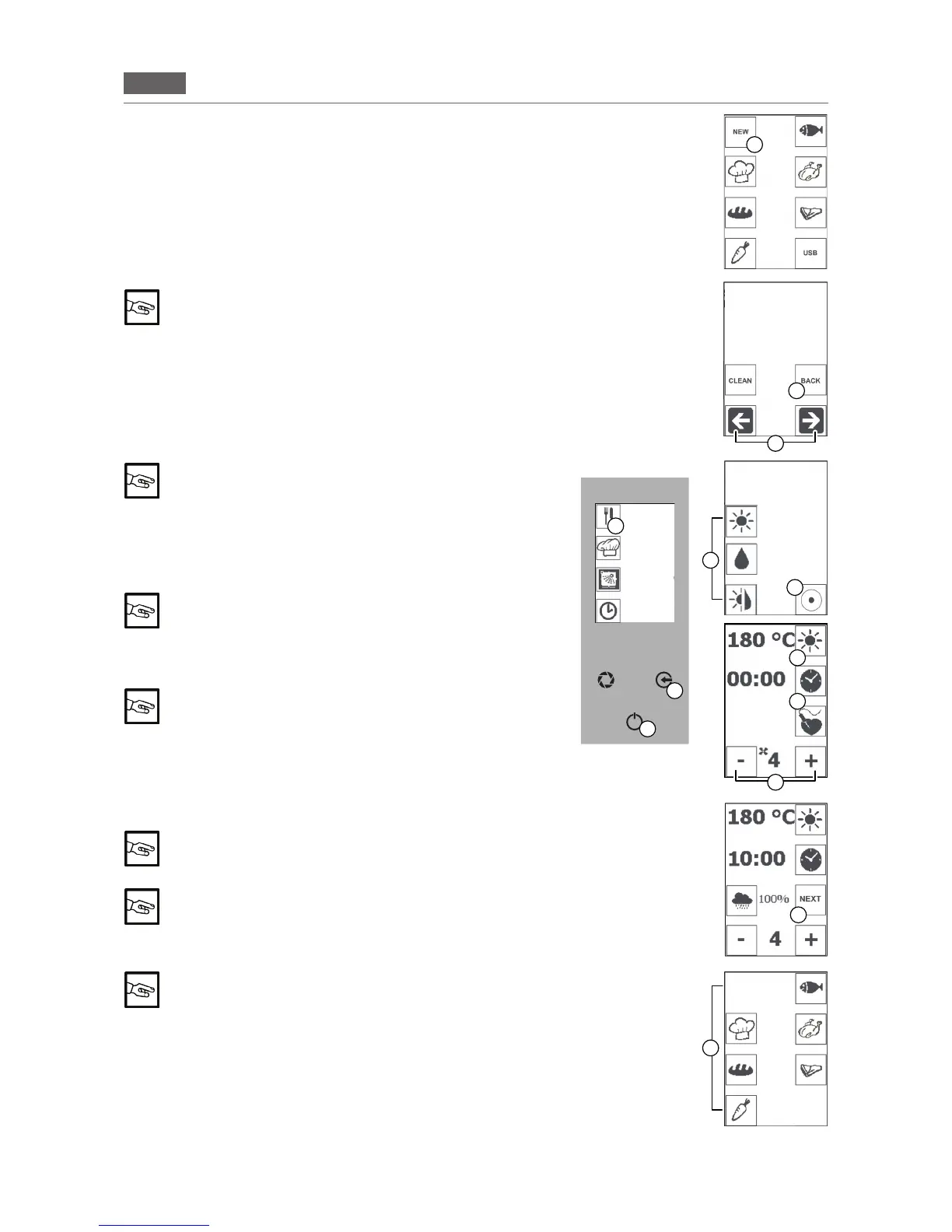
1.Pressthe“RECIPES”icon(Fig1/D)andthenpressthe“NEW”
icon(Fig1/E).
Selectthe rstletterofthe recipe withthe “ARROWS”icons(Fig
1/F).Pressthe“ENTER”key(Fig1/C)toconrm.
Fill in the name of the recipe.
Press the “BACK” icon (Fig 1/P) to cancel the letter you
entered
Keep the “ENTER” key pressed (Fig 1/C) and select the desired
cookingmode:CONV.,STEAM,COMBI(Fig1/G).
2.Presstheiconfortherequiredcookingmode(e.g.Fig1/I)anduse
the “MINUS” and “PLUS”icons(Fig1/N)tosetthetemperatureto
between 40 °C and 250 °C.
Pressthe“CONVECTION”icontoconrm(Fig1/H).
In STEAM mode the temperature is between 40 °C and
100 °C
Pressthe“TIME”icon(Fig1/L)andusethe“MINUS”and“PLUS”
icons(Fig1/N)tosetthetimebetween1minuteand09:00hours/
minutes.
Pressthe“TIME”icontoconrm(Fig1/E).
The time must be set (not innite) in order to proceed to
the next stage
3. To save other stages, press the “NEXT” button (Fig 1/M) and
repeat the operations.
“DOOR” stage: Press the “DOOR” icon (Fig 1/O). This
stage reminds the operator to open the door to make
changes to the product being cooked (e.g. by adding
ingredients)
4.Pressandholdthe“ENTER”key(Fig1/C)andpressthecorre
-
spondingiconinwhichyouwouldliketosavethenewrecipe(Fig
1/N).
The icons represent cooking categories: e.g. sh, meat,
pastry, vegetables, bread and preferred (the most used
recipes saved automatically)
It is possible to save 100 recipes and 5 phases/recipe
Ascreenandatripleacousticsignalconrmsaving.
You can set other parameters in the “SAVE RECIPES”
function (e.g. fan, humidity, vent and core probe)
Pressthe“ESC”key(Fig1/B)severaltimestoexitwithoutsaving
and return to the Home Page.
E
B
C
F
Fig.1
G
D
M
N
H
I
L
DOOR
O
P
RECIPES
MENU
WRITE THE TITLE
OF YOUR RECIPE
HONEY MUSTARD
CHICKEN_
MANUAL
COOKING
WASHING
POSTPONE-
MENT
FUNCTION
CONVECTION
SELECT
COOKING
MODE
STEAM
COMBI
STAGE 1/5


 To Next Page