C - DUAL CORE PROBE (SINGLEPOINT, MULTIPOINT, UNDER VACUUM)
Youcancooktwotypesofproductsinasinglecookingcycle. Pro
-
ceed as follows:
1. Insert the external core probe into the holder for this purpose
below the oven's control panel.
2. Insert the sharp end of the external core probe inside the product
(placedonatrayinsidethecookingchamber)sothatthetipisap
-
proximatelyinthemiddleoftheproduct.
3 Insert the sharp end of the internal core probe inside the product
(placedonatrayinsidethecookingchamber)sothatthetipisap-
proximatelyinthemiddleoftheproduct.
4. Close the door of the oven making sure the external core probe
remains connected.
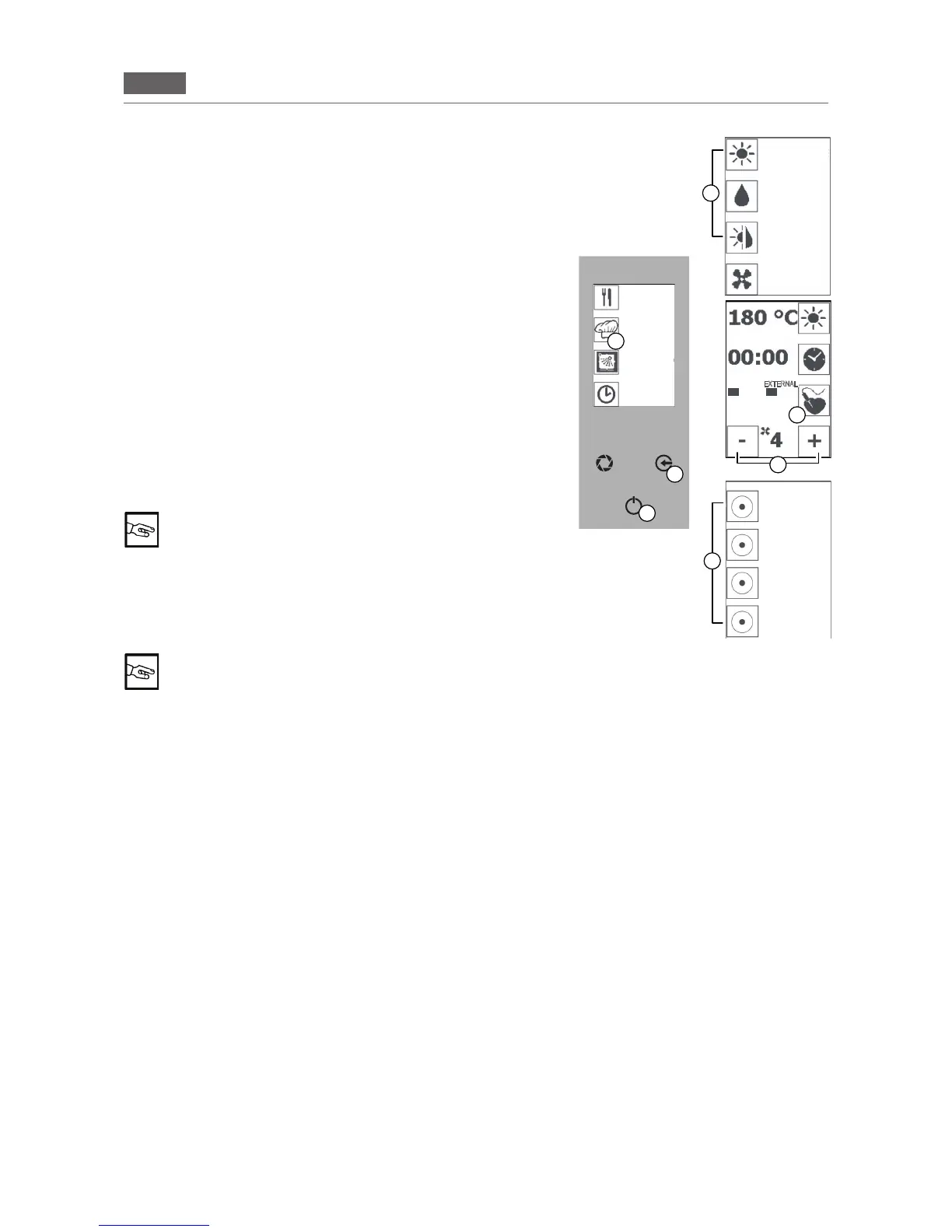
Pressthe“GO!”button(Fig3/A)toaccessthemainmenu.
Pressthe“MANUALCOOKING”icon(Fig3/D)andselectacook
-
ingmode(Fig3/E).
5.Pressthe“COREPROBE”icon(Fig3/F)andthe“DOUBLECORE
PROBE”(Fig3/H) icon.Press the “COREPROBE” icon (Fig 3/F)
and use the “MINUS” and “PLUS”icons(Fig3/G)tosetthetempera
-
ture for the internal core probe.
You can set the temperature of core probes up to 99° C
6.Pressthe“COREPROBE”icon(Fig3/F)andusethe“MINUS”
and “PLUS”icons(Fig3/G)tosetthetemperaturefortheexternal
coreprobe.Pressthe“COREPROBE”icon(Fig3/F)toconrm.
Pressthe“ENTER”key(Fig3/C)tostartcooking.
“PAUSE” function: Press the “ENTER” key (Fig 1/C) to
interrupt the function in progress and press the “ENTER” key again (Fig 1/C) to resume cooking
Pressthe“ENTER”key(Fig3/C)andpressthe“ESC”key(Fig3/B)severaltimestoreturntotheHomePage.
7.Tochangethetemperaturesoftheprobes,pressthe“COREPROBE”buttonandrepeatthestepsdescribed
at points 5 and 6.
Oncetheminimumsettemperaturehasbeenreached,theword“END”forthecorrespondingprobewillash.
Oncethemaximumsettemperaturehasbeenreached,theword“END”forthecorrespondingprobewillash.
The word “MAINTENANCE” will appear and the oven will retain the minimum temperature set.
Pressthe“ESC”key(Fig3/B)severaltimestoreturntotheHomePage.
F
B
C
Fig.2
G
FASE1/2
50° 60°
D
E
H
CONVECTION
STEAM
COMBI
VENTILATION
RECIPES
MENU
MANUAL
COOKING
WASHING
INTERNAL DELTA T
STAGE 1/2
POSTPONE-
MENT
FUNCTION
INTERNAL
CORE PROBE
DELTA T
EXTERNAL
CORE PROBE
DUAL CORE
PROBE
Fig.3
EXTERNAL


 To Next Page