6.2 CORE PROBE and DELTA T
The probe detects the internal temperature of a product during
cooking. The cooking time cannot be set or calculated while using
the probe.
The cooking cycle ends when the temperature of the product
reaches the one set for the probe.
Therearethreewaystomanagetheoventemperaturewhileusing
the core probe mode.
A - CORE PROBE (SINGLEPOINT, MULTIPOINT, VACUUM)
1. Insert the sharp end of the internal core probe inside the product
(placedonthetrayinsidethecookingchamber)sothatthetipis
approximatelyinthemiddleoftheproduct.
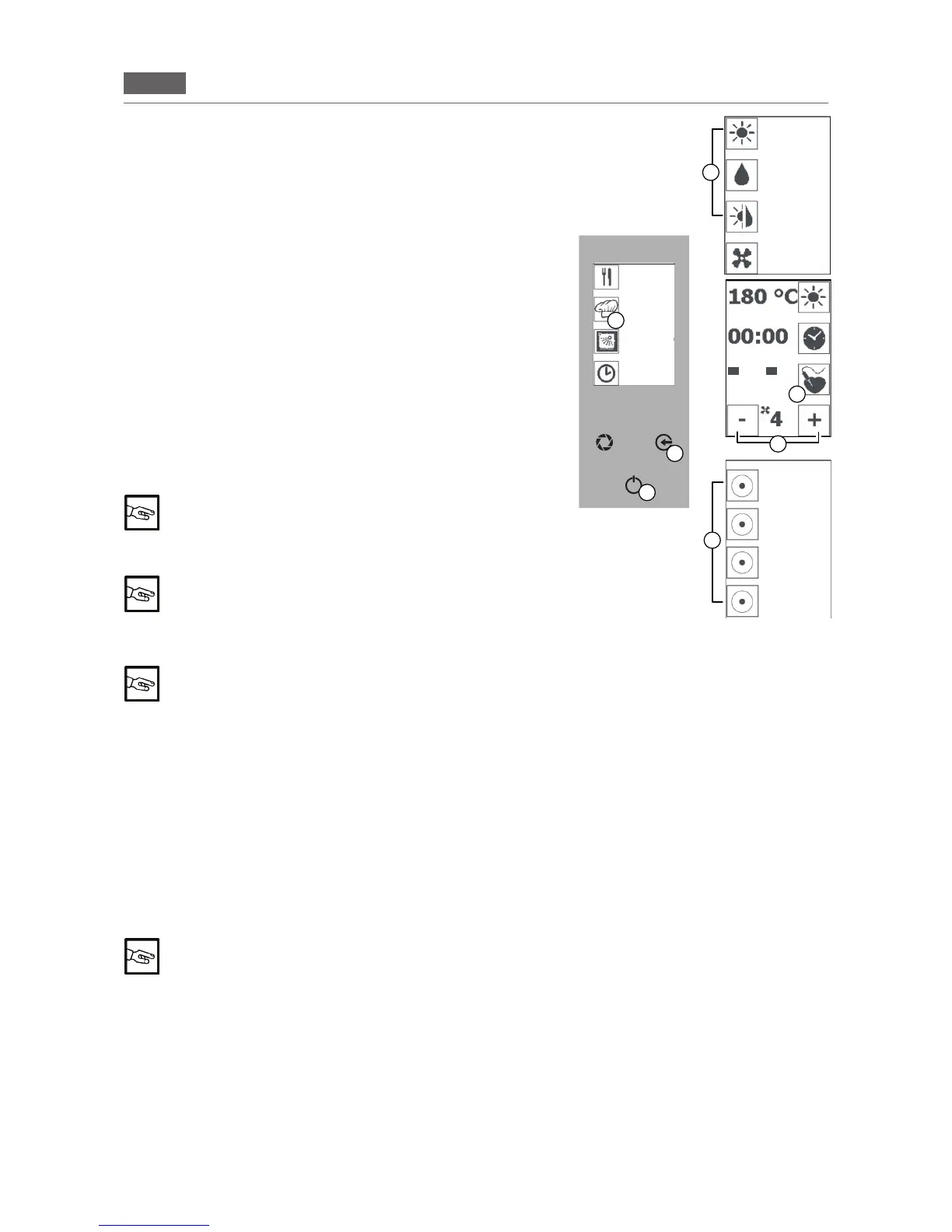
2.Closethedooroftheoven,pressthe“GO!”iconandpressthe
“MANUALCOOKING”icon(Fig2/D).
Selectacookingmode(Fig.2/E).
3.Pressthe“COREPROBE”icon(Fig2/F)andthe“COREPROBE
INTorEXT”(Fig2/H)icon.Pressthe“COREPROBE”icon(Fig2/F)
and use the “MINUS” and “PLUS”icons(Fig2/G)tosetthetempera
-
tureforthecoreprobe.Pressthe“COREPROBE”icon(Fig2/F)to
conrm.
You can set the temperature of the core probe up to
99° C
Pressthe“ENTER”key(Fig2/C)tostartcooking.
“PAUSE” function: Press the “ENTER” key (Fig 1/C) to
interrupt the function in progress and press the “EN
-
TER” key again (Fig 1/C) to resume cooking
Pressthe“ENTER”key(Fig2/C)andpressthe“ESC”key(Fig2/B)severaltimestoreturntotheHomePage.
It is possible to set the core probe function in all cooking modes and/or recipe phases
B - DELTA T
Repeat the procedure described above in points 1 and 2.
3.Pressthe“COREPROBE”icon(Fig2/F)andthe“DELTAT”icon(Fig2/H).Pressthe“COREPROBE”icon
(Fig2/F)andusethe“MINUS”and“PLUS”icons(Fig2/G)tosetthetemperaturefortheprobe.Pressthe
“COREPROBE”icon(Fig2/H)andusethe“MINUS”and“PLUS”icons(Fig2/G)tosetthepermanenttem
-
peraturedifferencebetweenthecookingcompartmentandthecoreprobe(between20 °C and 120 °C).
Pressthe“COREPROBE”icon(Fig2/H)toconrm.
Pressthe“ENTER”key(Fig2/A)tostartcooking.
Pressthe“ENTER”key(Fig2/C)tostopthefunctionandpressthe“ESC”key(Fig2/B)severaltimestoreturn
to the Home Page.
The core probe function and delta T can be set in all cooking mode and/or recipe phases
F
B
C
Fig.2
G
FASE1/2
50° 60°
D
E
H
CONVECTION
STEAM
COMBI
VENTILATION
RECIPES
MENU
MANUAL
COOKING
WASHING
INTERNAL DELTA T
STAGE 1/2
POSTPONE-
MENT
FUNCTION
INTERNAL
CORE PROBE
DELTA T
EXTERNAL
CORE PROBE
DUAL CORE
PROBE


 To Next Page