4.1 Commissioning
When commissioning the appliance and when starting it after a prolonged stop, it must be thor-
oughly cleaned to eliminate all residue of extraneous material (see Routine maintenance).
Cleaning at commissioning
Donotusepressurisedordirectwaterjetstocleantheappliance.
Removetheouterprotectivelm by handandthoroughlycleanall the outsidepartsof
theappliance.Whennishedwiththecleaningdescribedfortheoutsideoftheappliance,
proceedasdescribedin"DailyCleaning"(see9Routinemaintenance).
4.2 Daily activation
Procedure:
1. Checkthecleanlinessandhygieneoftheappliance.
2. Makesurethattheroomexhaustsystemworksproperly.
3. Whennecessary,plugtheapplianceintotheappropriatesocket.
4. Openthenetworklocksupstreamtheappliance(Gas-Water-Electric).
5. Makesurethatthewaterdrain(ifpresent)isnotclogged.
6. Proceed with the operations described in “Starting production”.
4.3 Daily and prolonged deactivation
Procedure:
1. Closethenetworklocksupstreamtheappliance(Gas-Water-Electric).
2. Makesurethatthedraincocks(ifpresent)are“Closed”.
3. Checkthecleanlinessandhygieneoftheappliance(SeeRoutineMaintenance).
In the event of prolonged inactivity, protect the parts more exposed to oxidation as described
in the specic chapter (See Routine Maintenance).
4.4 Starting production
Before proceeding with these operations, see "Daily
activation".
When loading the product into the appliance and un-
loading it, there is a residual risk of being burnt; this
risk can occur coming into unintentional contact with:
cooking compartment, pans, material treated.
Take appropriate measures for personal protection.
Wear protective equipment suitable for the operations to
be performed.
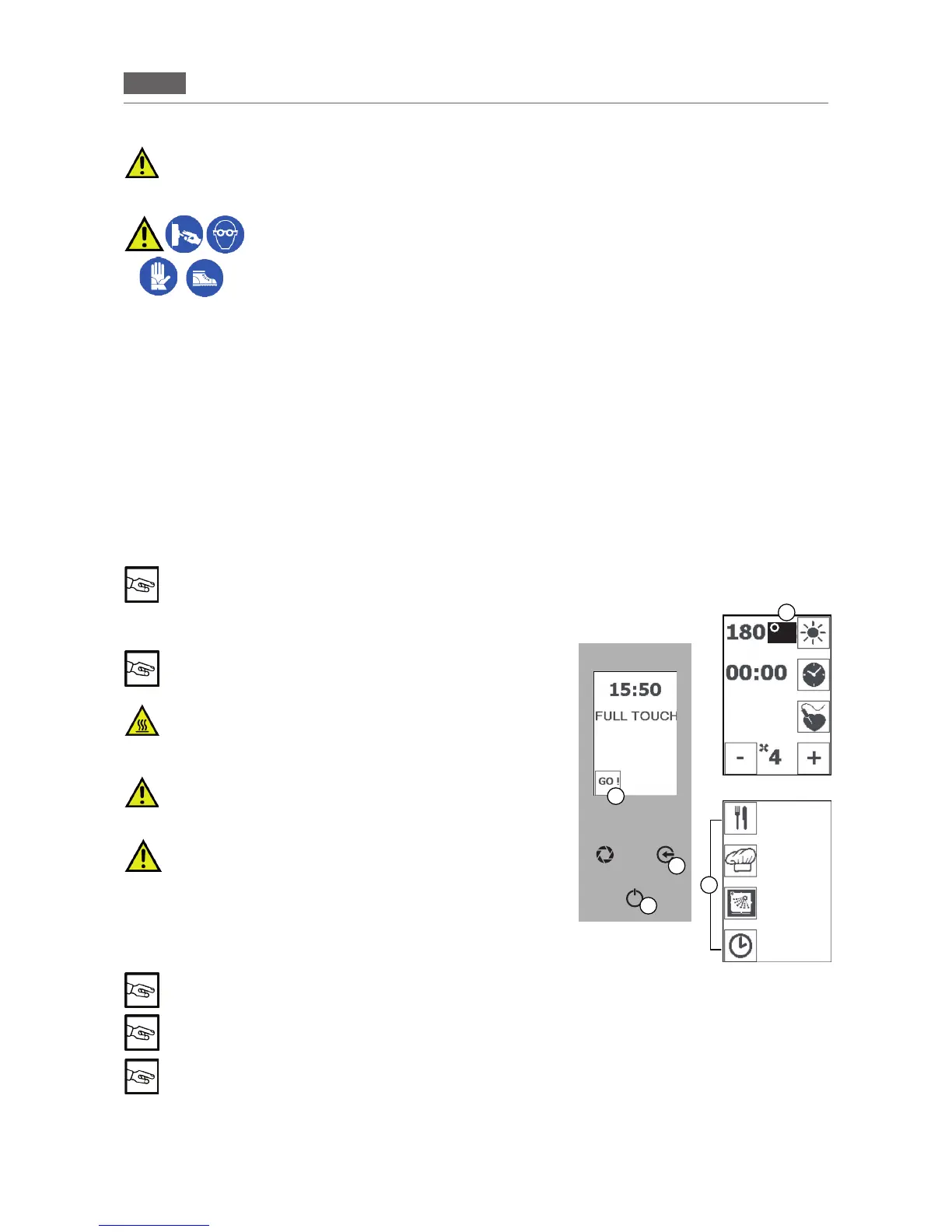
GAS BURNER switched on / °C ashing
GAS BURNER switched off / °C lit up (Fig 1/E)
4.5 Switching on and off
Pressthe“GO!”icon(Fig1/A)toactivatethemainmenu.Pressthe
iconforthefunction(Fig1/D)andswitchonwhatyourequire(see
e.g.section6“COOKINGPARAMETERS”).
After 15 minutes of inactivity on the “Home Page” the oven goes in “stand by” mode. Press the
“ENTER” key (Fig 1/C) to reactivate it
After 1 minute of inactivity on the main menu the oven returns to the “Home Page”.
Press the “ENTER” key (Fig 1/C) to reactivate it
After 5 seconds of inactivity in the parameter selection mode the oven saves the value displayed
Toswitchoff(fromtheHomePage):
1.Inmainmenumodepressthe“ESC”key(Fig1/B).
2.Inthefunctionsmenu,pressthe“ENTER”key(Fig1/C)tostoptheoperationandthenpressthe“ESC”key
severaltimestoexitthefunction(s)andreturntotheHomePage.
B
C
A
E
D
Fig.1
C
RECIPES
MENU
MANUAL
COOKING
WASHING
POSTPONE-
MENT
FUNCTION


 To Next Page