Page 78 of 188
User Manual MAS-100 Regulus en.docx, Version: 4.0
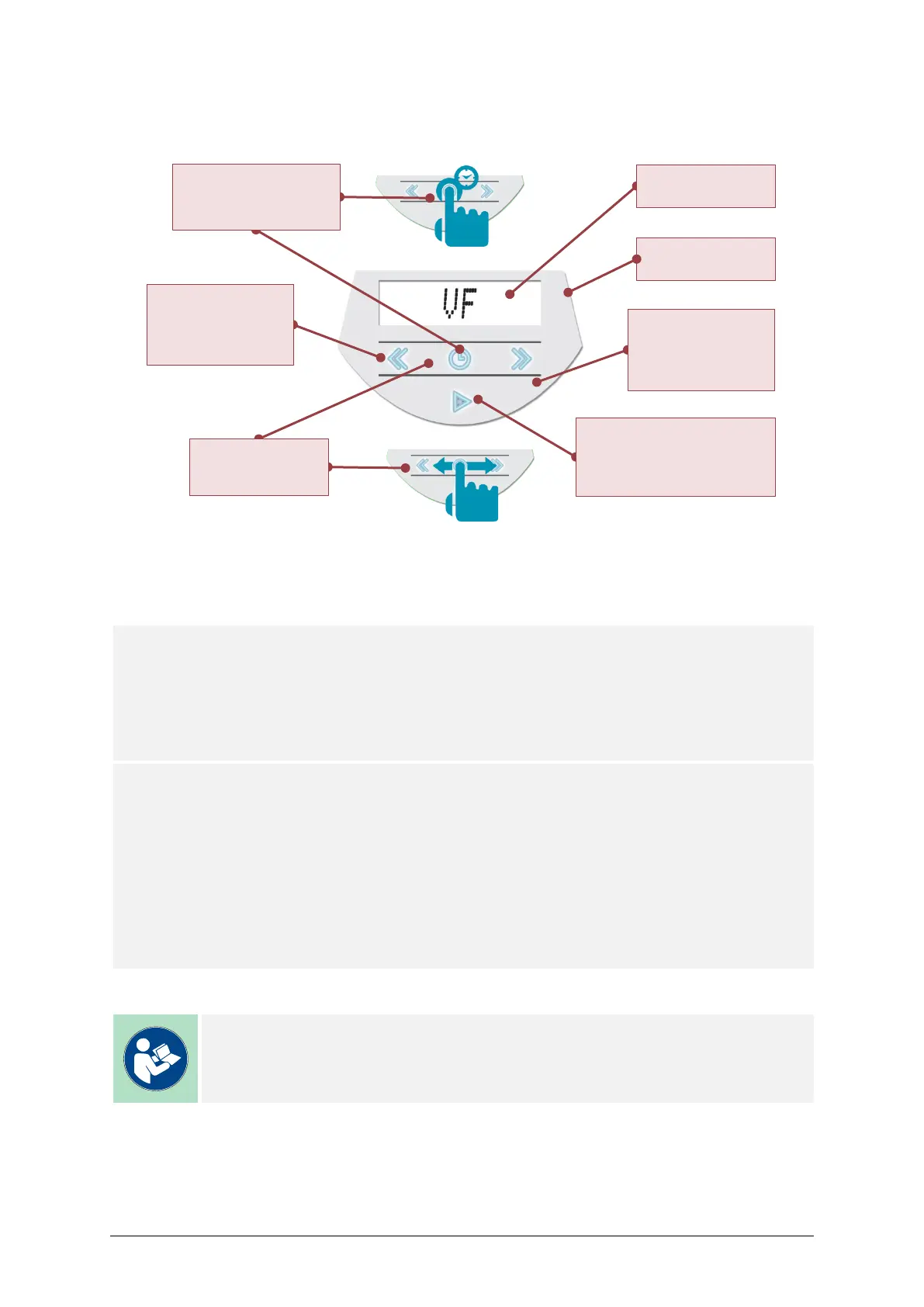
8.2. USER INTERFACE
8.3. LOGIN
Two different login options are available:
Default login
The user logs in as a generic and anonymous user named ??
User: ??
Password: 65011809
Signature: Created by: ??
Registered login
The user logs in with login credentials assigned by MBV AG or Merck KGaA to service en-
gineers who have successfully passed service training. Please ask the local representative
of our distribution partner for more information.
EXAMPLE
User: John Smith
Password: Please contact MBV AG or Merck KGaA
Signature: Created by: JS
Note
The Please consult the MAS-100 VF User Manual about how to connect to the
Browser-based Software.
Left arrow button
– Back / decrease value.
– One step back
Press & Hold 2 sec
(anytime).
– Next / increase value.
– Back to Home screen
Press & Hold 2 sec
(anytime).
Start button
– ON/OFF Press & Hold 2 sec.
– Start / Stop a sampling.
– Confirm values.
– Service menu.
– Configure Date, time, etc.
Display with backlight
Blinks to show status.
Slider
Enabled when left and
right buttons are lit.
Illuminated buttons
Enabled buttons are lit.



 To Next Page