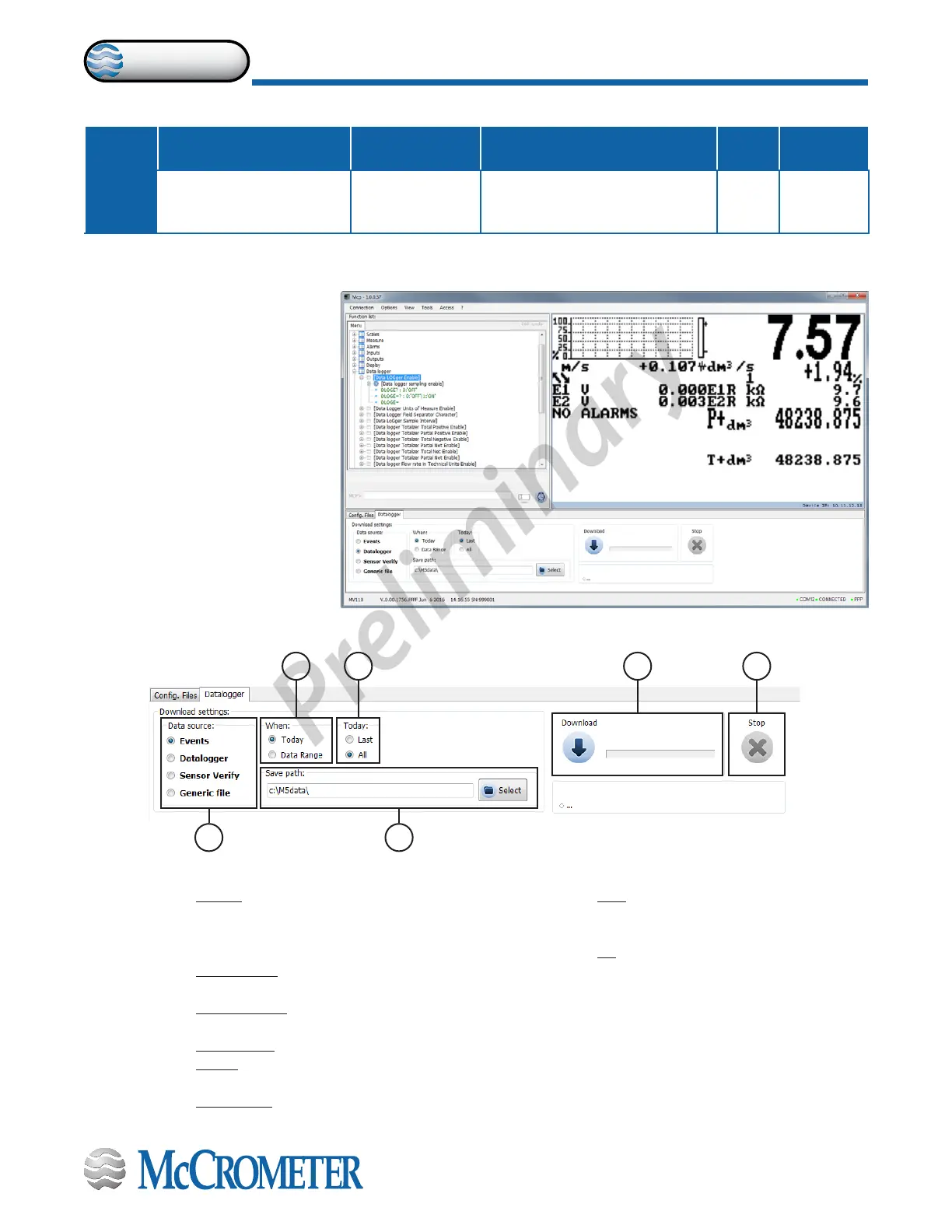
Click tab-control data logger to view les.
DATA LOGGER: ONLY MCP FUNCTIONS
Menu
Position
Converter Function Code Function Name Function Description
Access
Level
MCP
Command
[MCP ONLY]
LoG All
Information
Enable
Log all events information. This
function save in the event le all
MCP commands.
AL6 [LGAIE]
The sampling data backup depends on the value set by the POS function 10.4.
A D
B C E F
A=Data source Events: Save the le system events
(Example F-RAM hardware data
[WORKING AREA] [SUCCESSFULLY
LOADED])
Data logger: Save les of data logger
function enabled.
Sensor Verify: Data logged by BIV
function
Generic le:
B=When Today: It indicates the download le for
the current day
Data range: This option allows you to
select the date range for download.
C=Today Last: This option allows to download
the latest les, recorded after the last
download
All: this option allows the download of all
the current day of the le
D=Save path: This option allows you to save les to the
folder on your PC
E=Download: Button to start the download process
F=Stop: Button to stop the download process
Data are stored on micro SD
card; the organization is based
on “tree-structure”: the system
create a daily folder where it
save events and data logger .
The data can be downloaded
for MCP interface. (See example
at right.)
USING DATA LOGGER BY MCP INTERFACE
30124-60 Rev. 1.0 | unreleased
Page 34
Menu Descriptions
ProComm


 To Next Page