MAGNUM KEYPAD/DISPLAY REVISION 2.2
28
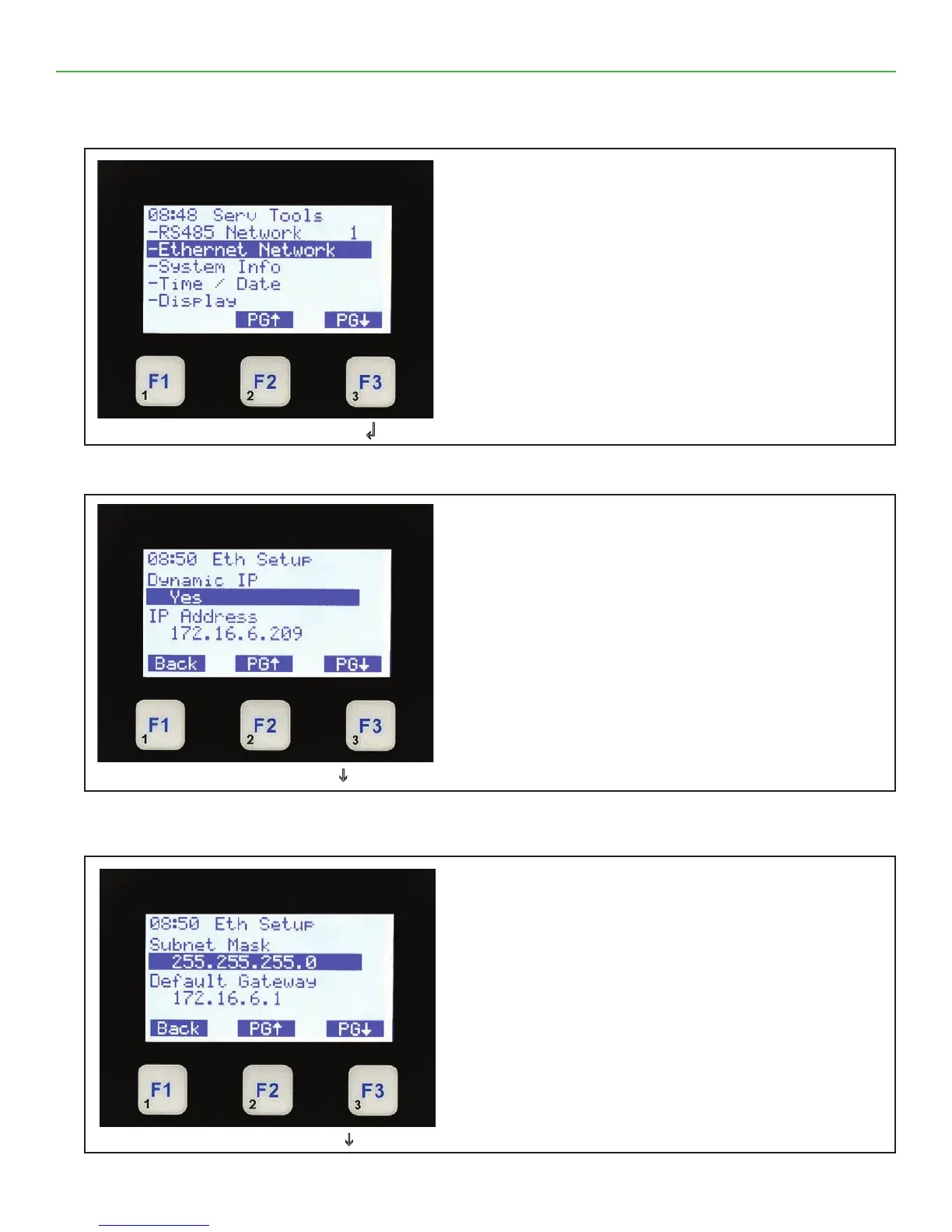
9.3. SERVICE TOOLS (Ethernet Network)
9.4. SERVICE TOOLS (Ethernet Setup)
9.5. SERVICE TOOLS (Subnet Mask)
Ethernet Network
• The top line shows Service Tools.
• The next 5 lines identify the rst ve options
available under Service Tools.
• The bottom line shows function keys with current
values.
• Pressing F2 or F3 pages the current screen up
or down the current selection.
Select Ethernet Network & Press ↲
Ethernet Setup
• The top line shows Eth Setup.
• The next 4 lines identify the following:
-Dynamic IP = YES or NO
-IP Address
• The bottom line shows function keys with current
values.
• Pressing F1 backs up to Serv Tools.
• Pressing F2 or F3 pages the current screen up
or down.
Select F3 to Page Down i
Ethernet Setup Subnet Mask
• The top line shows Eth Setup.
• The next 4 lines identify the Subnet Mask & the
Default Gateway.
• Pressing F1 takes you back to the previous
screen.
• Pressing F2 or F3 pages the current screen up
or down the current selection.
Select F3 to Page Down i



 To Next Page