Switching Between the Internal or External Clock Generator
By default, the internal clock generator of the Digital Music Library is the master clock generator. However, you can
use the external clock generator as the master clock generator by following the procedure below.
Before connecting or disconnecting the external clock generator, or pressing the Clock
Generator Select button, power off the Digital Music Library first as described in the procedure
below. If you do not follow the procedure, the Digital Music Library may stop working, and
malfunction of the unit may also result.
If the Digital Music Library stops working, power it off and configure the clock generator function by
referring to the procedure below. Unless the Digital Music Library has malfunctioned, it can continue to
be used as normal.
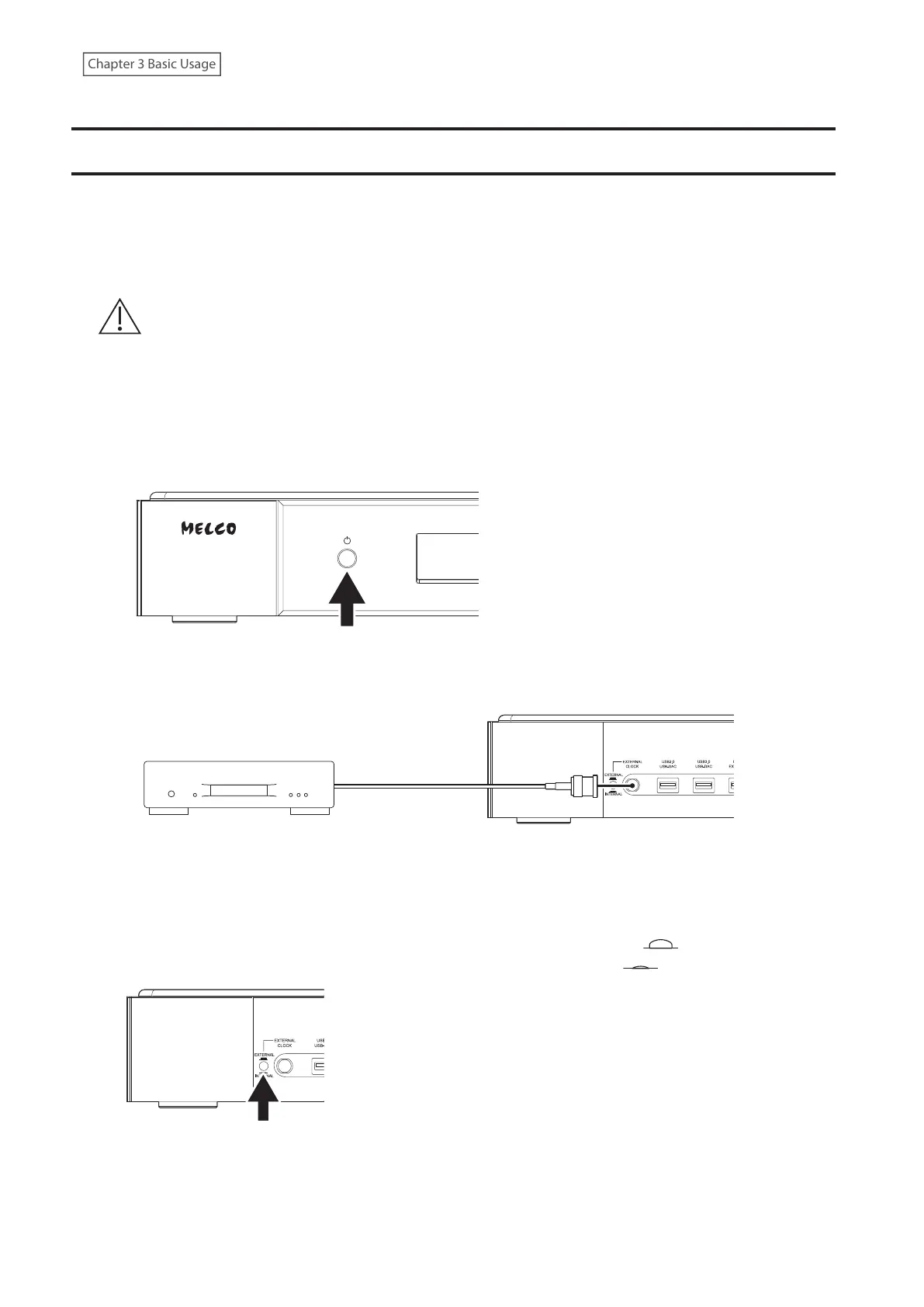
1 Power the Digital Music Library off.
To power the Digital Music Library off, press and hold down the power button.
2 To use the external clock generator, connect the clock generator.
To use the internal clock generator, disconnect the clock generator.
Clock Generator
10 MHz Output Connector
BNC Coaxial
Cable
BNC Coaxial
Cable
3 Press the Clock Generator Select Button.
To use the external clock generator, move the button to the unpressed position ( ).
To use the internal clock generator, move the button to the pressed position ( ).
15



 To Next Page